Helium 10 Listing Builder AI Limits: Keyword Bank, 5 Lifetime Uses and a Safer Workflow
Listing Builder now brings keyword discovery, a Keyword Bank and AI-assisted listing generation into one workflow. That convenience can obscure an important buying detail: its keyword organization and AI-generation counters are separate, and the published AI allowance is small on Platinum but recurring on Diamond and above.
Checked: September 28, 2026. This guide compares published feature limits and documents a related, dated Cerebro keyword-research example. We do not claim to have generated or published a seller’s listing in Helium 10.
What Listing Builder does in the current workflow
Helium 10’s updated documentation describes three broad stages. First, “Find Keywords” can use an optional seed ASIN plus up to nine competitor ASINs, with filters and sortable metrics. If the seller is eligible for Amazon Search Query Performance (SQP), they can select their own store and an eligible product to access that account-specific data. Second, the Keyword Bank organizes and prioritizes terms. Third, Listing Builder’s AI workflow can use product details, images, optional Rufus insights and a brand voice to draft or rewrite listing sections.
Those steps should not be collapsed into “the AI found the best keywords.” Keyword evidence helps create a candidate set; Keyword Bank is where the user organizes it; the generation step turns a reviewed brief into draft copy. Relevance, claims, compliance and final listing decisions still belong to the seller.
| Stage | What to verify | What it cannot prove by itself |
|---|---|---|
| Find Keywords | Seed and competitor ASIN fit, marketplace, filters, and whether eligible SQP data is selected. | That every returned term matches the product or that a search-volume estimate is a sale. |
| Keyword Bank | Term source, duplicate handling, starred priorities, and unused roots before moving them to Generic Keywords. | That a keyword should be forced into visible copy or that more terms automatically improve ranking. |
| AI listing generation | Product facts, supported claims, image inputs, brand voice, and remaining usage counter. | That generated copy is factually correct, policy compliant, indexed or likely to convert. |
The published AI limits—and how to budget them
The official Help Center article lists five lifetime AI-generation uses for Platinum and 100 monthly uses for Diamond and above. H10 says one generation covering the title, five bullets and description is one use, while a rewrite consumes one use for each section rewritten. The article distinguishes this AI allowance from the separate listing allowance; it also distinguishes Keyword Bank access from AI use.
| Feature | Platinum (published documentation) | Diamond and above (published documentation) | Budget implication |
|---|---|---|---|
| AI listing generation | 5 lifetime uses | 100 uses per month | On Platinum, treat the first complete generations as scarce; the allowance is not monthly. |
| Section rewrite | 1 use per section, according to H10 | 1 use per section, according to H10 | Rewrite only the section with a defined issue instead of regenerating everything. |
| Keyword Bank metrics | Limited metrics | Full access | Check whether the information you need is visible before building a workflow around it. |
| Listing allowance | Separate listing allowance | Separate listing allowance | Do not confuse saved/product-listing capacity with AI-generation uses. |
H10’s public plan pages can contain older tables alongside newer change notices. The figures above are from its Listing Builder Help Center article last updated May 13, 2026, checked on September 28. Plan terms can change or differ for legacy/renewal accounts. If your in-product counter disagrees, use the counter and the billing terms shown for your own account, and confirm with H10 support before relying on a quota for a launch deadline.
A real keyword discovery example before the listing stage
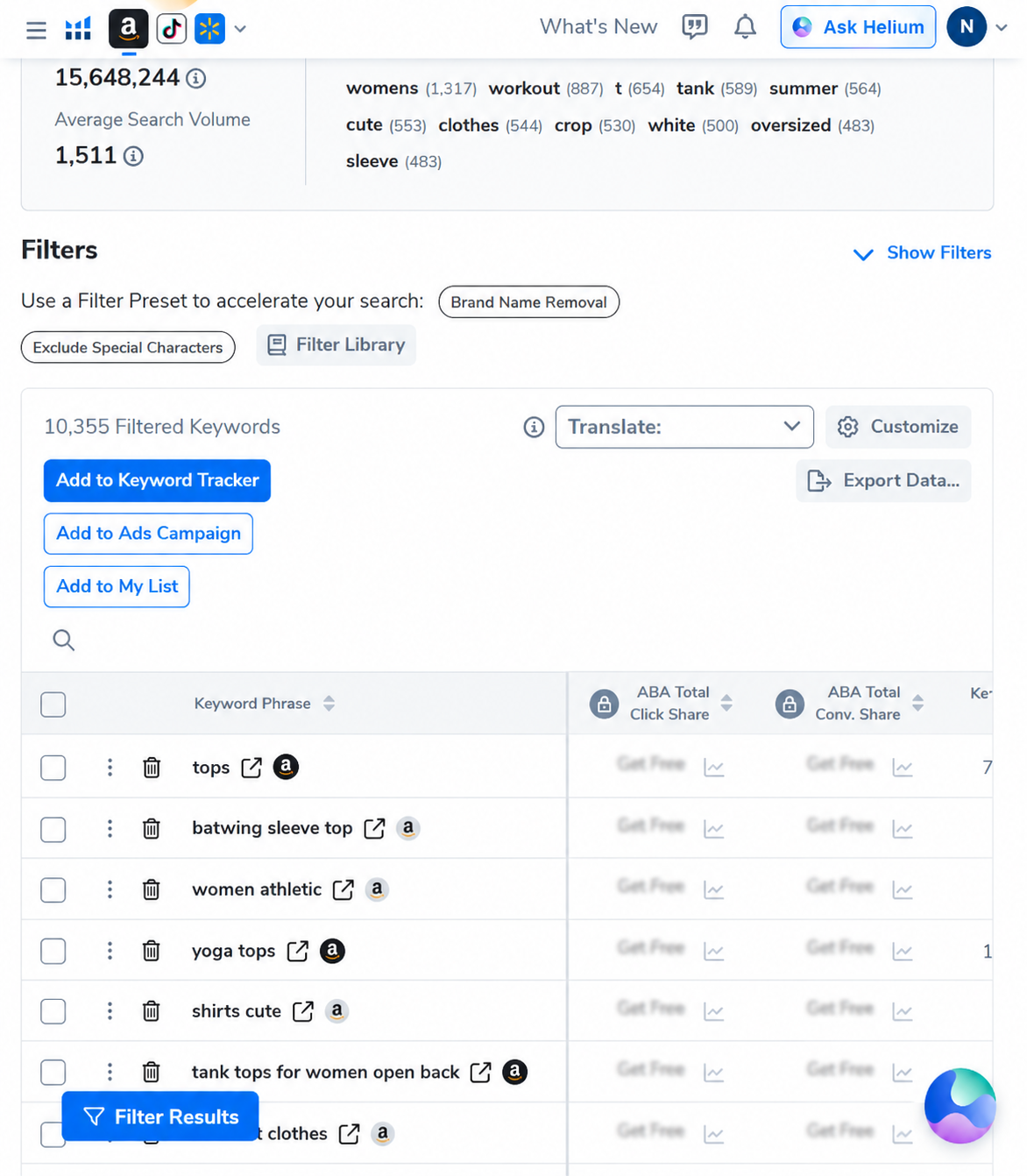
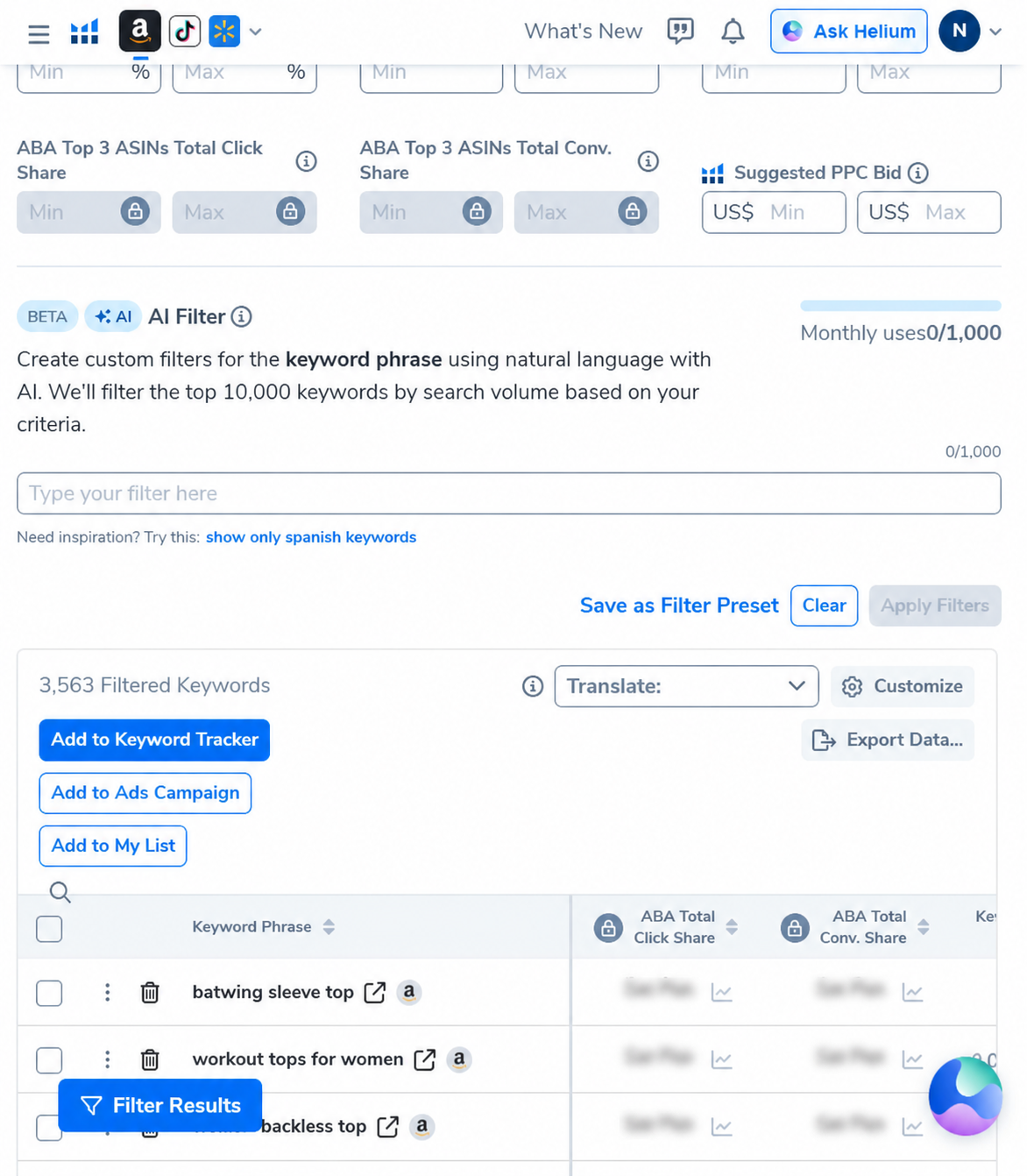
To show what a research input can look like before terms reach a listing workflow, we reviewed our saved Cerebro account capture from September 5, 2026. It was one Amazon U.S. ASIN for an open-back women’s workout top. The captured result set contained 10,355 keyword rows; after a three-word minimum and a 500 search-volume floor, the filtered view showed 3,563. These two counts are a historical tool output—not a Listing Builder result, current keyword demand or a controlled test of listing performance.
A safer workflow: research, organize, then draft once
- Start with verified product truth. Collect the exact materials, dimensions, included parts, compatibility, substantiated benefits and known exclusions from the seller’s own product documentation. Do not ask AI to invent specifications or health/safety claims.
- Build a focused competitor set. H10 documents an optional seed ASIN and up to nine competitor ASINs in Find Keywords. Exclude products that solve a different problem before comparing their terms.
- Filter for fit, not just volume. Search volume can help prioritize, but phrase relevance and buyer intent matter. Separate direct product terms from accessories, brand-only queries, misspellings and adjacent use cases.
- Deduplicate before adding to the bank. H10’s article describes source filters, bulk actions, starred priorities and an “Add Unused to Generic Keywords” function. Use those as organization controls; they do not replace manual review of Amazon’s listing-field rules.
- Review the brief before using AI. Identify the target buyer, product differentiators and supportable evidence. Include “do not claim” notes for anything unverified, and specify what the copy should not say.
- Generate the full draft only when ready. H10 says the tool can accept up to five product images and up to two ASINs for Rufus insights. These are optional inputs, not guarantees of accuracy; supply only accurate product evidence and review the result line by line.
- Rewrite narrowly. Because H10 counts each rewritten section as a use, note the precise issue (for example, an unsupported claim or unclear benefit) before requesting another section rewrite.
- Check every field before applying. Verify factual claims, Amazon restricted claims, title/bullet limits, search term placement, brand voice and keyword stuffing. H10’s documentation is a tool guide, not Amazon approval.
When this feature is worth paying for
The value depends on whether a seller will use the combined keyword organization and listing workflow repeatedly. Someone with one product and a mature, fact-checked listing may get more value by using their own search-query evidence and making a few careful edits than by paying for unused AI generations. A team producing or revising many listings may value a recurring allowance and a fuller Keyword Bank—but only if its users can supply accurate briefs and review the copy.
Before upgrading, write down how many products you expect to process, how often a full draft is genuinely useful, how many section rewrites you usually need, and whether the Keyword Bank metrics included in your current plan answer your research question. Compare that workload with the live in-account plan comparison and total bill—not with an older blog post or an unverified promo banner.
Common mistakes to avoid
- Burning a lifetime generation on an incomplete product brief.
- Assuming Keyword Bank access and AI-generation uses share one counter; H10 says they are separate.
- Confusing the AI generation allowance with the count of listings that may be managed.
- Treating a Cerebro candidate list as an approved keyword list.
- Using competitor ASIN terms that describe features your product does not have.
- Publishing generated copy without human fact-checking or Amazon policy review.
- Assuming that a high keyword score or search-volume estimate guarantees indexing, placement or sales.
AFFILIATE DISCLOSURE: AI Pilot Daily may earn a commission if you purchase Helium 10 through our link, at no added cost to you. The interface screenshots here are historical Cerebro research views; we did not generate or publish a seller’s listing in this review.
Check current plan access before you subscribe
Compare the live AI generation counter, Keyword Bank metrics and billing terms in your own account.
Plans and promotions can change. Verify feature access and checkout terms directly before purchase.
FAQ
How many AI listing generations does Platinum include?
Helium 10’s May 13, 2026 Listing Builder article lists five lifetime AI-generation uses for Platinum. Confirm current entitlements in your account because plan access can change.
How many generations are included in Diamond?
The same H10 article lists 100 uses per month for Diamond and above. The reset follows the billing cycle described there; confirm your current account’s allowance.
Does each rewrite use a credit?
H10 says rewrites count as one use per section rewritten. A full generation covering title, five bullets and description counts as one use according to the article.
Are Keyword Bank and AI generation limits the same?
No. Helium 10 says Keyword Bank access is separate from AI usage: Platinum has limited metrics, while Diamond+ has full access, and the counters do not share an allowance.
Can Listing Builder use Search Query Performance data?
H10 says SQP access requires selecting your own store and eligible product, and is limited to brand-registered accounts that meet marketplace eligibility requirements.
Does Helium 10 automatically publish the AI listing to Amazon?
The documentation describes reviewing the generated content and choosing whether to use a suggestion or rewrite a section. Regardless of available account controls, sellers should verify every claim and comply with Amazon’s current listing requirements before applying changes.
Sources and method
We reviewed Helium 10’s public Listing Builder article on September 28, 2026. The limits, Find Keywords inputs, SQP eligibility notes, Keyword Bank features and AI workflow are vendor statements. The screenshots are actual saved Cerebro captures dated September 5, 2026, included solely to show upstream discovery evidence. They are not Listing Builder screenshots or results. No listing was generated or changed for this article.
Official sources: Listing Builder keyword research and AI generation · Cerebro Platinum entitlement update · Magnet integrated into Cerebro.
Helium 10 discount codes (owner-provided screenshot dated September 4, 2026; not independently reverified)
AIPILOTDAILY20 — Screenshot terms: 20% off the first six months on monthly Diamond.
AIPILOTDAILY10 — Screenshot terms: 10% off monthly Diamond.
AIPILOTDAILY20_ANNUAL — Screenshot example: an extra 10% off annual Diamond, billed upfront.
The screenshot is dated and has not been independently verified. Before purchasing, confirm the code is accepted, eligibility, discount duration, renewal price, and billing terms at checkout. Offers may expire; do not assume codes can be combined.