Helium 10 Cerebro’s 100-Search Monthly Limit: Plan ASIN Research Before You Click
When a research tool has a monthly search allowance, the useful question is not “How many clicks do I get?” It is “How many decisions can I answer with those clicks?” Helium 10 documents a 100-use monthly Cerebro allowance for Platinum under its April 2026 entitlement update. Because a multi-ASIN search consumes one use per ASIN, a loose competitor dump can use the allowance much faster than a seller expects.
Checked: September 28, 2026. Scope: Helium 10’s published Platinum allowance and a dated Cerebro account example. This is a usage-planning guide, not a promise about every legacy subscription, promotion, marketplace or future plan change.
What counts as a Cerebro use?
Helium 10’s Help Center gives a simple rule for ASIN research: one ASIN equals one use. Entering ten ASINs in one batch consumes ten uses; it does not become one use merely because the seller clicked Search once. The same help article describes keyword research as one use for “Find Keywords,” including an analysis of up to 200 keywords at a time. It also says the ASIN and keyword-research actions share the Platinum allowance.
| Research action | Documented allowance cost | What to plan for |
|---|---|---|
| Run Cerebro for one ASIN | 1 use | One product’s reverse-ASIN result set. |
| Run a 5-ASIN comparison | 5 uses | Five ASINs count separately even if submitted together. |
| Run a 10-ASIN comparison | 10 uses | Use only when all ten are genuinely relevant competitors. |
| Re-run a prior search from History | 0 additional uses, per H10 | Reuse saved work before spending a new query. |
| Find Keywords for up to 200 terms | 1 use | Batch terms after cleaning duplicates and irrelevant phrases. |
The distinction changes how you should prepare. A seller who enters 10 competitor ASINs for each of 10 product ideas may use the full 100-search allowance in those ten batches—before running any separate keyword discovery. Conversely, a seller can compare one or two well-chosen ASINs, revisit history without a new use, and batch a curated keyword list into the documented one-use action.
A transparent account example: why filter first
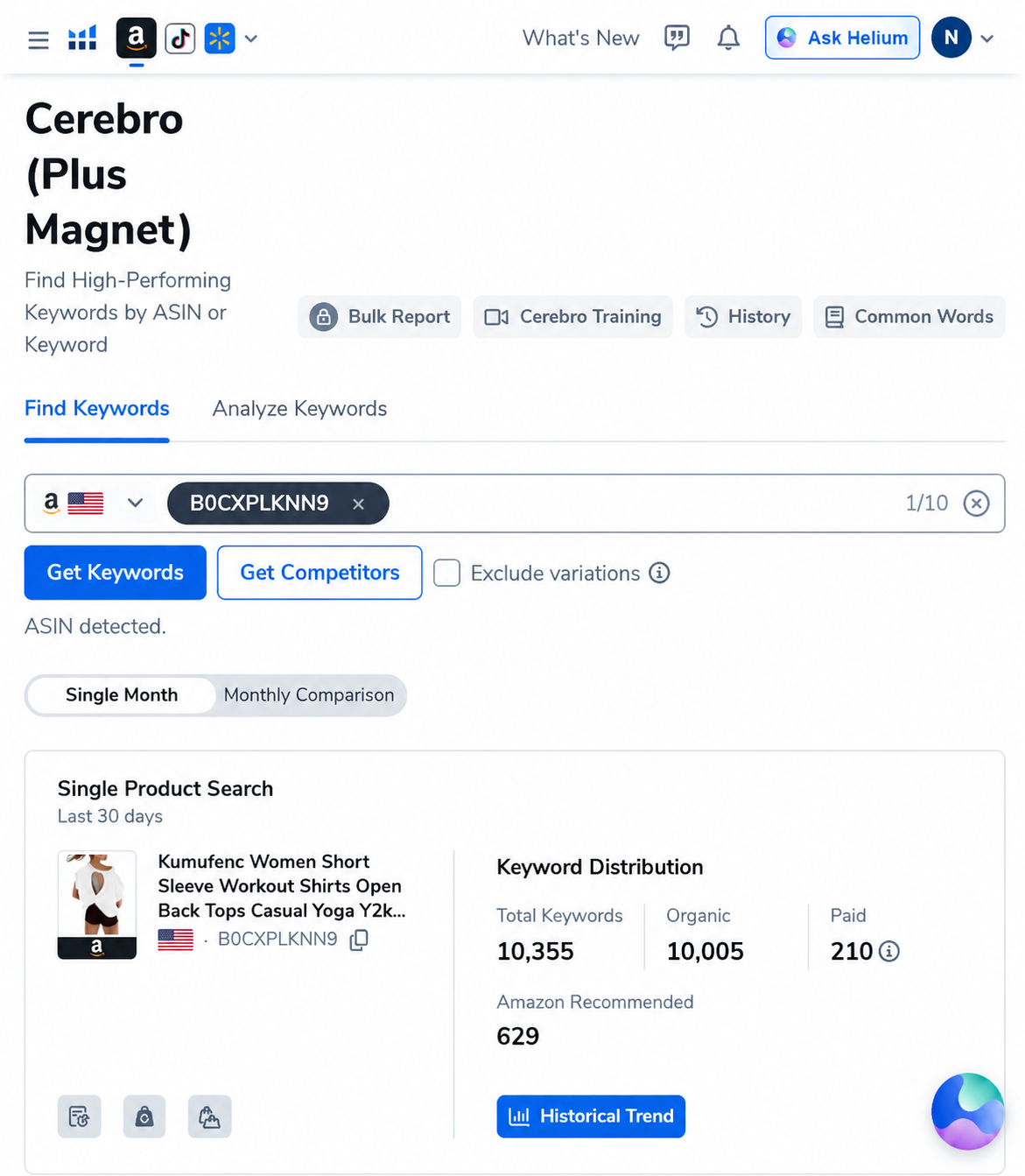
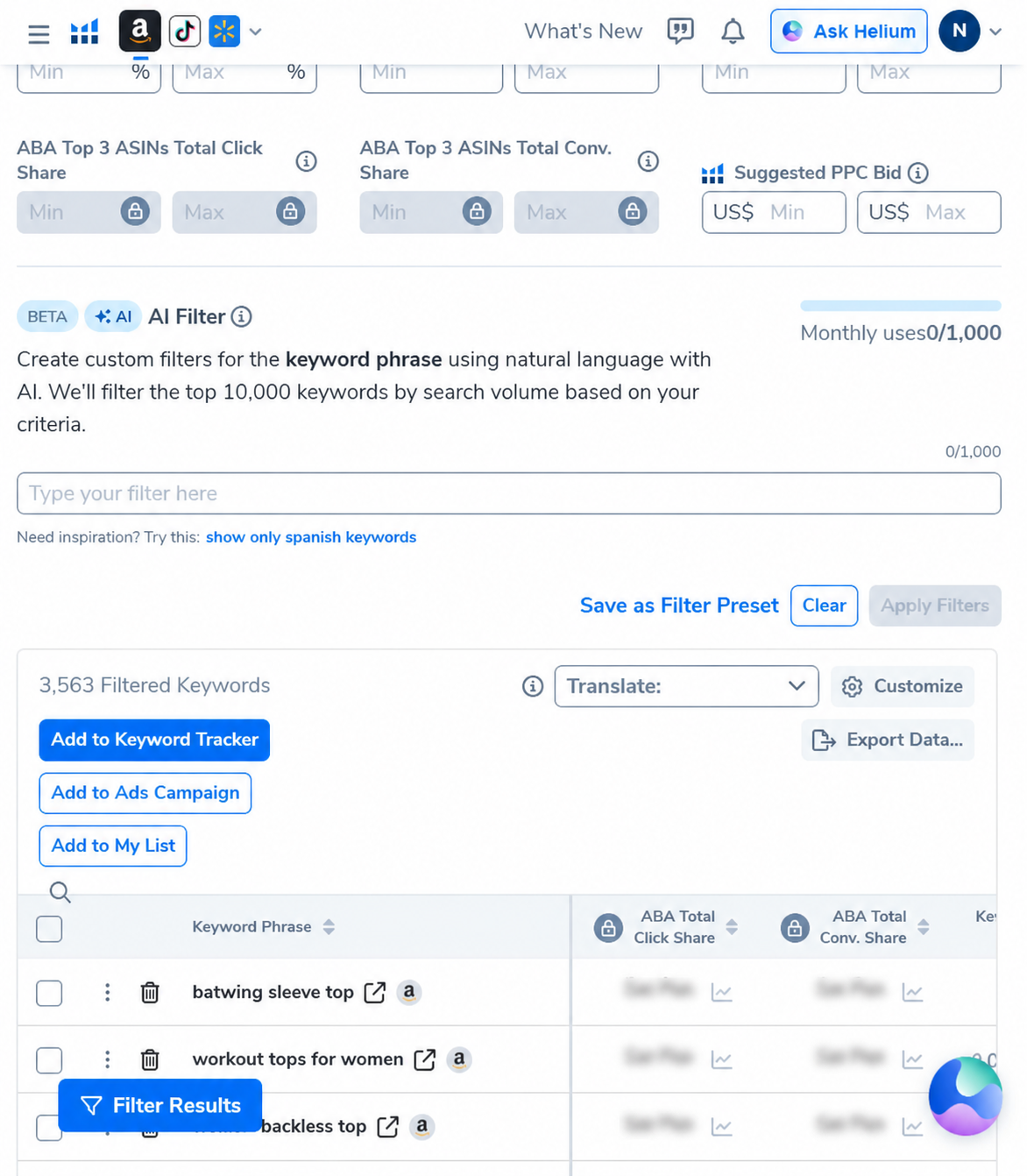
Our saved U.S. Cerebro research capture from September 5, 2026 used one ASIN for an open-back women’s workout top. The unfiltered result view recorded 10,355 keyword rows. After applying a minimum word count of three and a minimum search-volume threshold of 500, the view showed 3,563 rows. That is a reduction of about 65.6% in this one saved result set (3,563 divided by 10,355 leaves about 34.4%); it made manual review more manageable, but it did not prove that the removed terms were worthless or that the remaining terms would sell the product.
How to budget 100 uses without wasting the month
Use the allowance as a research budget. A short plan written before opening the tool prevents the “enter every competitor and see what happens” pattern.
- Write one decision question. Examples: “Do these two direct substitutes share a meaningful generic keyword set?” or “Is this phrase relevant enough to test in a listing?” Avoid a broad “show me everything” query.
- Screen competitors before Cerebro. Compare product purpose, audience, pack size, price format and marketplace on Amazon’s public listings. Exclude accessories, unrelated variants and products that solve a different buyer problem.
- Use the smallest useful ASIN set. A 3-ASIN comparison costs 3 uses; an 8-ASIN comparison costs 8. There is no research prize for using the maximum batch size.
- Save the query context. Record marketplace, ASINs, date and the question. This makes later review interpretable and helps you find the same query in History.
- Use History for follow-up. H10 says running a saved search again from History does not count as a new use. Confirm that you are opening the existing saved result, not submitting a new search.
- Clean a candidate keyword set before “Find Keywords.” Deduplicate phrases and exclude brand terms or unrelated product language that will not inform the current decision. The official article says up to 200 keywords can be analyzed in one use; that is a maximum batch size, not a recommendation to feed 200 weak terms.
- Keep a use ledger. Before each new query, record the intended ASIN count and expected remaining balance. If your account shows a different allowance, trust that live counter over this guide.
- Stop when the answer is good enough. Additional competitor batches should test a real uncertainty, not merely make the spreadsheet longer.
Example monthly budget (calculation, not H10 data)
Suppose a seller plans 12 comparisons of eight direct competitors. That is 12 × 8 = 96 uses, leaving four in a 100-use allowance. One Find Keywords batch of up to 200 cleaned terms would take that example to 97, leaving three. The arithmetic follows H10’s published counting rules; it is not a recommended quota plan for every seller.
| Planned work | Uses | Running total |
|---|---|---|
| 12 batches × 8 ASINs | 96 | 96 |
| One Find Keywords batch (up to 200 terms) | 1 | 97 |
| Saved-history review | 0 additional, per H10 documentation | 97 |
| Allowance remaining in this example | — | 3 |
If you actually need ten-ASIN batches, the same 100-use allowance supports ten such batches, not one hundred. If your comparisons can be narrowed to three strong competitors, the pool goes further—but only if those three are representative enough to answer your question. Sample size is a judgment call, not a guarantee of statistical representativeness.
What to do when you hit the limit
First, check the billing-cycle reset date in your account: H10 says the counter follows the subscription cycle, not the first day of a calendar month, and unused searches do not roll forward. Next, revisit saved History and your own spreadsheet. A new tool search is not always the next useful step; manually checking product fit, reading listing details and validating your own costs may resolve the decision better.
If the current allowance repeatedly blocks work that directly supports your business, compare plan options only after documenting how many ASIN searches and keyword batches you actually need. Do not assume a higher plan means unlimited Cerebro, and do not upgrade solely because a counter is nearly empty. Plan entitlements and offers can change; confirm the current account’s usage table, billing cycle and checkout total before paying.
For business outcomes, separate estimated research data from your own Seller Central evidence. Search-volume estimates can help prioritize questions. Your own orders, sessions, conversion, ad reports, inventory and margin calculations determine whether an answer matters commercially.
Who this limit suits—and who may need a different workflow
- Likely workable: a seller doing a few deliberate product investigations a month, reusing saved searches and narrowing ASIN sets before querying.
- Potentially tight: an agency or research team repeatedly comparing many products across multiple clients, marketplaces and competitor sets. Budget by ASIN count rather than by number of clicks.
- Not enough on its own: a seller who expects Cerebro to prove product-market fit. No query allowance turns estimated competitor data into audited sales or a profit forecast.
- Possibly the wrong purchase: someone who only needs one or two isolated checks and has not tested whether H10’s free or lower-cost options meet their actual task. Review the current plan inclusions rather than buying features you will not use.
Alternatives when the next query is not justified
Use Amazon’s public search results to check whether candidate listings are true substitutes, and use Seller Central or Amazon Brand Analytics/Search Query Performance where you have eligible access for your own business evidence. These sources answer different questions, so do not force a one-to-one data comparison. A spreadsheet can also hold the query log, competitor rationale, cost assumptions and decision; it cannot replace an unavailable market measurement, but it can prevent repeated work.
See our Cerebro keyword-research workflow comparison, dated Cerebro ASIN case, Helium 10 plan guide and H10 Guides hub. Each covers a different part of the decision.
AFFILIATE DISCLOSURE: AI Pilot Daily may earn a commission if you subscribe to Helium 10 through our link, at no added cost to you. We use a paid account for research, but this article is based on dated screenshots and current public Help Center documentation—not a controlled sales or ranking experiment.
Check the plan and usage counter that apply to your account
Review current feature access, the billing-cycle reset and the exact checkout terms before you subscribe.
This link may be an affiliate link. Plan features, pricing and promotions can vary and change; verify them in your account before purchase.
FAQ
How many Cerebro searches does Helium 10 Platinum include?
Helium 10’s April 16, 2026 Help Center update documents 100 Cerebro (Plus Magnet) uses per month for Platinum under the conditions described there. Existing annual subscribers in an active pre-change term may retain prior benefits until renewal. Check your own account counter and current terms.
Does a 10-ASIN Cerebro search cost one use or ten?
Helium 10 says each ASIN counts as one use, so ten ASINs use ten credits even in one submitted batch.
Does searching again from History use another credit?
Helium 10 says re-running a saved search from History does not count as a new use. Make sure you are opening saved history rather than submitting a fresh query.
Do Find Keywords searches share the same allowance?
Yes. The Help Center says Find Keywords costs one use for up to 200 terms and shares the Platinum monthly allowance with ASIN searches.
When does the monthly counter reset?
Helium 10 says it resets with your billing cycle, not necessarily on the first of the calendar month. Unused uses do not roll over.
Does reaching the limit delete my saved research?
The help article says Cerebro search functionality is temporarily frozen until the next billing-cycle reset. It does not say that existing saved research is deleted; verify access and retention in your account.
Sources and method
We checked Helium 10’s public plan and entitlement documentation on September 28, 2026. The 100-use limit, per-ASIN counting, History behavior, shared Find Keywords allowance and billing-cycle reset are vendor statements; the 12 × 8 budget table is our arithmetic example. The screenshots are genuine Helium 10 Cerebro captures dated September 5, 2026, and are included as historical discovery evidence only. No product sales, campaign outcome or future rank was tested.
Official sources: Cerebro (Plus Magnet) Platinum entitlement update · Helium 10 plan comparison.
Helium 10 discount codes (owner-provided screenshot dated September 4, 2026; not independently reverified)
AIPILOTDAILY20 — Screenshot terms: 20% off the first six months on monthly Diamond.
AIPILOTDAILY10 — Screenshot terms: 10% off monthly Diamond.
AIPILOTDAILY20_ANNUAL — Screenshot example: an extra 10% off annual Diamond, billed upfront.
The screenshot is dated and has not been independently verified. Before purchasing, confirm the code is accepted, eligibility, discount duration, renewal price, and billing terms at checkout. Offers may expire; do not assume codes can be combined.