PAID-ACCOUNT KEYWORD WORKFLOW
Magnet is best used when you know the language shoppers might type but do not yet know every relevant phrase. The practical goal is not the biggest export; it is a defensible shortlist for listing copy, PPC testing and competitor validation.
What Magnet does—and where it stops
Helium 10’s documentation historically described two Magnet paths, and the current platform has integrated those jobs into Cerebro: Find Suggestions expands a single keyword, while Analyze Keywords evaluates a supplied list. That distinction matters: expansion is discovery; analysis is triage. Neither proves conversion rate, margin or sourcing feasibility.
A repeatable five-step Magnet workflow
- Choose a product-specific seed: use “open back workout top,” not “clothing.”
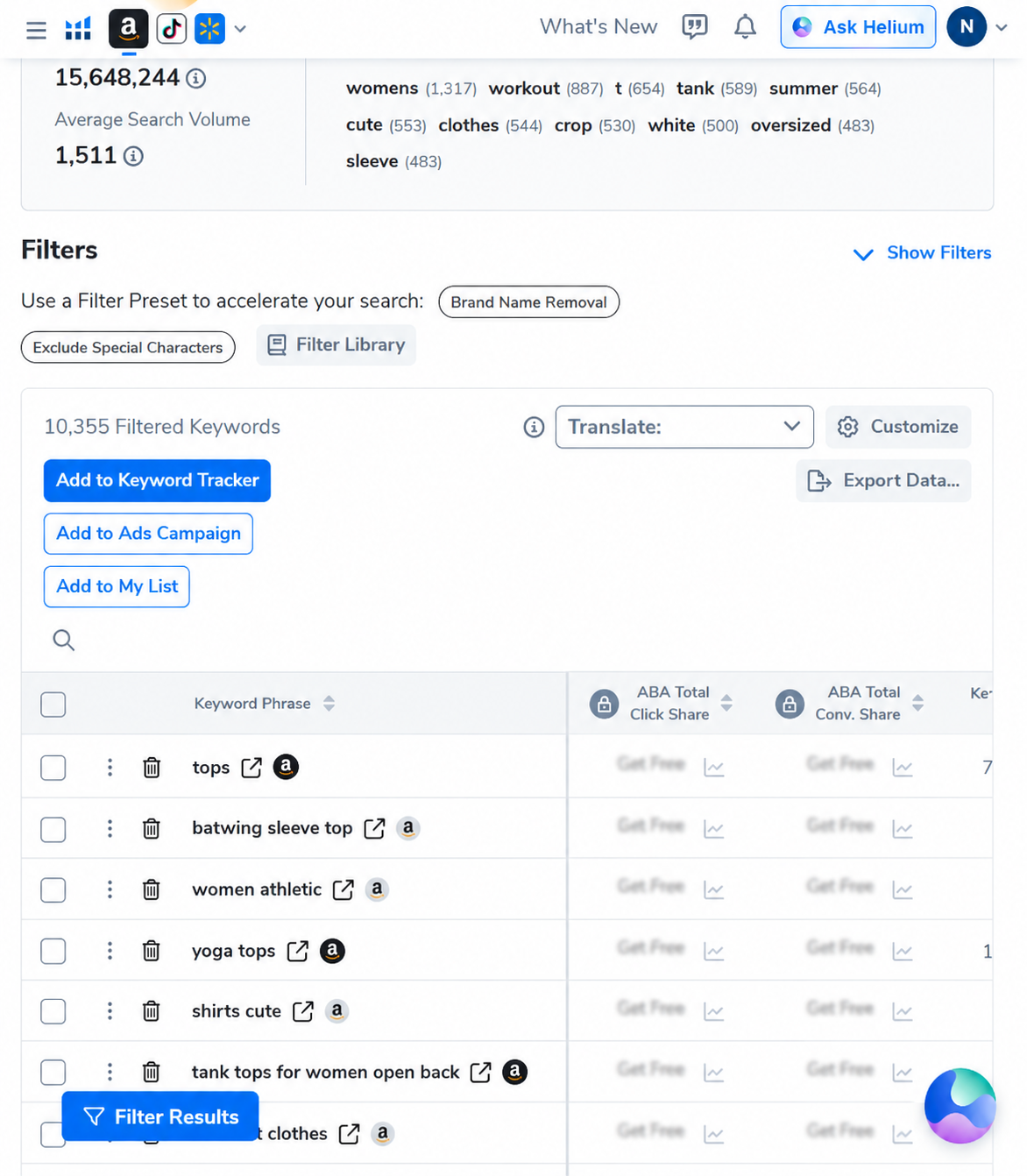
- Scan word frequency before individual rows: recurring modifiers reveal how shoppers describe fit, use and style.
- Set a relevance floor: remove phrases that describe an adjacent product, audience or material you do not sell.
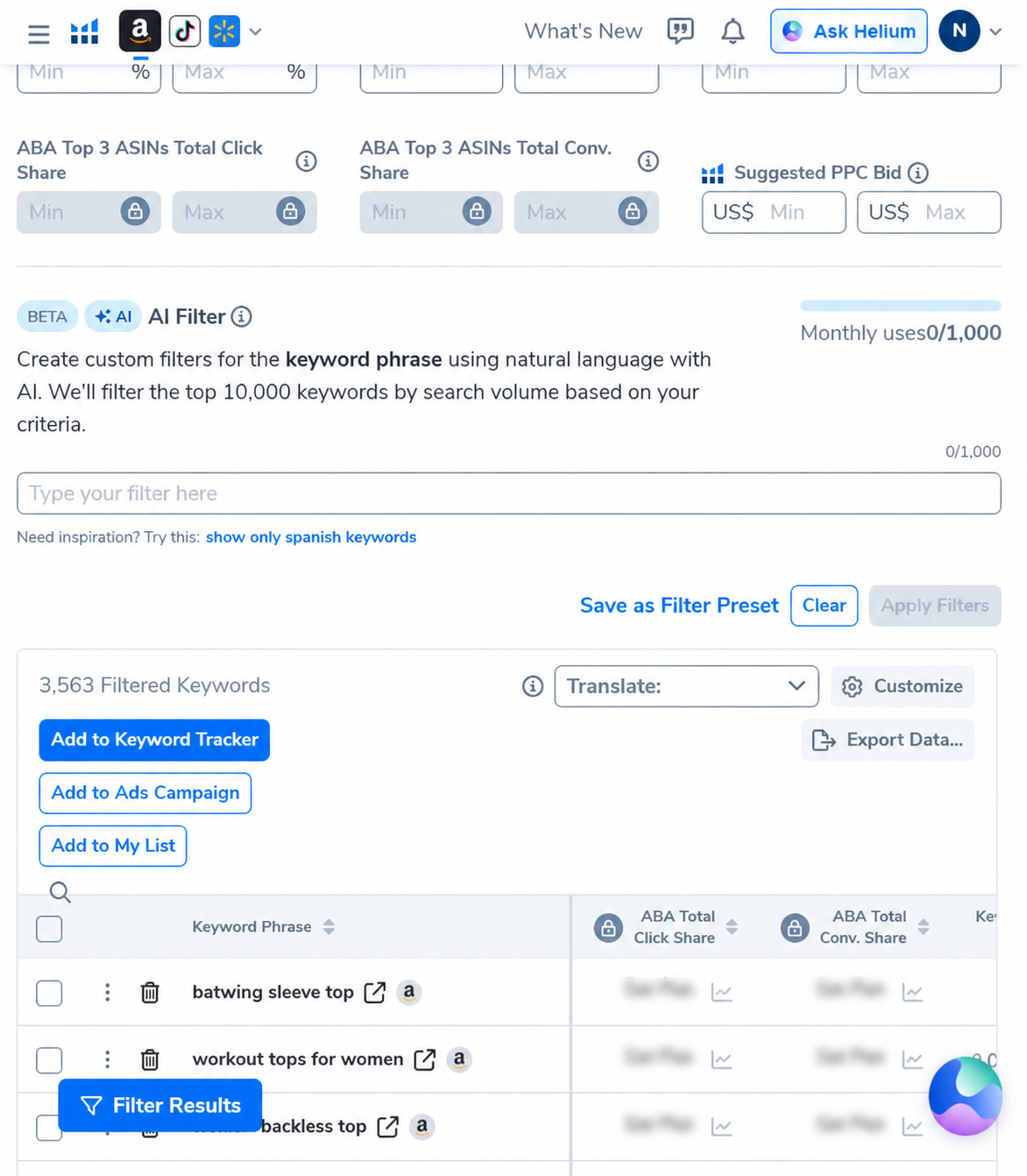
- Layer demand and length filters: minimum search volume controls demand; word count exposes longer-tail intent.
- Cross-check in Cerebro: see whether relevant competitors actually rank for the shortlisted phrases.
How to read the output without fooling yourself
| Signal | Useful for | Does not prove |
|---|---|---|
| Search volume | Relative demand and prioritization | Conversion, profit or achievable rank |
| Title density | How often the exact phrase appears in ranking titles | Overall competitive strength |
| Word frequency | Recurring shopper vocabulary | That every phrase fits your product |
| PPC bid estimate | Budget planning and relative ad competition | Your future CPC or ROAS |
Magnet-to-Cerebro handoff
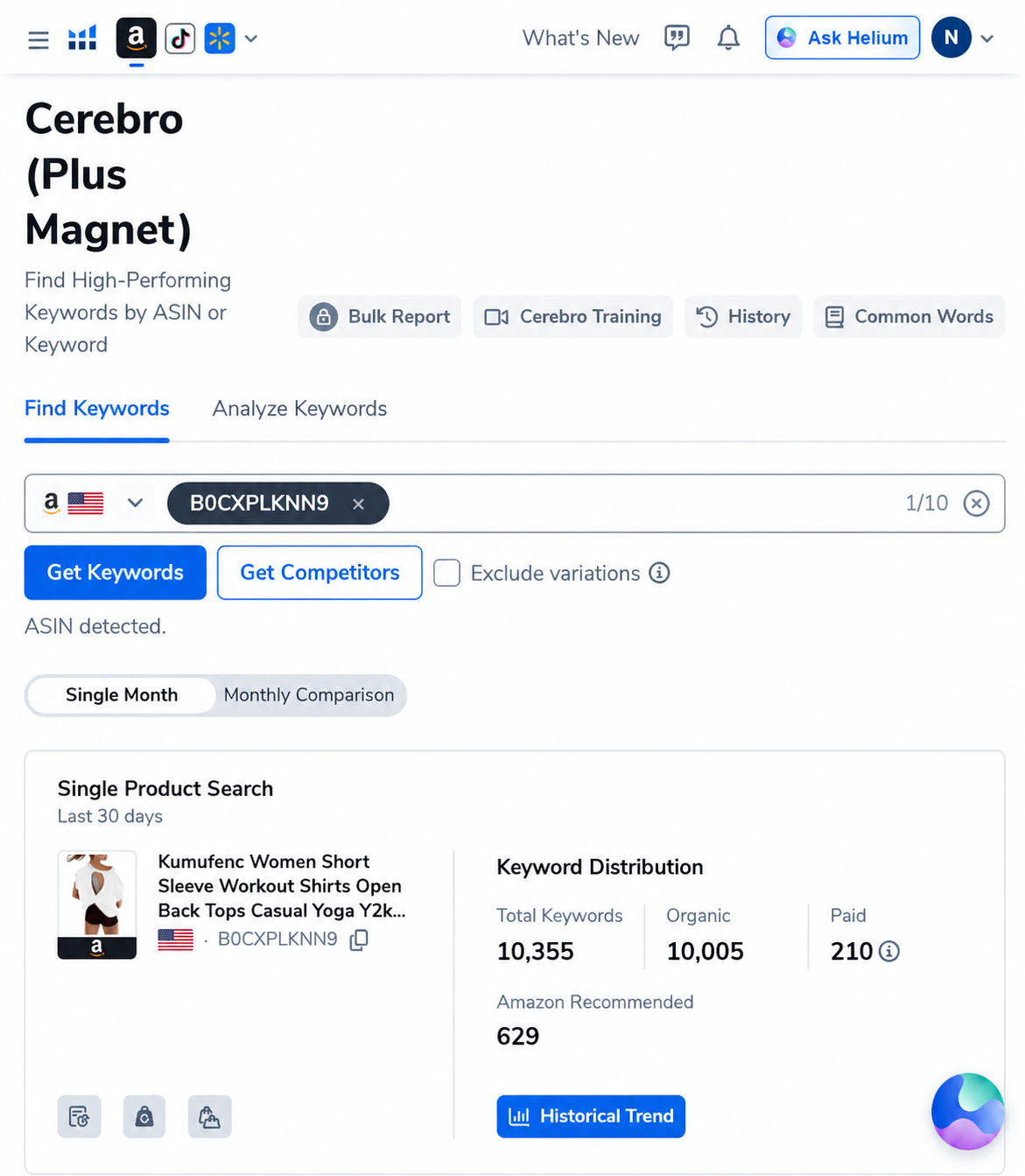
Use Magnet to discover vocabulary, then use Cerebro to test whether comparable ASINs rank for it. In our real ASIN run, the full set contained 10,355 phrases: 10,005 organic, 210 paid and 629 Amazon-recommended. A phrase appearing in both seed expansion and competitor rankings deserves closer inspection.
Important 2026 interface change: Magnet now lives inside Cerebro
Helium 10 has integrated the former Magnet workflow into the current Cerebro experience. That means older tutorials telling you to find a separate Magnet item in the Tools menu may no longer match the interface in your account. The underlying research jobs still exist: you can begin with a product identifier for reverse-ASIN research or begin with a phrase for keyword suggestions and analysis. In this guide, “Magnet workflow” means the seed-keyword side of the current combined Cerebro + Magnet workspace, not a promise that every account still shows a standalone Magnet screen.
Worked example: planning the seed before touching filters
Assume the product is a women’s workout top with an open back. A weak starting phrase such as “women clothes” spans too many products and produces noise. A very narrow phrase such as a complete color-size-style combination may return too little evidence. We would begin with open back workout top, then test nearby roots separately: backless workout top, open back gym shirt and yoga top open back. Keeping roots separate makes it possible to compare intent instead of mixing every modifier into one opaque export.
| Candidate seed | Likely intent quality | Action |
|---|---|---|
| women clothes | Far too broad; category browsing intent | Reject as a primary seed |
| workout tops for women | High demand but broad style intent | Use as a benchmark, not the only seed |
| open back workout top | Strong product-feature match | Use as the main expansion seed |
| backless workout tops for women | Relevant long-tail phrasing | Validate demand and conversion separately |
Filter in layers instead of applying one “magic” preset
Layer 1: literal product relevance
Read the phrase as a shopper would. Remove terms for the wrong garment, gender, material, occasion or feature. This human review should happen before chasing volume because irrelevant high-volume keywords can distort listing copy and waste PPC spend.
Layer 2: demand floor
Use a minimum search-volume threshold to reduce very small phrases, but keep a separate experimental list. In our related ASIN dataset, a 500-volume floor combined with a three-word minimum reduced 10,355 terms to 3,563. That is a 65.6% reduction, yet 3,563 is still too many for an actionable brief.
Layer 3: competitive context
Title density, competing products and estimated PPC bids are context signals, not independent green lights. A low title density can mean weak optimization, but it can also mean the exact phrase is unnatural or less relevant. Open the ranking listings and check what buyers actually receive.
Layer 4: job assignment
Give every retained phrase one role: primary listing phrase, supporting copy, backend indexing candidate, exact-match PPC test, phrase-match discovery or negative keyword. A phrase with no assigned job should not survive simply because it appeared in the export.
Build a keyword brief, not a keyword dump
| Brief column | What to record | Decision it supports |
|---|---|---|
| Phrase and root | Exact wording plus normalized root | Prevents duplicate concepts |
| Intent | Product, feature, use case, audience or problem | Controls relevance |
| Demand snapshot | Dated search volume and trend | Prioritizes testing |
| Competitive evidence | Title density and ranking ASINs | Shows current market use |
| Placement | Title, bullets, description, backend or PPC | Turns research into action |
| Validation status | Observed, inferred or untested | Stops estimates becoming claims |
Common Magnet workflow mistakes
- Sorting only by volume: demand without product fit creates misleading copy.
- Using one seed: different buyer vocabulary can reveal separate intent clusters.
- Treating estimates as current Amazon totals: record the date and marketplace.
- Copying competitor terms blindly: competitors may rank for irrelevant phrases or sell a different variation.
- Exporting before clustering: the spreadsheet gets larger while the decision remains unclear.
- Skipping PPC separation: listing terms and ad experiments have different risk tolerances.
When to stop researching
Stop expanding when new seeds mostly repeat known roots, the remaining suggestions are materially less relevant, and every high-priority cluster has an assigned listing or advertising job. Then move to a controlled test. Keyword tools reduce uncertainty; they do not remove the need to measure impressions, clicks, conversion and contribution margin after launch.
Turn the research into a 7-day action plan
Day 1: define the product facts that cannot be compromised—audience, material, fit, main feature and use case. Day 2: run three to five seed roots and save unfiltered counts. Day 3: remove literal mismatches and cluster synonyms. Day 4: compare the clusters against three to ten close ASINs. Day 5: assign phrases to listing fields and PPC match types. Day 6: have a second editor read every prominent phrase for accuracy and naturalness. Day 7: publish or launch the smallest useful test and record baseline metrics.
Frequently asked questions
Did Helium 10 discontinue Magnet?
The standalone navigation changed: Helium 10 says it integrated Magnet into Cerebro. Seed-keyword suggestion and analysis jobs remain relevant, but current users should follow the combined interface rather than an older menu path.
What is a good minimum search volume?
There is no universal threshold. A 500-volume floor was useful for reducing our example dataset, but a specialized or expensive product may justify smaller phrases. Use the threshold as a workload control, not as a guarantee of demand.
Should every retained keyword appear in the listing?
No. Some belong in PPC tests, some in backend fields, and some should be excluded after a relevance review. Prominent copy should remain natural and literally accurate.
Can Magnet predict sales?
No. Keyword metrics help estimate demand and prioritize research. Actual sales depend on offer quality, price, reviews, traffic, conversion, availability and competition.
AI PILOT DAILY EXCLUSIVE
Turn your seed keyword into a usable research list
AIPILOTDAILY20 20% off the first 6 months of an eligible monthly subscription.
AIPILOTDAILY10 10% off eligible monthly billing on an ongoing basis.
Affiliate disclosure: we may earn a commission if you purchase through this link, at no extra cost to you. Verify plan eligibility and the final price at checkout.
FAQ
Is Magnet better than Cerebro?
No. Magnet expands from a keyword; Cerebro starts from competitor ASINs. Use the one that matches the evidence you have.
How many keywords should I keep?
There is no universal count. Keep only phrases that accurately describe the product and have a clear job in indexing, copy or advertising.
Sources and methodology
Tool behavior was checked in a paid Helium 10 account on September 5, 2026. Feature definitions were cross-checked against Helium 10’s Magnet documentation and its 2026 integration notice. Results change by marketplace, seed and date.