
Introduction: The Rise of Terminal-Based AI Programming
The landscape of AI-assisted development has undergone a dramatic transformation in 2026. What began as simple code autocomplete has evolved into sophisticated, context-aware programming partners that fundamentally reshape how developers approach their craft. At the forefront of this revolution stands Claude Code, Anthropic’s terminal-first AI coding assistant that has accumulated over 310,000 GitHub stars with a growth rate of +5,200 stars daily, making it one of the most adopted developer tools in history.
Claude Code represents a fundamental rethinking of how developers should interact with AI programming assistants. Rather than embedding AI within a graphical IDE, Claude Code embraces the terminal—a developer environment where efficiency, keyboard-centric workflows, and direct system access are paramount. This design philosophy resonates deeply with professional developers who spend their days in terminal windows, managing git repositories, running build systems, and orchestrating complex development workflows.
For website operators and content creators exploring technical topics, understanding Claude Code provides insight into the cutting edge of developer tooling. For developers themselves, the platform offers capabilities that can dramatically accelerate productivity while maintaining the code quality and architectural integrity that professional projects require. This comprehensive review examines Claude Code’s capabilities, comparing it to alternatives, and exploring how different users can leverage its strengths effectively.
Understanding Claude Code: Design Philosophy and Core Architecture
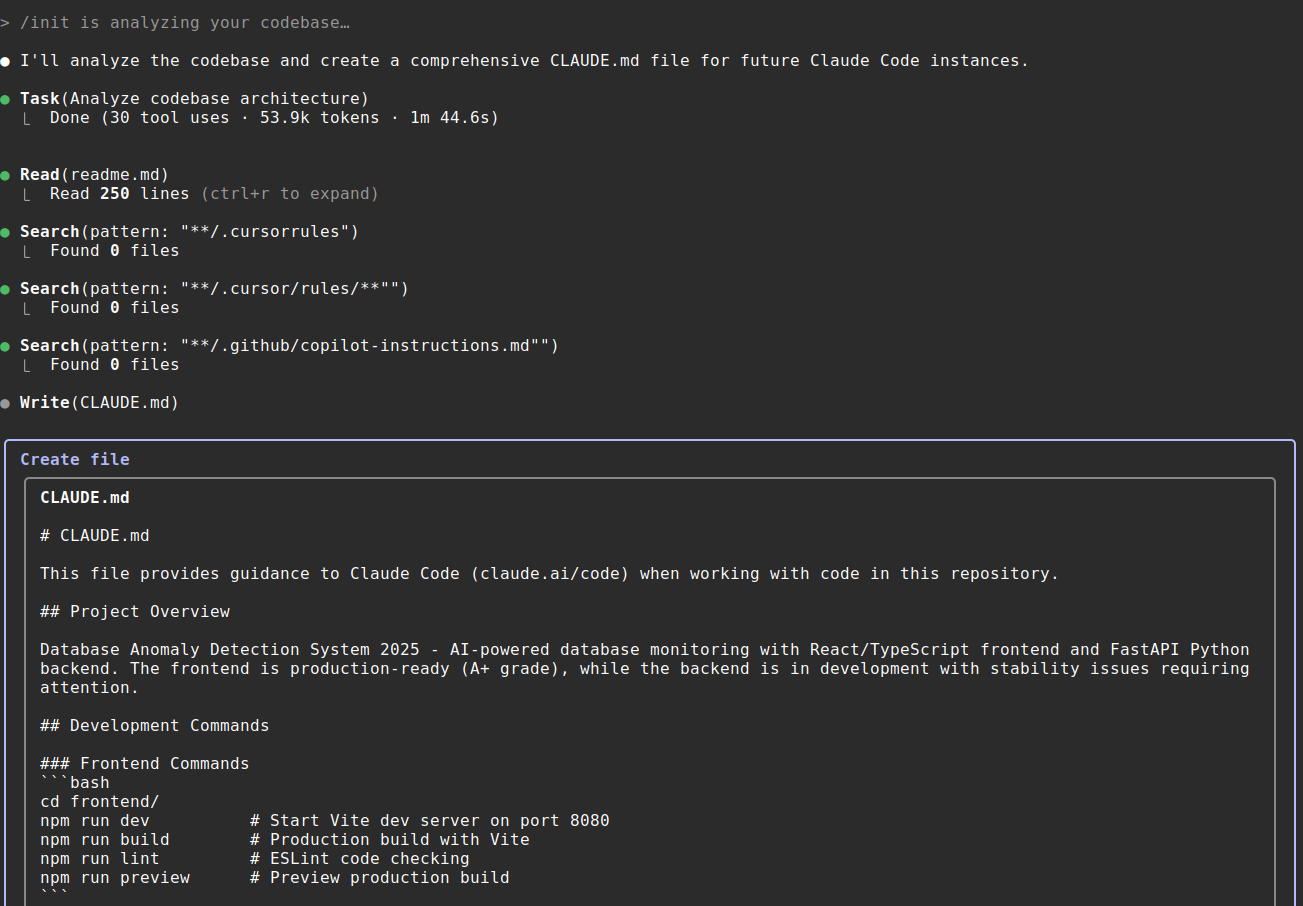
Claude Code embodies a philosophy that prioritizes developer agency and workflow integration. The tool operates entirely within the terminal environment, accepting natural language commands and producing code, explanations, and analysis directly within the command line interface. This approach eliminates the context switching that plagues GUI-based AI coding assistants, allowing developers to maintain their focus while leveraging powerful AI capabilities.
The platform’s context management system sets it apart from simpler code generation tools. Claude Code maintains awareness of entire projects, understanding file relationships, dependency structures, and architectural patterns across millions of lines of code. This comprehensive context enables the assistant to generate code that not only solves immediate problems but also aligns with existing conventions, follows established patterns, and integrates seamlessly with surrounding systems.
Anthropic’s approach to model training specifically optimizes Claude Code for programming tasks. The underlying model receives extensive training on code repositories, documentation, and technical discussions, developing an understanding of programming patterns, best practices, and common pitfalls. This specialized training produces code suggestions that more closely match human developer expectations and professional standards.
The tool’s integration with version control systems deserves particular attention. Claude Code naturally understands git workflows, commit histories, and branch structures, enabling it to generate code that accounts for repository state and collaborate effectively within team environments. This integration proves especially valuable when working with legacy codebases or navigating complex feature branches.
Key Features Driving Developer Adoption
1. Intelligent Code Generation and Completion
Claude Code’s code generation capabilities extend far beyond simple autocomplete. The assistant can produce complete functions, classes, and even entire modules based on natural language descriptions. What distinguishes this generation from simpler tools is the attention to context, error handling, edge cases, and maintainability that Claude Code naturally incorporates.
The system excels at understanding complex requirements expressed in plain English. Rather than requiring precise technical specifications, developers can describe what they want to accomplish in natural language, and Claude Code translates these descriptions into functional code. This capability dramatically accelerates prototyping and experimentation, allowing developers to test concepts quickly without extensive boilerplate setup.
Code review and refactoring support represents another strength. Claude Code can analyze existing codebases, identify potential improvements, and suggest or implement refactors that enhance code quality. The assistant understands the tradeoffs involved in different architectural decisions, providing recommendations that balance immediate needs with long-term maintainability.
2. Multi-Language and Framework Support
Professional development rarely involves a single language or framework, and Claude Code’s multi-language support reflects this reality. The platform handles major languages including Python, JavaScript, TypeScript, Java, Go, Rust, C++, and dozens more with equal fluency. This versatility proves essential for developers working across full-stack applications or managing diverse technology portfolios.
Framework-specific knowledge distinguishes Claude Code from general-purpose code generators. The assistant understands React component patterns, Django model structures, Node.js idioms, and countless other framework-specific conventions. This specialized knowledge enables the generation of code that not only functions correctly but also aligns with community best practices and expected patterns.
Documentation generation benefits from similar expertise. Claude Code can produce comprehensive docstrings, README files, and API documentation that accurately describe code functionality. This documentation generation addresses one of the most commonly neglected aspects of software development, helping teams maintain comprehensive documentation without dedicating explicit time to the task.
3. Debugging and Error Resolution
Debugging consumes substantial developer time, and Claude Code offers meaningful assistance in this critical area. The platform can analyze error messages, trace through stack traces, and identify potential root causes with remarkable accuracy. This diagnostic capability accelerates the debugging process, particularly for unfamiliar codebases or complex runtime issues.
Beyond identifying problems, Claude Code proposes and can implement solutions. The assistant understands common error patterns and anti-patterns, suggesting fixes that address immediate symptoms while also considering underlying causes. This comprehensive debugging support proves especially valuable when working with legacy systems or third-party libraries where deep expertise may be lacking.
Performance analysis and optimization suggestions represent another debugging-adjacent capability. Claude Code can identify potential performance bottlenecks, suggest optimizations, and explain the tradeoffs involved in different approaches. For developers building high-performance applications, this guidance helps navigate the complex landscape of optimization decisions.
Claude Code vs the Competition: A Comprehensive Comparison
Claude Code vs GitHub Copilot
GitHub Copilot, Microsoft’s widely-adopted AI coding assistant, takes a different approach than Claude Code. While both tools provide code generation capabilities, their operational models differ significantly. Copilot operates as an IDE plugin, providing inline suggestions as developers type. Claude Code, in contrast, operates in the terminal with explicit command-and-response interactions.
This difference in interaction model leads to divergent strengths. Copilot excels at providing unobtrusive, continuous assistance during typing sessions, generating code completions that integrate smoothly with the developer’s immediate flow. Claude Code’s explicit commands enable more complex operations, multi-file refactoring, and sophisticated analysis that would be cumbersome within an inline suggestion interface.
Context management also differs between the platforms. Claude Code’s terminal-based architecture naturally provides comprehensive project context, enabling informed suggestions that consider broader system design. Copilot’s IDE integration offers excellent file-level context but may require additional configuration for comprehensive project awareness.
Claude Code vs Cursor
Cursor, the AI-first code editor, represents another significant competitor in the AI coding space. Cursor’s approach combines IDE features with AI capabilities, offering a graphical interface enhanced by AI functionality. This hybrid approach provides accessibility benefits for developers less comfortable in terminal environments.
The choice between Claude Code and Cursor often reduces to workflow preferences and use case requirements. Developers who spend most of their time in graphical IDEs may find Cursor’s integration more natural. Those who prefer terminal-centric workflows or require advanced scripting capabilities often prefer Claude Code’s command-line interface.
Performance and resource usage also factor into the comparison. Claude Code’s terminal operation imposes minimal overhead on system resources, making it attractive for developers working with resource-constrained systems. Cursor’s graphical interface requires more system resources but offers visual debugging, file management, and other GUI-based features that some developers prefer.
Practical Applications for Different Developer Profiles
Frontend Developers
Frontend developers benefit from Claude Code’s strong JavaScript and TypeScript support, along with comprehensive HTML and CSS capabilities. The assistant excels at component generation, state management patterns, and API integration code. Framework-specific knowledge enables the production of React, Vue, and Angular code that follows current best practices.
Build tooling and configuration represent additional areas where Claude Code assists frontend developers. The platform understands webpack, Vite, and other build systems, helping troubleshoot configuration issues and optimize build performance. This comprehensive support accelerates development across the full frontend stack.
Backend Developers
Backend developers working in languages like Python, Java, Go, or Rust find Claude Code’s capabilities particularly valuable. The assistant understands database patterns, API design, authentication systems, and other backend concerns that require careful architecture. Multi-file refactoring capabilities prove essential for implementing changes across complex backend systems.
DevOps and infrastructure code receives equally comprehensive support. Claude Code can generate Docker configurations, CI/CD pipelines, Kubernetes manifests, and infrastructure-as-code templates. This versatility helps backend developers manage the full scope of modern application deployment.
Full-Stack Developers
Full-stack developers perhaps benefit most from Claude Code’s comprehensive capabilities. The ability to work seamlessly across frontend and backend technologies, understanding how changes in one layer affect another, proves invaluable for building cohesive applications. Claude Code’s context awareness enables suggestions that consider the full technology stack rather than optimizing individual components in isolation.
Getting Started: Maximizing Claude Code’s Potential
Initial Configuration and Setup
Getting started with Claude Code requires installing the Claude CLI and configuring authentication with Anthropic’s API. The setup process involves obtaining API credentials, configuring the CLI with appropriate permissions, and establishing project-specific configurations for optimal performance.
Environment setup extends to configuring Claude Code’s awareness of your specific projects. The platform automatically detects project structure, but explicit configuration can enhance context awareness for complex repositories. Documentation provides guidance on configuring include and exclude patterns, specifying relevant files, and establishing project-specific defaults.
Effective Prompting Strategies
Effective use of Claude Code requires developing proficiency in crafting clear, specific prompts. While the platform handles ambiguity better than many alternatives, precise descriptions produce more accurate results. Learning to express requirements in terms of behavior, inputs, and outputs rather than implementation details often yields better code generation.
Iterative refinement represents another key skill. Rather than expecting perfect code on first generation, effective Claude Code usage involves building toward solutions through progressive refinement. Initial prompts establish direction, and subsequent interactions refine and extend the generated code based on observed results.
Integration with Existing Workflows
Claude Code’s terminal-based operation enables integration with virtually any development workflow. Scripts can invoke Claude Code for automated tasks, git hooks can leverage AI assistance, and continuous integration systems can use Claude Code for code analysis. This flexibility allows teams to incorporate AI assistance into processes that match their specific needs.
Conclusion: Claude Code’s Position in the 2026 Developer Toolkit
Claude Code has established itself as a premier AI coding assistant in 2026, with its terminal-first approach resonating with developers who value efficiency, automation, and deep integration with existing workflows. The platform’s comprehensive context awareness, multi-language support, and sophisticated code generation capabilities address needs that simpler tools cannot meet.
For website operators and content creators exploring technical topics, Claude Code offers insight into how professional developers leverage AI assistance. For developers themselves, the platform provides capabilities that can significantly accelerate productivity while maintaining code quality and architectural integrity.
The tool’s continued evolution and Anthropic’s commitment to developer-focused AI suggest Claude Code will remain relevant as AI coding assistance matures. Whether used as a primary coding environment or integrated selectively into existing workflows, Claude Code represents a meaningful advancement in developer productivity tools.
Rating: 4.7/5



Leave a Reply