Helium 10 Guides / Keyword Tracker
KEYWORD MONITORING · CHECKED SEPTEMBER 27, 2026
Helium 10 Keyword Tracker: Daily Rank Checks vs Hourly Boosts
The useful question is not “Can I check rank every hour?” It is “Which keywords are important enough to justify a short, higher-frequency observation window?” Most listings do not need an hourly alert for every phrase they could rank for.
Keyword discovery and rank tracking answer different questions
Cerebro helps you discover or reverse-research keywords. Keyword Tracker follows a selected ASIN’s position and related metrics for keywords you decide to monitor. The first tool helps answer “which terms should I investigate?” The second is for “what happened to this listing’s visibility for the terms I chose?” A long export is not yet a tracking plan.
This distinction matters because an unfiltered competitor list can include broad phrases, adjacent products, brand terms and words with weak purchase fit. If you add every row, the dashboard becomes a noisy list instead of a readable experiment.
A real Cerebro snapshot: use the data to build a shortlist, not a forecast
Our paid-account Cerebro capture from September 5, 2026 used one Amazon U.S. ASIN for an open-back women’s workout top. The initial snapshot showed 10,355 total keyword rows, including 10,005 marked Organic, 210 marked Paid and 629 marked Amazon Recommended; it also displayed 15,648,244 as Total Search Volume and 1,511 as Average Search Volume. These categories may overlap, so do not add them as if they were mutually exclusive buckets.
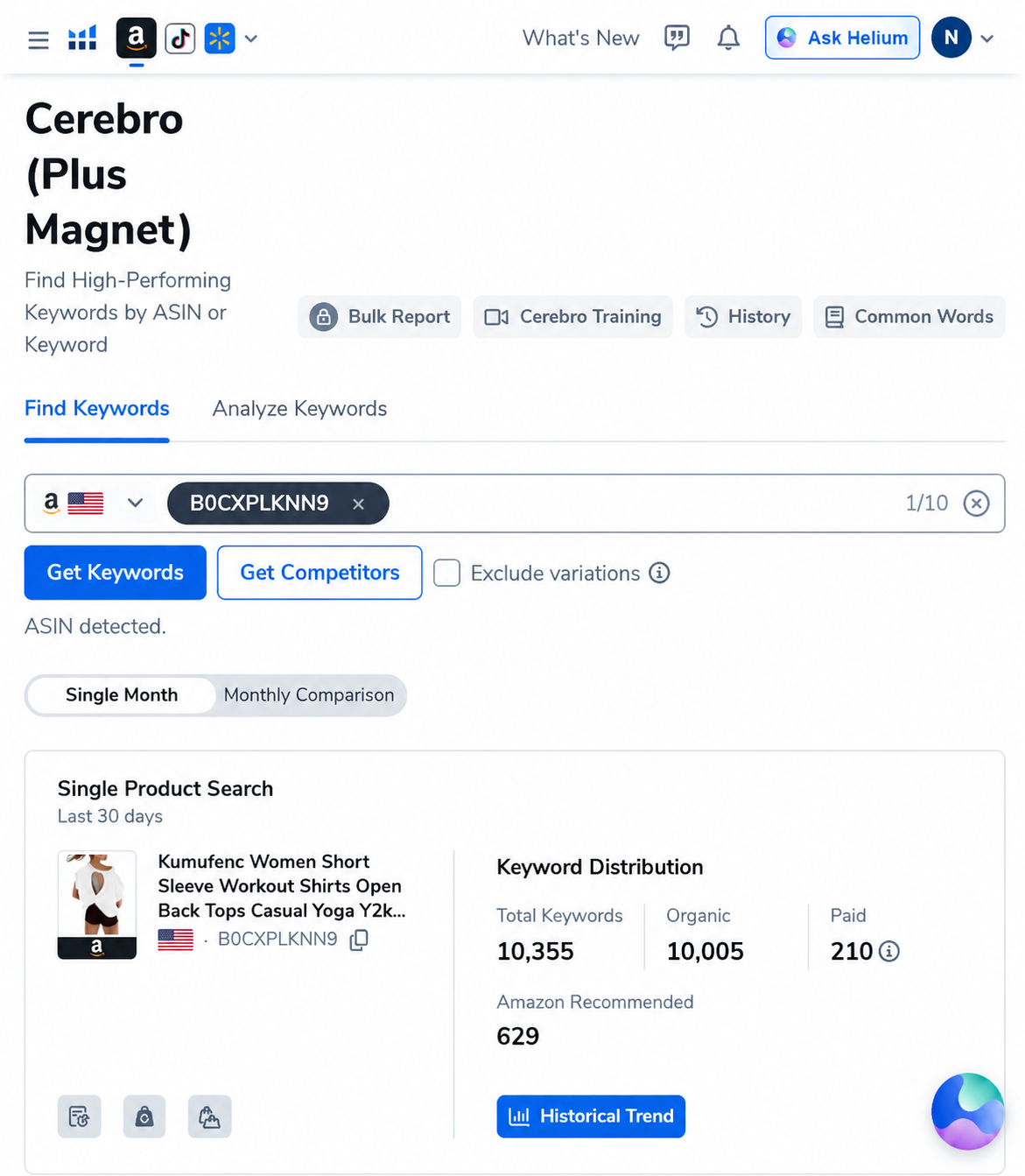
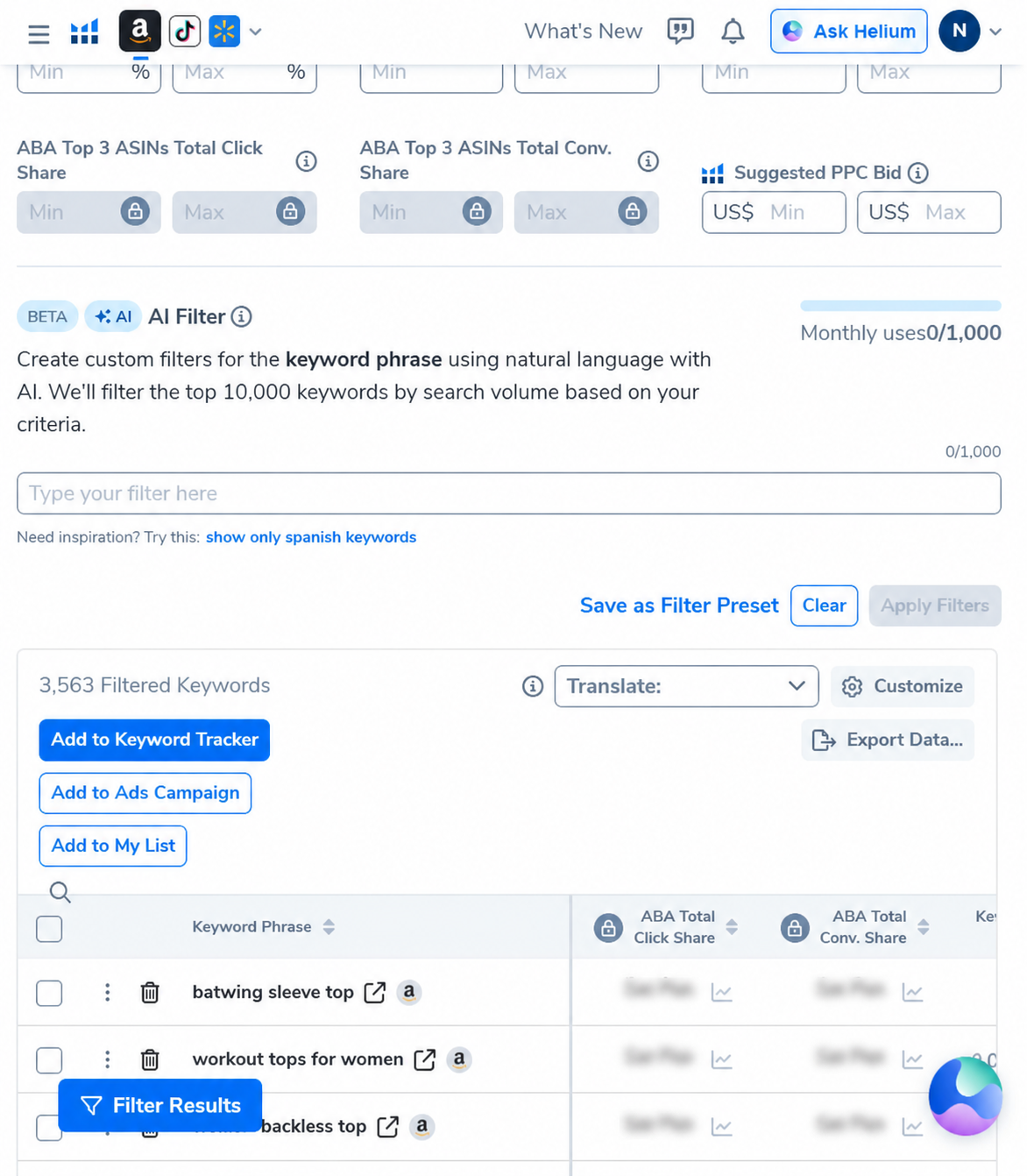
We then applied two discovery filters to that result set: a minimum word count of three and a minimum search volume of 500. The tool displayed 3,563 filtered keywords, with 8,623,791 total search volume and a 2,420 average. In this particular snapshot, that left about 34% of the original rows and about 55% of the displayed total search volume. This is arithmetic about one saved tool view, not proof that the remaining terms convert or that the omitted terms are worthless.
How often does Keyword Tracker update?
| Mode or signal | What Helium 10 documentation says | Practical use |
|---|---|---|
| Keyword rank without Boost | The Help Center’s frequency article says once per day. | Trend monitoring and before/after checks; not a live SERP feed. |
| Keyword rank with Boost | The frequency article says hourly while Boost is active; the Tracker overview says hourly updates for up to 10 days. | A short test around a defined listing or campaign change. |
| Other keyword and trend fields | Availability and update cadence depend on the column, tool view and plan. | Read the individual column and the current in-account help; do not assume every field refreshes at the rank cadence. |
| Tool allowance | Helium 10 says the table shows how many tracked keywords and boosts are used and available on your plan. | Check the live counter before designing a large tracking set. |
There is a reason not to compare an hourly Boost line to a casual Amazon search and call one “wrong.” Rank can vary by search location and context. Helium 10’s own help article notes that its rank data may not exactly match what you see in your own geographically specific Amazon searches. Use consistent marketplace and measurement conditions when judging movement.
When does an hourly Boost earn its place?
Use a Boost when you have a specific, short-lived question and an action you could take based on the answer. Examples include checking whether a carefully documented listing change coincides with movement for a top-priority phrase, or watching a launch term during a short operational window. The point is not to stare at a line every hour; it is to add timing detail to an experiment.
Do not Boost every keyword just because the rocket icon exists. Avoid an hourly window when:
- the phrase is only loosely related to the product;
- no listing, ad, price or inventory event is documented;
- you would not change a decision based on a one-day movement;
- the item has not accumulated enough baseline history;
- you are trying to infer total sales from rank alone.
A practical 30-minute setup for a clean tracking list
- Pick one marketplace and one ASIN. Parent/child variations and marketplaces can produce separate views. Keep the object being measured explicit.
- Start from relevant discovery data. Use Cerebro or the Keyword Tracker’s Suggested Keywords to identify terms, then manually remove brand-only or mismatched phrases.
- Tag by decision. Separate launch terms, core generic phrases, competitor terms and experiments so the dashboard stays understandable.
- Choose a manageable shortlist. Our editorial recommendation is to begin with a few dozen highly relevant terms rather than the entire discovery export. This is not a Helium 10 cap; your plan’s live counter governs actual allowance.
- Record the baseline. Save the date, marketplace, ASIN, keyword and visible rank before changing a listing or campaign.
- Add a note when something changes. The tool supports notes and tags; use them to record the timing of edits, promotions or campaign decisions. Correlation still is not proof of causation.
- Review daily first. If daily observations answer the question, do not spend a Boost. Activate hourly tracking only for the small subset where timing matters.
- Recheck the decision, not just the rank. Look at sessions, conversion, sales and ad data available in your own seller account. Rank alone is not profit.
What to do when the rank graph and sales disagree
That is not automatically a tool failure. Check whether the comparison uses the same marketplace and location, whether the product was in stock, whether ads or a promotion changed, and whether the keyword attracts shoppers who actually want your offer. A product can rank for a phrase but convert poorly; another phrase can be harder to see in one manual search but still contribute to sessions.
For your own ASIN, Seller Central’s sessions, ordered units, ad reports and Search Query Performance (if available to your account) are more direct business evidence than a third-party estimate. For a competitor ASIN, none of those private account metrics are yours; treat H10’s competitor data as estimates and triangulate cautiously.
Keyword Tracker vs Cerebro vs Amazon search checks
- Cerebro: find terms associated with competitor ASINs and examine rank/keyword evidence. See our organic rank vs sponsored rank explainer.
- Keyword Tracker: monitor a selected product’s chosen terms over time and annotate work with tags and notes.
- Manual Amazon search: a spot check for a particular user context, location and time—not a universal rank measurement.
- Seller Central: business metrics for your own account and listings; use them to validate whether visibility changes matter commercially.
For a plan decision, compare our Free Plan test and current pricing guide. Do not choose a tier until you know how many terms you intend to monitor, how often you need feedback and which feature allowance is included for your account.
AFFILIATE DISCLOSURE
Try the workflow before expanding your keyword list
AI Pilot Daily may earn a commission if you purchase Helium 10 through our links, at no extra cost to you. We use a paid Helium 10 account for workflow research. The screenshots above are genuine historical Cerebro views; they are not Keyword Tracker results, and we did not conduct a controlled ranking experiment on the pictured product.
Check current Helium 10 offer details
Confirm your current plan’s keyword and Boost allowance, billing terms and offer eligibility in your account before purchase.
Frequently asked questions
Does Helium 10 Keyword Tracker update rankings hourly?
Helium 10’s Help Center says normal rank checks are once a day and ranks with Boost are checked hourly while the feature is active. The overview describes Boost for up to 10 days. Verify the live controls and allowance shown in your account.
Does Boost update every Keyword Tracker metric hourly?
The documentation describes hourly updates for boosted keyword tracking/rank. Do not assume every column or estimate refreshes at the same rate; check each metric’s definition and current tool notes.
How many keywords should I track?
Track the smallest set that supports a decision. We suggest beginning with a few dozen highly relevant terms as an editorial workflow, not as a product limit. Your plan’s in-account counter is authoritative for capacity.
Why does Keyword Tracker rank differ from my Amazon search?
Rank can vary by geographic search context, and Helium 10 says its results may not exactly match a search performed from your own location. Keep marketplace and comparison conditions consistent.
Should I track competitor keywords too?
Helium 10 documentation describes adding competitors and viewing competitor details. Use this to monitor a focused comparison set, not to assume a competitor’s full business results are public.
Does high search volume mean the keyword will sell my product?
No. Search volume is a demand estimate, and relevance, ranking, offer quality, price, conversion and inventory all affect actual outcomes. Validate with your own account data where possible.
Sources and editorial method
We checked Helium 10’s Keyword Tracker documentation on September 27, 2026. Its support materials describe daily rank checks and hourly Boost checks; another overview says boosted tracking is hourly for up to 10 days and the account table shows plan allowances. These are vendor statements, and product limits can change. The screenshots are real Helium 10 Cerebro captures supplied for this site and dated September 5, 2026; they show keyword discovery data, not Keyword Tracker ranks. We did not make listing edits or claim a controlled test of ranking outcomes.
Official sources: Keyword Tracker check frequency · Keyword Tracker setup, Boosts, notes and tags · Magnet integrated into Cerebro.