Helium 10 Guides / Market Tracker
MARKET RESEARCH · UPDATED SEPTEMBER 27, 2026
Helium 10 Market Tracker: Build a Useful Competitor Set and Read Market Share
Market Tracker is most useful when the market definition is tight enough that a daily change means something. If the tracked set mixes different product jobs, sizes, bundles and buyer groups, its charts can look precise while answering the wrong question.
What Market Tracker is for—and what it is not
Helium 10 describes Market Tracker as a way to define a market using your own criteria, then review the market’s findings and suggested products over time. In the dashboard, the product-level fields can include review count and rating, price, estimated sales and revenue, BSR, fulfillment method, seller count, Sales Share and Market Share. The product’s Power Score is Helium 10’s relevance assessment against the market criteria you created; it is not a probability of success.
That makes Market Tracker a monitoring workspace, not a one-click product validator. It can help answer “what changed among the competitors I chose to monitor?” It cannot answer “will my product make money?” without your costs, ads, supply constraints, return rate, differentiation and Amazon-native account data.
| Question | Market Tracker can help with | It does not establish |
|---|---|---|
| Is the competitor set changing? | Daily observations and suggestions can surface products to review. | That every suggested ASIN serves the same customer or belongs in your market. |
| Are the monitored products moving? | Estimated sales, revenue, price and share trends can help flag a change worth investigating. | Audited Amazon orders, your true sales, profit or causal reasons for the change. |
| Is my product gaining share? | Mark your own ASIN as “My Product” so it appears in the relevant share view. | That a share change came from your listing edit, ad, price or promotion without further evidence. |
| Should I source the niche? | It can help create a competitor map and a shortlist of questions for validation. | Supplier reliability, landed cost, compliance, patent safety or launch economics. |
Start with a market definition, not a broad category
“Fitness” is not a useful market for one seller. “Women’s open-back workout tops for low-impact training” is closer: it gives you a product form, audience and use case. A narrower definition makes it easier to decide whether an ASIN belongs in the same comparison set.
Before you create a Market, write one sentence answering each of these:
- Who is the buyer? Be specific enough to separate adjacent products.
- What job are they hiring the product to do? Avoid mixing accessories with the main product.
- Which marketplace and category are in scope? A U.S. result set is not interchangeable with another country.
- Which products are credible substitutes? Similar appearance alone does not prove similar use or demand.
- What would make you exclude an ASIN? Set the rule before looking at the ranking or sales estimate.
Use Black Box to discover candidates—but do not dump the result set into a Market
Candidate discovery and market monitoring are different steps. In a Helium 10 Black Box Competitors search captured on September 5, 2026, we entered one U.S. Amazon ASIN and the tool returned 194 products. That is a candidate pool generated by a specific query—not 194 proven substitutes, not the Market Tracker’s measured market size, and not a forecast of 194 successful products.
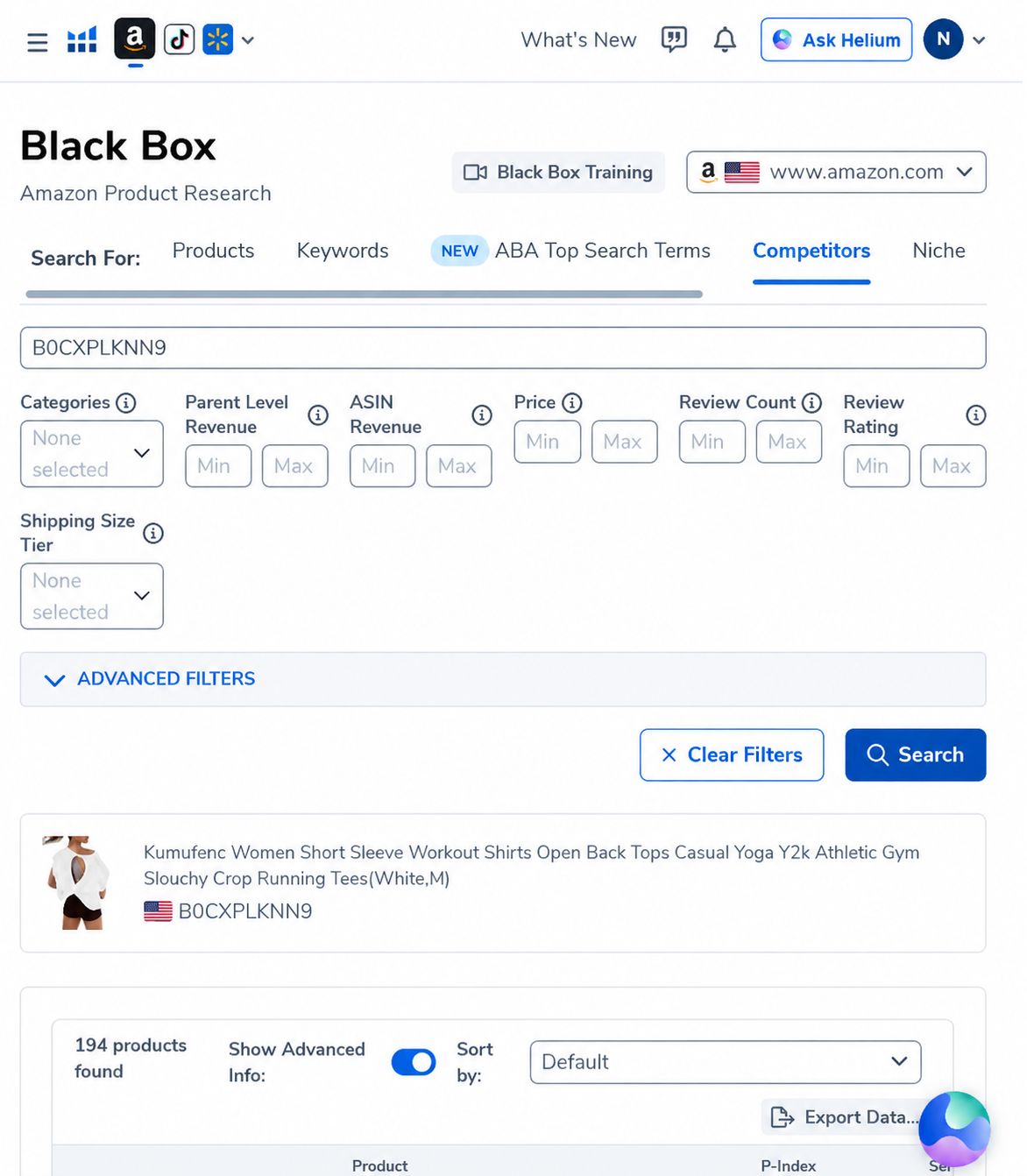
The practical mistake is to read “194 products found” as “194 products in my market.” Before creating a Market, inspect a handful of results and remove at least these kinds of noise:
- accessories or replacement parts that do not solve the same primary job;
- bundles and multipacks whose unit economics are not comparable to single items;
- different sizes, audiences or use cases that change the buyer’s decision;
- out-of-stock, discontinued or unusual listings that distort a snapshot;
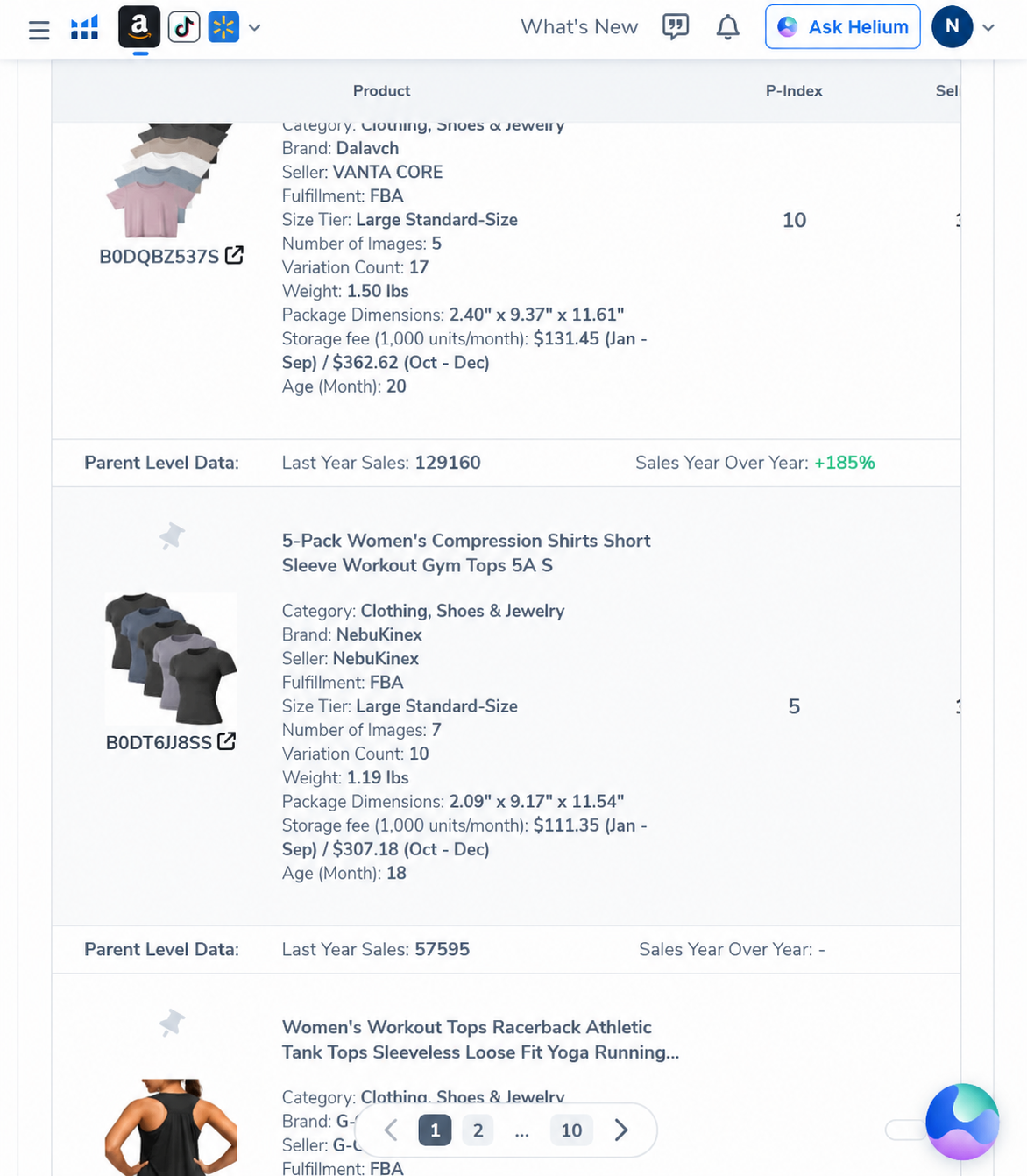
- near-duplicates or parent/child variations that may overstate the number of independent competitors.
Create the Market and allow the baseline to form
Helium 10’s Market Tracker guide describes a setup flow in which you define the Market and create it. Its help article explains that some figures—such as estimated revenue, estimated sales and market volume—use each ASIN’s activity in the 30 days before Market creation. It also says that Market Share analysis begins once the Market exists. In other words, creation is a meaningful start point for the share history; it is not just a folder label.
- Open Market Tracker and start a new Market.
- Choose the marketplace and enter the initial criteria or products that represent the buyer problem.
- Review each suggested product before tracking it; use Track for relevant entries and Ignore for off-market noise.
- If one of your own ASINs belongs in the set, mark it as My Product so the dashboard can show the corresponding share view.
- Wait for the initial build and first updates rather than drawing a conclusion from an empty chart.
Helium 10’s help-center article says the initial build can take several hours; the dashboard may need up to 24 hours before data begins to populate. The article also describes daily updates. Check the current in-product status message because interface timing and entitlements can change.
How to read daily movement without fooling yourself
| If you notice… | Check next | Do not jump to… |
|---|---|---|
| Your Market Share changes sharply. | Did the tracked ASIN list, seed criteria or date range change? Did a large product enter or leave? | “My listing edit caused the change.” |
| Estimated sales rise for several products. | Check whether the product category is seasonal and whether the same movement appears across the whole group. | “Demand has permanently increased.” |
| A new suggestion has a high Power Score. | Open the listing and verify product type, audience, price format and variation relationship. | “This is automatically a direct competitor.” |
| One ASIN appears to dominate. | Compare the market definition and the specific product’s listing, price, reviews and sales history. | “The entire niche belongs to this seller.” |
| Your product appears to lose share. | Cross-check your own sessions, ordered units, ad activity, inventory and price in Seller Central. | “The tool proves a single cause.” |
Keep the comparison cohort stable for a useful trend. When you add or ignore many products, note the date and the reason. Otherwise, the graph may be responding to a changed measurement set rather than a changed market. We recommend keeping a short research log: date, marketplace, criteria, ASINs added or ignored, and the question the update was meant to answer.
Market Tracker vs Black Box, Cerebro and Amazon Brand Analytics
- Black Box helps discover possible product candidates from structured criteria or a seed ASIN. It is a starting list, not a curated market.
- Market Tracker monitors a defined competitor group over time and suggests related ASINs.
- Cerebro investigates organic and sponsored keyword visibility for selected ASINs. See our Cerebro workflow case study.
- Amazon Brand Analytics, when available in the seller’s account, is a separate Amazon-native source. Its scope and access differ; compare like-for-like periods and search terms rather than treating one dashboard as the ground truth for everything.
A good sequence is: discover candidates in Black Box, manually curate the market, monitor a stable set, then use Cerebro to investigate the language shoppers use around the products. Our Black Box vs Xray guide explains the distinction between candidate discovery and a marketplace-page screen.
Plan limits and what to verify before paying
Helium 10’s Market Tracker help article lists a different number of Markets by subscription level and says the Free plan has limited access. That article is dated August 2025, so we do not treat the listed plan counts as timeless. Check the current plan comparison and the limits shown in your account before upgrading. The current Helium 10 pricing guide explains how we handle changing plan details; use the official checkout as the final authority.
AFFILIATE DISCLOSURE
Check whether Market Tracker fits your research loop
AI Pilot Daily may earn a commission if you purchase through our links, at no extra cost to you. We maintain a paid Helium 10 account for interface and workflow research. The Black Box screenshots above are real historical product research captures; they are not a Market Tracker output and do not independently verify sales.
Review current Helium 10 offers
Confirm current access, Market limits, billing period and final checkout terms in your account before purchasing.
Frequently asked questions
Does Helium 10 Market Tracker show real sales?
It reports Helium 10 estimates for competitor products. Treat them as directional research data, not audited orders from your Seller Central account. Use your own account data for your own business performance.
How long does a new Market take to populate?
Helium 10’s help article says a new Market may take several hours to build and data may take up to 24 hours to begin appearing. Check the current status message inside the tool.
Should I track every ASIN Black Box finds?
No. A Black Box result count is a candidate pool. Curate products for buyer, use case, marketplace and product format before adding them to a Market.
Can I add competitor products after the Market is created?
Helium 10’s Market Tracker 360 settings article describes adding competitor ASINs from Market Settings and saving changes. Because settings can change, use the current in-product help and verify the confirmation state.
Does Market Tracker need my MWS token?
The Helium 10 help article says the described Market Tracker setup does not require an MWS Token. Confirm any current account-connection requirements in the tool itself.
What is the safest first use?
Track a coherent set of direct substitutes, record the criteria and date, and wait for the baseline. Do not treat a broad category, one high Power Score or one day of movement as a sourcing decision.
Sources and editorial method
We checked Helium 10 Help Center documentation on September 27, 2026. The Black Box screenshots are owner-supplied paid-account captures from September 5, 2026, showing one U.S. seed-ASIN query and its candidate results. They are historical examples; we did not rerun that exact query today. Helium 10’s estimated sales, revenue, volume, Power Score and share should be read as tool outputs, not audited Amazon records. We did not source or buy the pictured product, and this is not a product test.
Official sources: Market Tracker setup and product suggestions · Market Tracker 360 settings.