Paid-account walkthrough
How to Use Helium 10 Black Box: A Practical Product Research Workflow
Helium 10 (often shortened to H10) Black Box is a database-driven product discovery tool for Amazon sellers. It is useful for building a shortlist—not for declaring a product “safe” or profitable on its own.
Real data case study · September 5, 2026
We entered one Amazon ASIN: what did Black Box return?
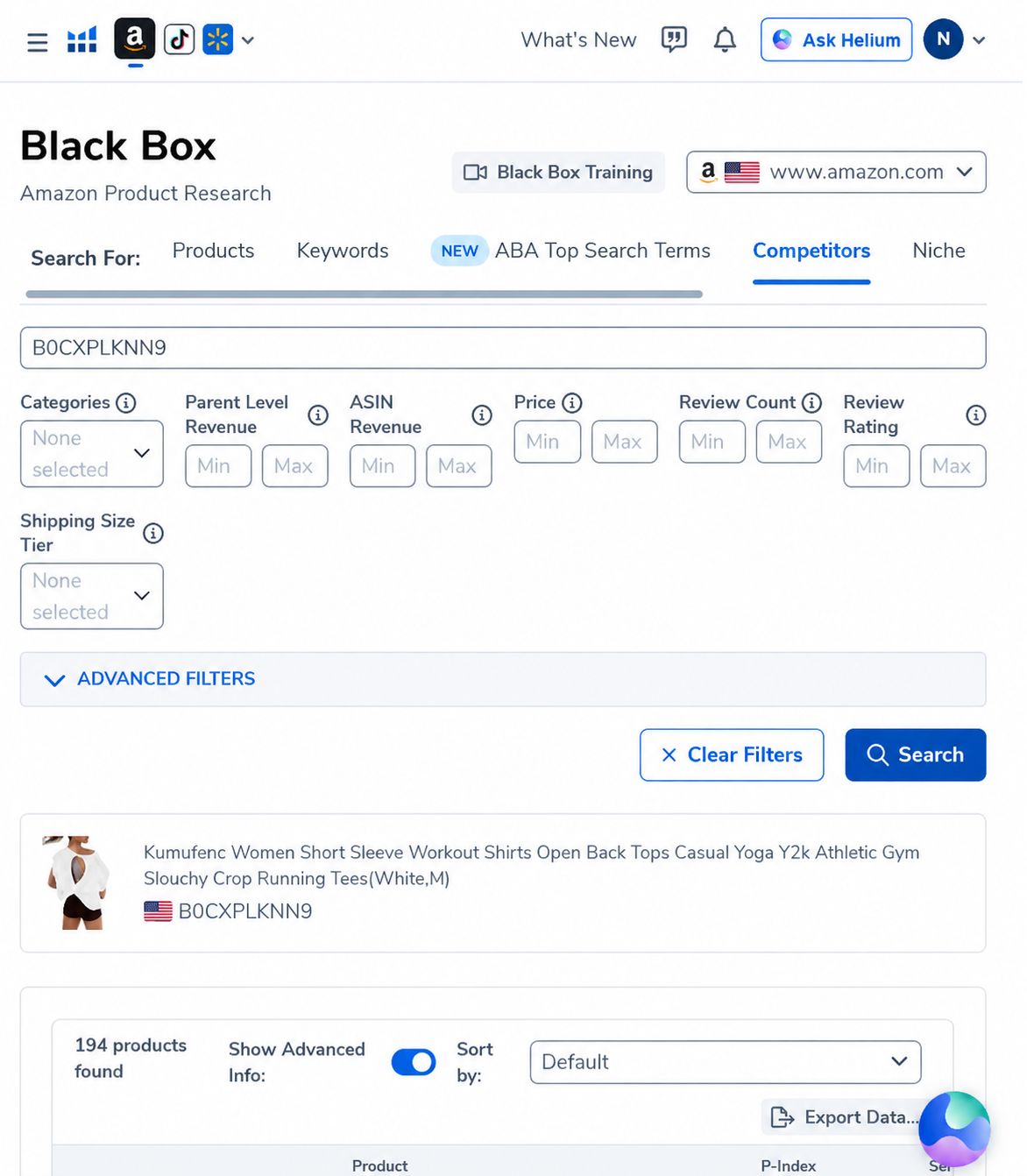
To move beyond a feature tour, we used the Competitors tab with ASIN B0CXPLKNN9, a women’s open-back workout shirt listing on Amazon US. We left the optional revenue, price, review and shipping-size filters empty. That matters: this was a broad competitor-discovery query, not a hand-picked result engineered to look attractive.
The first lesson: “194 competitors” is a discovery pool, not a market count
The result total is useful because it shows Black Box can expand one listing into a large comparison set. It does not mean all 194 products are direct substitutes. The visible results mix open-back tops, multipack compression shirts, racerback tanks and generic workout T-shirts. Before calculating opportunity size, a seller would need to remove products with a different silhouette, pack count, price architecture or customer intent.
Two visible candidates, compared with the same lens
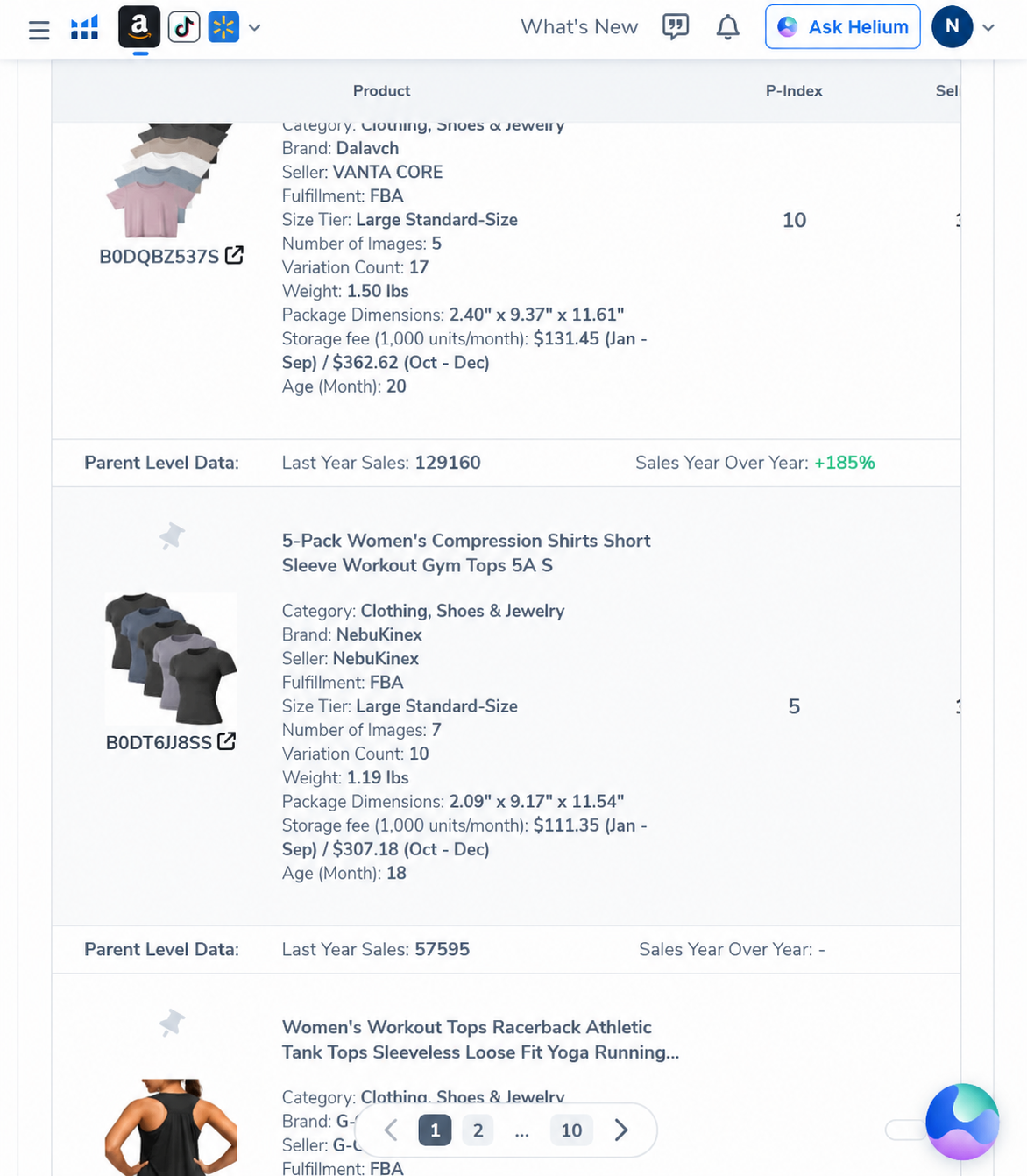
| Visible result | Operational data shown | Demand signal shown | Our interpretation |
|---|---|---|---|
| Dalavch 6-pack crop tops ASIN B0DQBZ537S |
FBA; Large Standard-Size; 17 variations; 1.50 lb; 5 images; storage estimate for 1,000 units: .45 Jan–Sep / .62 Oct–Dec | Parent last-year sales: 129,160; sales YoY: +185%; 90-day sales trend: −20%; best period: Jul 2026 | Strong historical demand, but the recent decline and Q4 storage step-up need investigation. A six-pack also changes sourcing cash and return economics. |
| NebuKinex 5-pack compression shirts ASIN B0DT6JJ8SS |
FBA; Large Standard-Size; 10 variations; 1.19 lb; 7 images; storage estimate for 1,000 units: .35 Jan–Sep / .18 Oct–Dec | Parent last-year sales: 57,595; 90-day sales trend: −9%; best period: Mar 2026; YoY field unavailable in the visible result | Lower visible scale but a milder recent decline. Missing YoY data is a reason to investigate, not permission to assume flat growth. |
What the data says—and what it cannot say
the query finds adjacent listings and exposes comparable operational signals.
multipacks and variation-heavy listings are meaningful competitors in this result set.
visible 90-day trends are negative for both examples despite strong historical sales.
net profit, ad efficiency, return rate, supplier quality or legal safety.
Our decision from this pass
Do not select a product yet. The query is valuable for mapping the competitive set, but it is too broad for a sourcing decision. We would next narrow by product form and pack count, examine the live Amazon pages, estimate landed cost and FBA fees, review recent one-star complaints, and use Cerebro on three genuinely comparable ASINs. That is a more defensible workflow than choosing the row with the largest revenue estimate.
What Black Box actually does
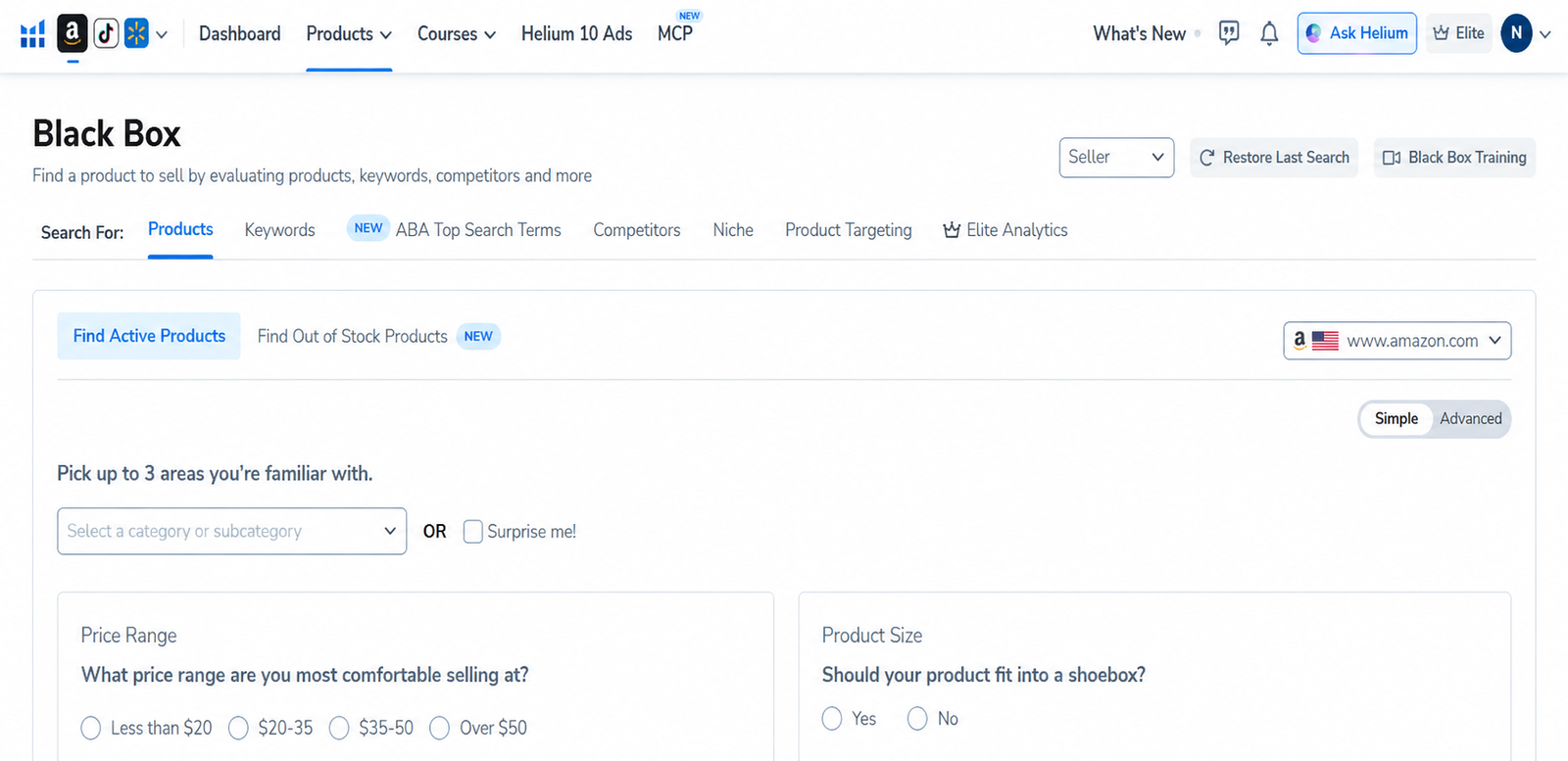
Black Box searches Helium 10’s Amazon product and keyword datasets using filters such as marketplace, category, price, estimated monthly revenue, review count, size and sales trends. The current dashboard divides research into seven routes:
| Tab | Best use | What it does not prove |
|---|---|---|
| Products | Filter individual listings and create a product shortlist. | That your sourcing cost or margin will work. |
| Keywords | Find demand expressed through search terms. | That a single product can rank profitably. |
| ABA Top Search Terms | Explore Amazon Brand Analytics search-term and click-share signals. | Future demand or low competition. |
| Competitors | Start with known ASINs and inspect adjacent opportunities. | That competitors’ estimated sales equal audited sales. |
| Niche | Review groups of related products and market-level patterns. | That every ASIN in the niche has similar economics. |
| Product Targeting | Look for listings that may be useful product-ad targets. | Advertising conversion or acceptable CPC. |
| Elite Analytics | Advanced opportunity analysis for eligible plans. | A substitute for primary market validation. |
Our repeatable Black Box workflow
1. Define the business constraints first
Choose the Amazon marketplace and no more than a few categories you understand. Decide your maximum landed cost, target selling-price band, acceptable size and compliance tolerance before touching the revenue filters. A lightweight product and a bulky product can have completely different fee and return economics.
2. Use Products in Simple mode for discovery
Simple mode is useful when you are learning the database. Pick a category or use “Surprise me,” select a price band and product size, then run a broad search. Treat the first result set as a map of possibilities, not a shopping list.
3. Switch to Advanced and remove obvious mismatches
Advanced filters let you combine demand and competition signals. Useful constraints can include monthly revenue, sales, price, review count, rating, number of sellers, listing age and keyword exclusions. Avoid copying a guru’s fixed threshold: a maximum of 200 reviews may be sensible in one subcategory and meaningless in another.
4. Compare trends, not only headline estimates
Open the product details for candidates and check whether demand appears stable, seasonal, newly spiking or declining. A strong current month can be caused by promotions, stockouts elsewhere or a seasonal event. Look for multiple plausible sellers rather than one outlier carrying the entire niche.
5. Save a small shortlist
Move only the most plausible ideas to a list. Add a brief note stating why each candidate survived: stable demand, manageable review distribution, price room, differentiated design opportunity or a clear customer complaint to solve. This prevents a large export from becoming another unused spreadsheet.
6. Validate every finalist outside Black Box
- Open the live Amazon listings and read recent critical reviews.
- Check patents, trademarks, restricted-product rules and category compliance.
- Request supplier quotes and calculate landed cost, FBA fees, ad cost, returns and taxes.
- Use Xray to inspect the live search page and Cerebro/Magnet to test keyword coverage.
- Reject ideas that require optimistic assumptions to reach the target margin.
Useful presets—and when to ignore them
Helium 10 documents presets including High Growth, Low Rating, Low Image Count, and Small and Light. They can speed up exploration, but they are starting points. “Low Rating” may expose a quality gap, or it may expose a category with unavoidable dissatisfaction. “Low Image Count” may indicate weak merchandising, or a simple product that needs few images. Read the listings before assigning a story to the filter.
Need the browser step? Use our Helium 10 Chrome Extension and Xray guide to screen a live Amazon results page before deeper database research.
Black Box vs Xray vs Cerebro
| Tool | Question it answers | Typical handoff |
|---|---|---|
| Black Box | What products or niches match my filters? | Send finalists to a live Amazon results page. |
| Xray | What does this live search page or product set look like now? | Identify competing ASINs. |
| Cerebro | Which keywords appear to drive visibility for those ASINs? | Build keyword and listing research. |
AI Pilot Daily reader codes
Try the workflow in your own H10 account
Choose the discount structure that matches your billing preference. Confirm the final terms at checkout because plans and promotions can change.
AIPILOTDAILY2020% off the first 6 months on eligible monthly checkout (observed in our checkout).
Open Helium 10 and use AIPILOTDAILY20 →
AIPILOTDAILY1010% ongoing on eligible monthly checkout (shown as “forever” in our test).
Check plans with AIPILOTDAILY10 →
Affiliate disclosure: We may earn a commission if you purchase through these links, at no extra cost to you. The discount language above reflects our observed checkout; verify the final price and duration before paying.
Frequently asked questions
Is Helium 10 Black Box accurate?
It is useful for comparative research, but its sales and revenue numbers are estimates. Validate candidates with live listings, multiple data views and your own cost model.
What are the best Black Box filters?
There is no universal combination. Start with marketplace, familiar categories, price and product size; then add demand, competition and trend filters based on your business constraints.
Can Black Box find a winning product automatically?
No. It can produce a relevant shortlist. Product differentiation, sourcing, compliance, advertising and unit economics require separate work.
Is Black Box the same as Cerebro?
No. Black Box discovers products and niches from filters. Cerebro is primarily a reverse-ASIN keyword research workflow.
Sources and review notes
This guide was checked against the current paid interface and Helium 10’s official knowledge-base documentation for the Black Box dashboard, Products tab and out-of-stock workflow. Interface and plan availability can change. Last reviewed: September 5, 2026.
- Helium 10: Black Box Product Tab Overview
- Helium 10: Navigating the Black Box Dashboard
- Helium 10: Find Out-of-Stock Products
Continue: Read our full Helium 10 review · See verified Helium 10 coupon tests · Use Cerebro for reverse-ASIN research