
Last verified: 2026-10-29
Affiliate disclosure: We may earn a commission if you subscribe to Helium 10 through our links. Screenshots and workflow notes come from our own signed-in Helium 10 account (English UI, Black Box). Codes: AIPILOTDAILY20 and AIPILOTDAILY10 via https://i.helium10.com/jR0Z10. Offers change, so recheck before paying.
Quick answer
Helium 10 Black Box is the product database search (Products tab) with Simple and Advanced filter modes. Filters that “work” are boring constraints that produce a reviewable shortlist—not magic profitable-product presets.
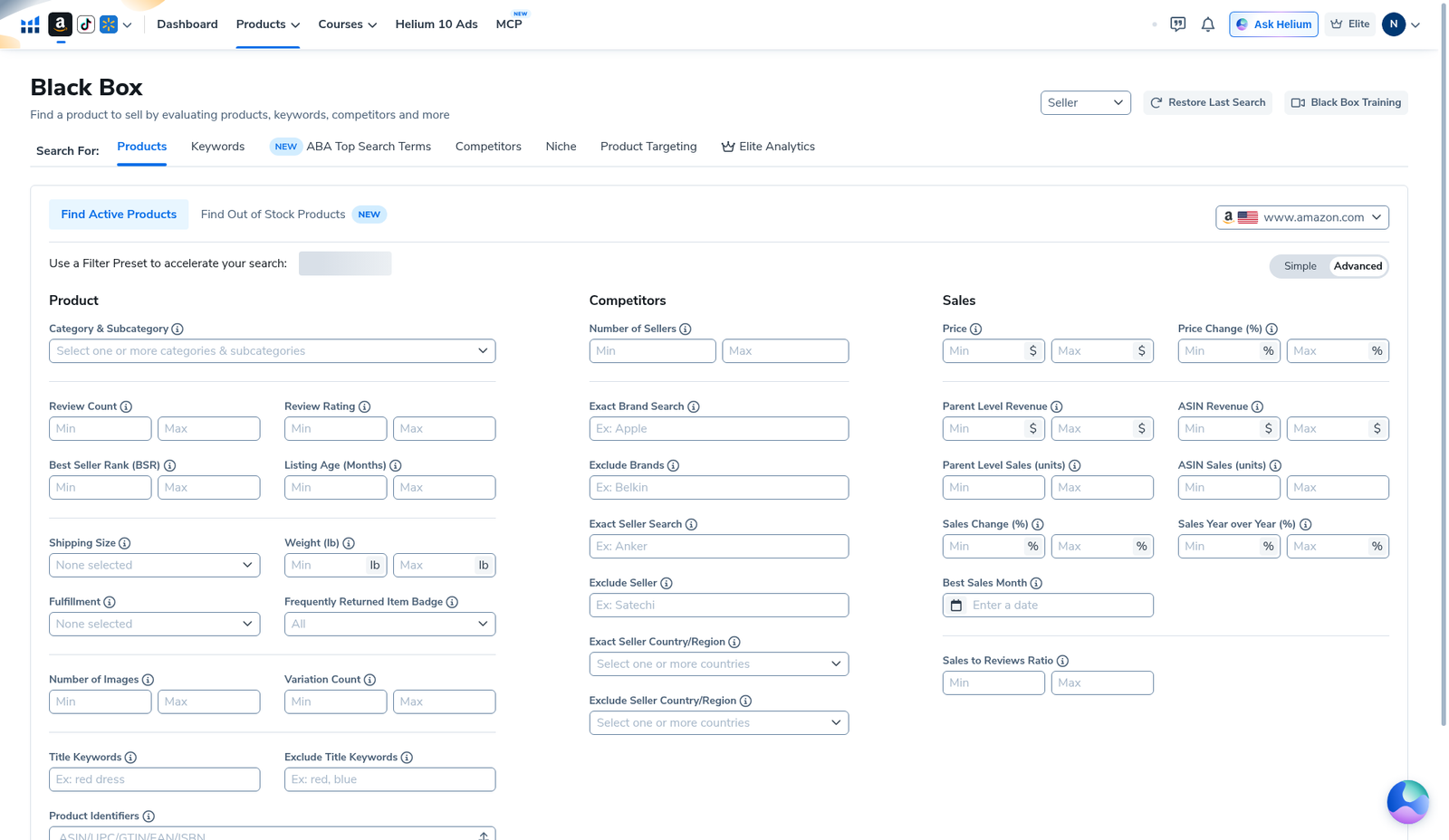
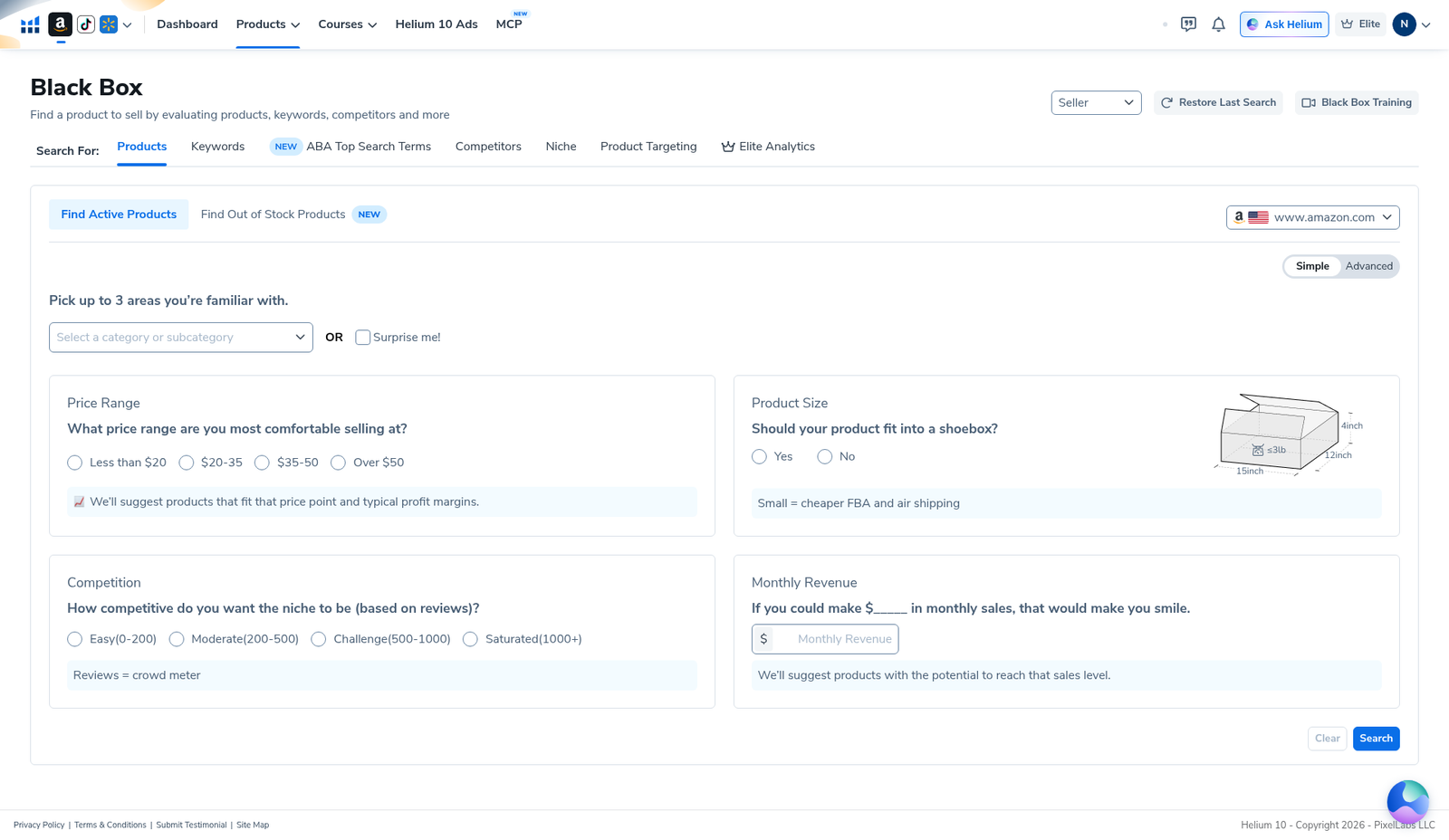
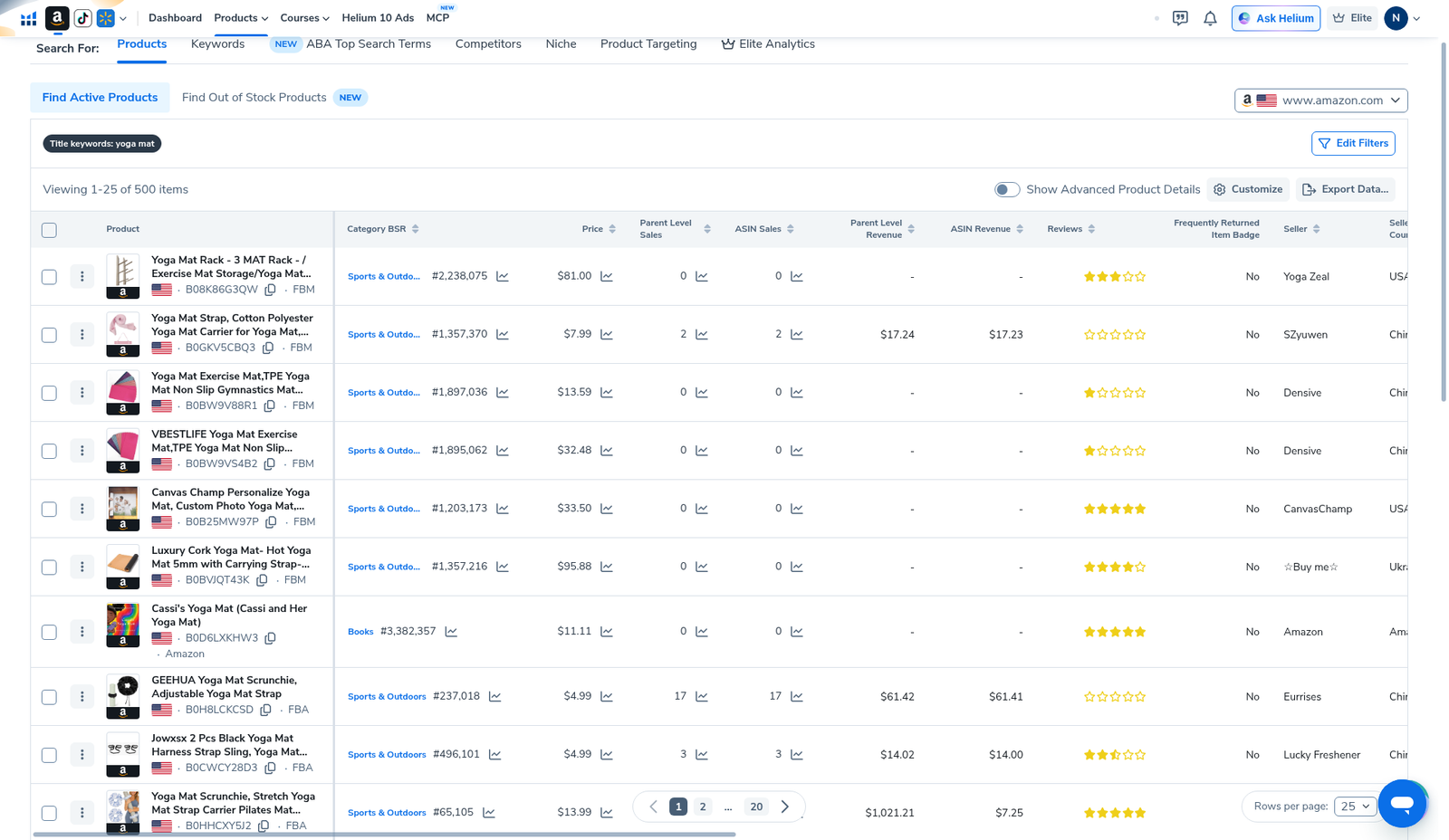
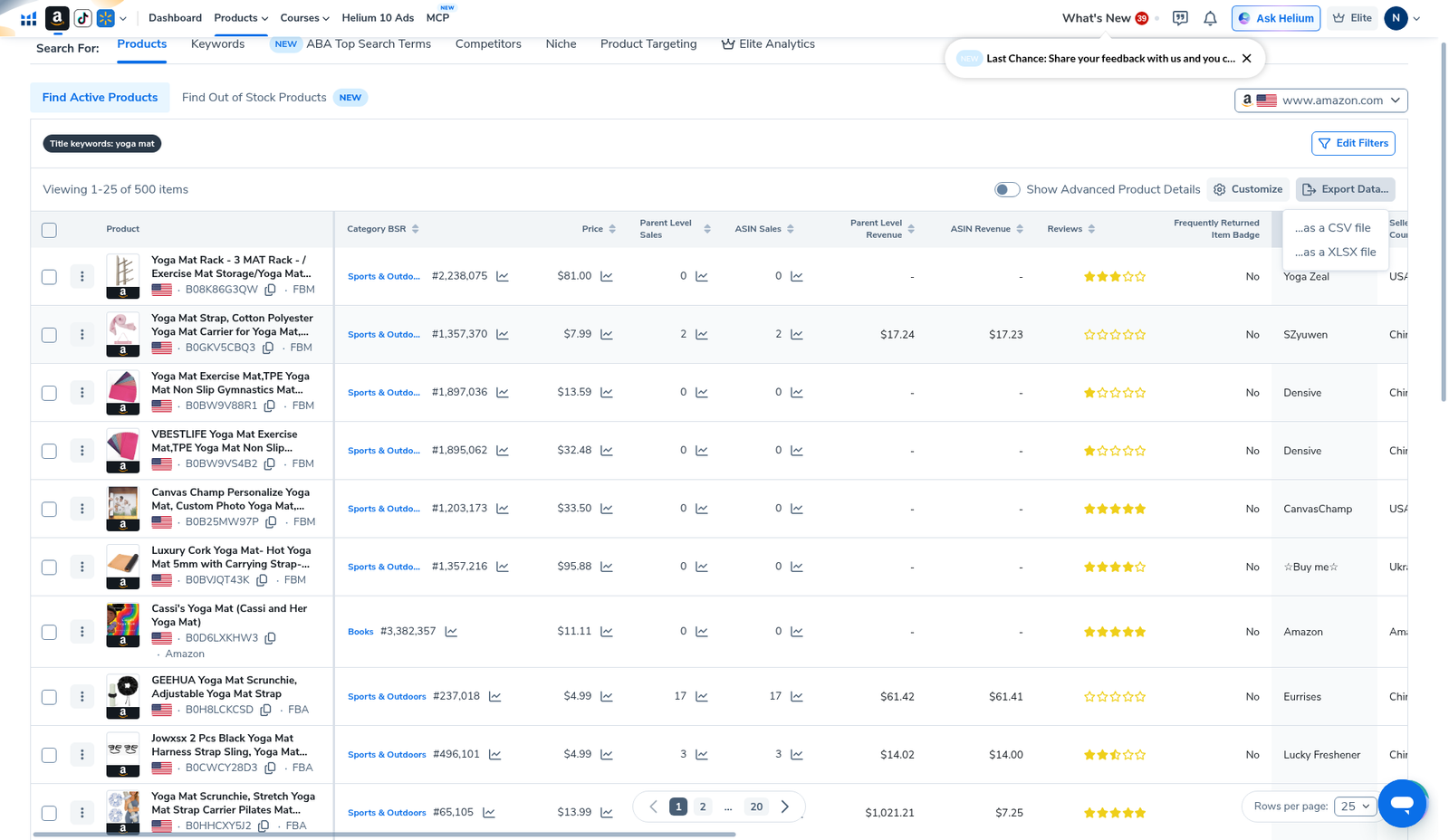
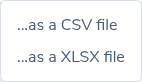
On 2026-10-29 (English UI, Elite, Amazon US) we opened Black Box Products → toggled Advanced (full filter columns) and Simple (wizard: category, price, shoebox size, review competition, monthly revenue). We ran a title keyword = yoga mat search and landed on Viewing 1–25 of 500 items with columns for BSR, price, parent/ASIN sales & revenue, reviews, seller, and seller country. We opened Export Data… showing …as a CSV file and …as a XLSX file—export download was not confirmed.
| Field | What we saw |
|---|---|
| Where | Black Box → Products · marketplace www.amazon.com |
| Modes | Advanced filter grid · Simple wizard |
| Worked search | Title keywords: yoga mat |
| Results | 1–25 of 500 items (Find Active Products) |
| Export | CSV / XLSX menu opened; file download not confirmed |
| Plan badge | Elite |
Honest takeaway: start wide, tighten one dimension at a time, export candidates, validate on Amazon / Xray / Cerebro. Our 500-row yoga-mat set is a reviewable list—not a guaranteed winner list. English UI only in this rewrite.
Related: Cerebro reverse ASIN · Xray · pricing · coupons.
Ready to try Helium 10?
New checkout codes we verified 2026-10-29:
Monthly: AIPILOTDAILY20 (20% off for 6 months) · Annual: prefer AIPILOTDAILY10 (≈10% forever on our annual test). Confirm on your own summary.
What I tested vs what I did not claim
Tested: Black Box Products on US Amazon; Advanced empty filter grid (documented available fields); Simple wizard controls; yoga-mat title-keyword results (500 items); Export Data CSV/XLSX menu.
Did not claim: a universal filter recipe for every category; confirmed export file download; seasonality-graph courtroom evidence we did not screenshot; that 500 rows are all profitable. Affiliate only https://i.helium10.com/jR0Z10.
Step 1 — Open Black Box on Amazon US (Advanced)
Black Box subtitle: Find a product to sell by evaluating products, keywords, competitors and more. Stay on Products. Toggle Advanced. You get three columns:
- Product — category, reviews, rating, BSR, listing age, size/weight, fulfillment, images/variations, title keywords / exclude, identifiers
- Competitors — seller count, brand/seller include-exclude, seller country/region
- Sales — price, revenue, units, sales change / YoY, best sales month, sales-to-reviews ratio
Also available: Restore Last Search, Black Box Training, Seller dropdown.
Step 2 — Know the Simple wizard (beginner path)
Toggle Simple for a guided path: pick up to 3 familiar categories (or Surprise me!), price bands (<$20 / $20–35 / $35–50 / Over $50), shoebox-fit question, review-competition tiers (Easy 0–200 through Saturated 1000+), and a monthly revenue target field. Then Search or Clear.
Step 3 — Run a concrete search (yoga mat → 500 results)
Our worked English-UI example used title keyword yoga mat on Find Active Products. Result header: Viewing 1–25 of 500 items. Table columns included Product (ASIN + FBA/FBM), Category BSR, Price, Parent/ASIN Sales & Revenue, Reviews, Frequently Returned Item Badge, Seller, Seller Country. Example rows included accessories (racks, straps)—title-keyword search is broad; manually reject off-niche ASINs.
Step 4 — Export Data (CSV / XLSX) — menu only
Click Export Data…. Menu options: …as a CSV file and …as a XLSX file. We opened the menu for evidence; we did not confirm a downloaded file in this package. Prefer export + offline review when you are near plan limits.
Filter recipes that actually help
Recipe A — Private-label scouting
Use Advanced: marketplace first, title/category focus, review ceiling that leaves room to compete, price band your sourcing can hit, and a parent revenue / sales floor matched to your capital. Tighten one control at a time until the list is reviewable in one work block. Our yoga-mat title search still returned 500 rows—pageable, not empty, not “infinite junk.”
Recipe B — Low-review demand hunt
Keep a demand floor (sales/revenue) while capping reviews more aggressively. Then reverse-ASIN winners in Cerebro before emailing suppliers.
Recipe C — Wholesale / brand outreach
Higher reviews can be fine; prioritize stable brands you can contact. Black Box is discovery—not a CRM.
Workflow after filters
- Reject off-niche title matches in the results table.
- Validate survivors on Amazon + Xray.
- Reverse-ASIN shortlist in Cerebro (we use B0HF4FK2QS in the sibling guide).
- Landed-cost spreadsheet before supplier talks.
Filters I stopped overusing
- Stacking every metric until zero results, then blaming Helium 10.
- Copying someone else’s exact numbers for a different category/marketplace.
- Treating seller count alone as a green light.
FAQ
What are the best Helium 10 Black Box filters in 2026?
No universal best set. Start with marketplace, title/category, price band, review ceiling, and a demand band—then tighten one control at a time.
Can Black Box guarantee a profitable product?
No. Filters reduce noise. Profit still needs sourcing, compliance, differentiation, and ads.
Did you confirm export?
We confirmed the CSV/XLSX menu only—not a successful download.
CTA
Open Black Box, run one constrained search, and stop at a shortlist. Access: AIPILOTDAILY20 / AIPILOTDAILY10 at https://i.helium10.com/jR0Z10. Confirm on the coupon page. More: guides.

Leave a Reply