
Last verified: 2026-10-30 · Author: Alexander Vance · Human review
Affiliate disclosure: We may earn a commission if you buy Helium 10 through our links, at no extra cost to you. Helium 10 UI notes and screenshots come from our logged-in Helium 10 members account (English UI, Black Box captures 2026-10-29 / verified 2026-10-30). New-customer checkout figures for AIPILOTDAILY20 / AIPILOTDAILY10 come from our 2026-10-28 tests via https://i.helium10.com/jR0Z10 (no payment completed). Always trust your order summary and the usage / entitlement card on your account before you pay or burn searches.
Quick answer
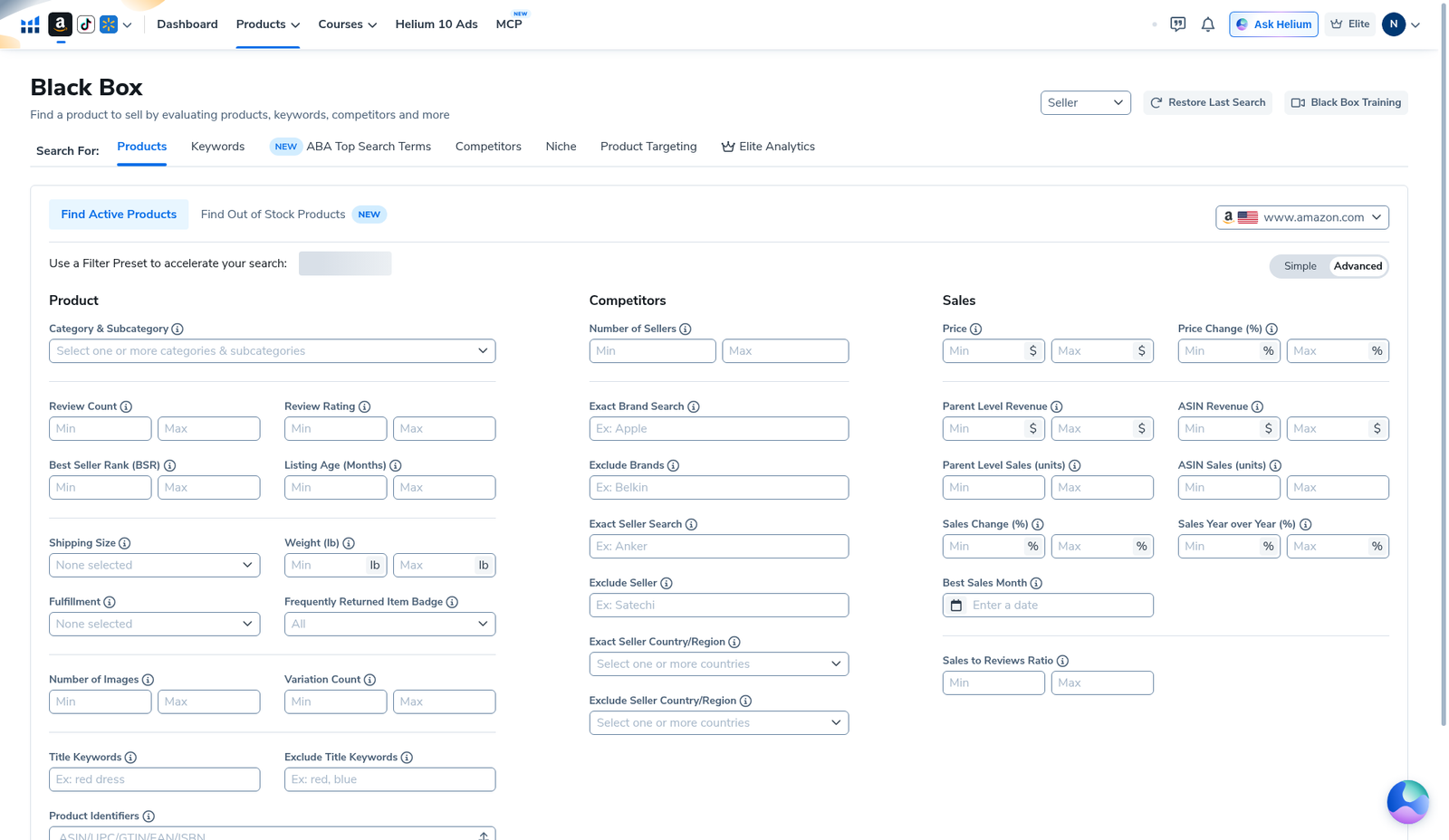
Helium 10 Black Box search volume filter: keyword Search Volume is not a field on Black Box → Products → Advanced (our English empty-grid capture). Product Advanced’s Sales column shows Price, Parent/ASIN Revenue, Parent/ASIN Sales (units), Sales Change %, YoY %, Best Sales Month, and Sales to Reviews Ratio—those are product sales / revenue knobs, not keyword search-volume. Keyword Search Volume belongs on Black Box’s Keywords (and related keyword) modes in the Products/Keywords/ABA tab row—and, for reverse-ASIN work, on Cerebro Filters. Honest gap: this package has no dedicated Black Box Keywords-tab screenshot with Search Volume min/max filled and results re-run. We document the Products Advanced grid (to prevent the common mix-up), show results/export context, and point you to Cerebro for keyword SV filtering we did capture.
| Field | What we saw (English UI) |
|---|---|
| Products → Advanced | No “Search Volume” filter label on the grid we captured |
| Sales column (Products) | Revenue / units / change % / Best Sales Month / sales-to-reviews |
| Keywords mode | Tab visible in Black Box header — dedicated SV UI not in this screenshot pack |
| Where we have SV proof | Cerebro Filters + keyword table (separate guides) |
| Sibling Black Box | beginners 92274 · export 92278 · PL 92297 · seasonality 92300 |
Honest takeaway: do not hunt for “Search Volume” inside Products Advanced Sales and call Parent Level Sales (units) the same thing. Units sold ≠ keyword search volume.
Related: Black Box beginners · private label · seasonality · export · Cerebro listing optimization · keyword hub · product hub · coupon.
Pick your Helium 10 plan, then enter your AI Pilot Daily code.
Confirm eligibility, duration, renewal terms and the final amount on your checkout. Existing subscriptions usually cannot apply these codes.
Search Volume vs product sales units (do not mix these)
Sellers say “volume” for two different numbers:
- Keyword Search Volume (SV) — estimated how often shoppers type a phrase. Lives on keyword tools (Cerebro / Magnet, Black Box Keywords mode, ABA-style banks).
- Product sales units / revenue — estimated how many units / dollars a listing sells. Lives on Black Box Products filters (Parent Level Sales, ASIN Sales, Parent/ASIN Revenue).
Filtering Products by ASIN Sales Min = 300 is a demand floor for the ASIN, not a Search Volume filter. Filtering Cerebro by Search Volume Min = 300 is a phrase demand floor. Both are useful; they answer different questions.
Step 1 — Confirm you are on the right Black Box mode
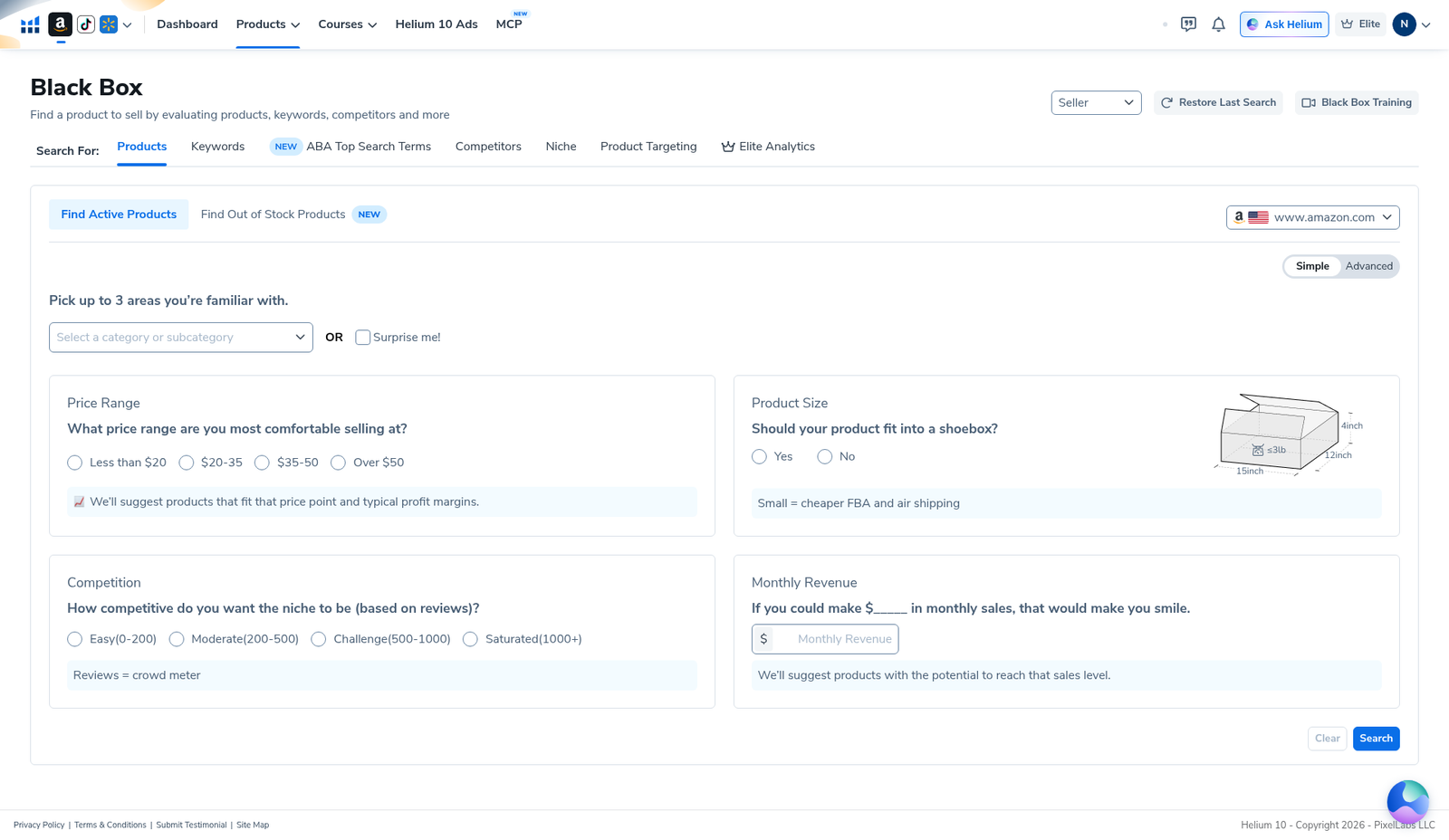
Open Black Box. The mode tabs on our English capture include Products, Keywords, ABA Top Search Terms, Competitors, Niche, Product Targeting, Elite Analytics. Product research shortlists start on Products. Keyword phrase banks start on Keywords (or ABA). If you only see the Simple questionnaire (price / shoebox / reviews / revenue smile), you are still in Products Simple—flip Advanced for the full Products grid, or switch tabs for Keywords.
Step 2 — Products Advanced: what Sales filters actually are
Toggle Advanced on Products (marketplace www.amazon.com in our shots). Three columns: Product · Competitors · Sales. Scroll Sales: Price, Price Change %, Parent Level Revenue, ASIN Revenue, Parent Level Sales (units), ASIN Sales (units), Sales Change %, Sales Year over Year %, Best Sales Month, Sales to Reviews Ratio. No Search Volume min/max on this grid in our 2026-10-29 English capture.
Operator sequence when you want product demand (not keyword SV):
- Set Category or Include Title Keywords so you are not searching the whole catalog.
- Add Price band you can source.
- Set Parent Level Revenue and/or Parent Level Sales (units) floors you can believe.
- Optional competition ceilings (Review Count Max, Number of Sellers)—see low competition (WP 92280).
- Optional Best Sales Month (WP 92300) only if you want seasonal inventory risk.
- Find Active Products → reject accessories → export (WP 92278).
Private-label shortlist that uses those product knobs correctly: Black Box for private label (WP 92297). First session: beginners tutorial (WP 92274).
Step 3 — Where keyword Search Volume actually lives
For phrase-level Search Volume inside Helium 10 we trust these paths (plan entitlements vary—read your card):
- Black Box → Keywords (and ABA Top Search Terms): intended for keyword databases / search-term style research. Evidence gap: we did not capture this tab’s SV filter UI in the current EN Black Box pack—do not invent a filled SV screenshot.
- Cerebro (Plus Magnet): reverse ASIN → Filters → Search Volume min/max + keyword table SV column. We have English UI proof shots and how-tos for that workflow.
- Magnet (seed expand): phrase → related terms with volume estimates (same Cerebro allowance on many plans).
Practical recommendation while the Black Box Keywords SV shot is missing: shortlist products in Black Box Products → reverse keepers in Cerebro → apply Search Volume floors there → map listing/PPC buckets via Cerebro for listing optimization (WP 92286). Keyword hub: best Amazon keyword research tools.
Step 4 — Read a Products results grid without calling it SV
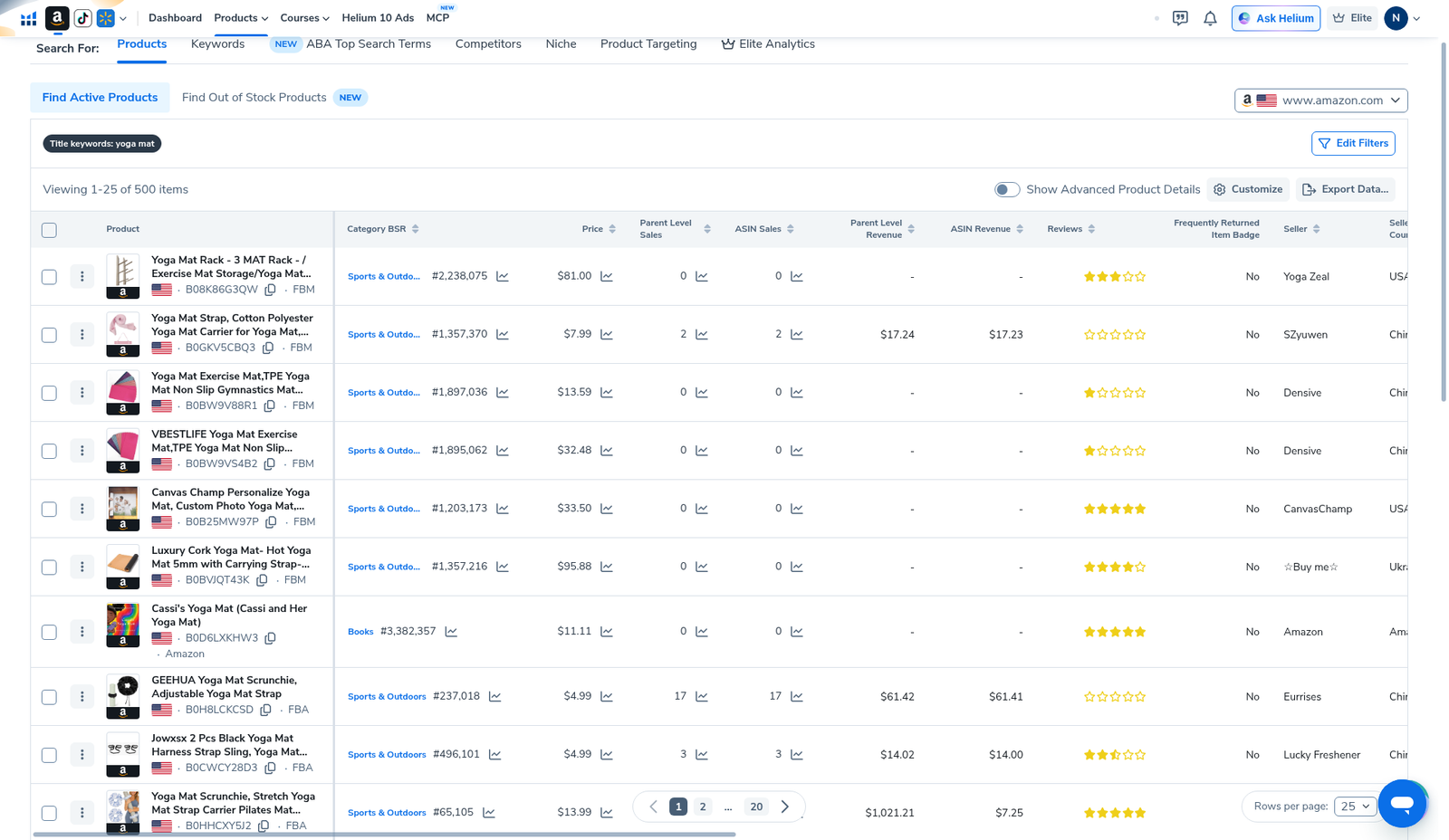
Our yoga-mat title-keyword Products run (Viewing 1–25 of 500 items) is product research output: BSR, revenue estimates, reviews—not a keyword Search Volume table. Use it to practice reject discipline after any demand floor (units/revenue), then export.
After the list is finishable:
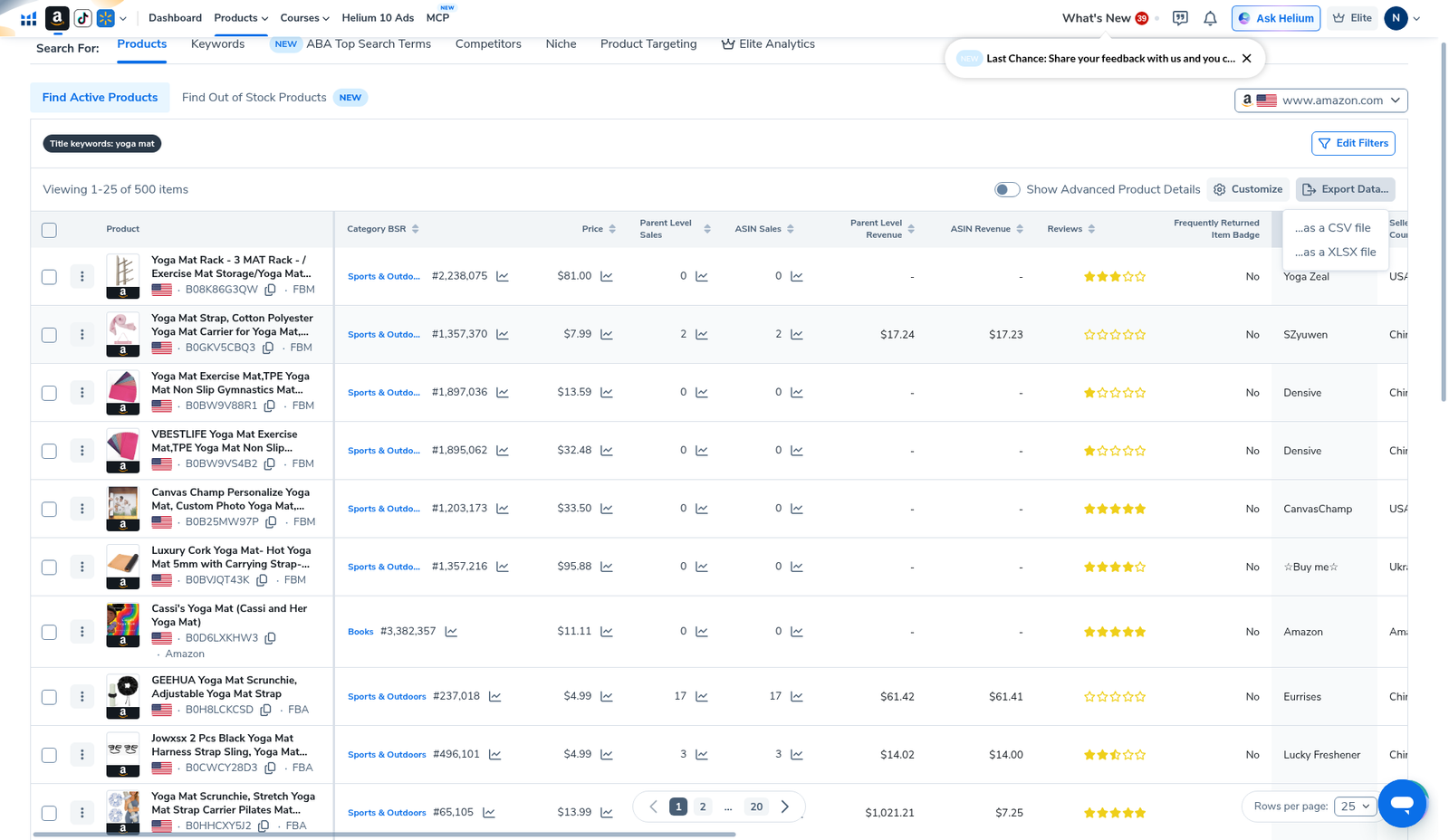
Export notes: Black Box export. Validation: Amazon + Xray → Cerebro. Product research roundup: product research hub.
Step 5 — Operator recipe: product demand + keyword SV (two tools)
- Black Box Products: niche + price + Parent/ASIN Revenue or Units floor (product demand).
- Reject pass: accessories, mismatched variants, brands you cannot compete with.
- Export once (avoid re-burning searches).
- Cerebro reverse on keepers; set Search Volume min; cut irrelevant / brand spam.
- Listing / PPC buckets from the Cerebro sheet—not from Black Box Products Sales units.
If your account shows Search Volume filters on Black Box Keywords, use them for phrase discovery—then still validate winners on live Amazon and with Cerebro when you care about competitor rank columns. We simply cannot screenshot that Keywords SV panel from this pack yet.
Search Volume filter mistakes
- Calling Parent Level Sales (units) “Search Volume.” Different metric.
- Looking only in Products Advanced for a keyword SV box that is not there.
- Skipping Cerebro because Black Box “should” do keyword volume—use the right mode/tool.
- Inventing a universal SV min (e.g. “always >5000”) for every niche.
- Stacking revenue + units + YoY + seasonality until zero results, then blaming Helium 10.
- Burning searches re-running the same Products query instead of exporting—read your plan card.
What we tested vs what we did not claim
Tested / visible: Black Box Products Simple; Products Advanced empty grid with Sales revenue/units/Best Sales Month (no Search Volume label); Keywords tab present in mode row; yoga-mat Products results; Export menu.
Did not claim / missing evidence: a Black Box Keywords-tab Search Volume filter screenshot; that Products Sales units equal keyword SV; invented SV cutoffs or keyword lists. Affiliate only https://i.helium10.com/jR0Z10.
How we would recapture a dedicated Black Box Keywords SV shot (later)
- Black Box → Keywords (English UI) on www.amazon.com.
- Open filters; locate Search Volume min/max (or equivalent label on your plan).
- Screenshot empty filter + filled SV range.
- Run search; capture results header with SV column visible.
- Keep language English; do not substitute Chinese UI.
Until then, this article stays honest about the Products vs Keywords distinction and routes keyword SV work through Cerebro evidence we already published.
When product units filters are enough vs when you need keyword SV
Stay on Products Advanced (units/revenue) when: you are still deciding which ASIN niche to enter, validating price bands, or rejecting accessory junk. Keyword SV does not tell you if the parent listing clears enough monthly units for your landed-cost model.
Move to Keywords mode or Cerebro SV when: the ASIN shortlist is stable and you need phrase prioritization for title / bullets / backend / PPC. That is when Search Volume floors, Competing Products, and Title Density matter—see Cerebro siblings for Competing Products and Title Density once the product is chosen.
Mixing the two in one panicked filter session usually produces either empty Product grids or keyword banks for ASINs you will never launch. Finish the product reject pass first (PL workflow), export, then open Cerebro.
ABA Top Search Terms vs Products Sales units
Black Box’s mode row also shows ABA Top Search Terms on our Elite English capture. ABA-style banks are another keyword-demand surface (Amazon Brand Analytics–adjacent lists inside Helium 10’s product framing)—still not the Products Advanced Sales column. We did not open ABA for this package, so we will not invent its Search Volume / rank columns. If your weekly SOP uses ABA inside Black Box, capture your own English UI proof; otherwise Cerebro remains our documented SV filter path.
Frequently asked questions
Where is the Helium 10 Black Box search volume filter?
Not on Products → Advanced Sales in our capture. Look at Black Box → Keywords (UI not in this pack) or use Cerebro Search Volume filters for reverse-ASIN banks.
Is Parent Level Sales the same as Search Volume?
No. Parent Level Sales is estimated product unit sales. Search Volume is estimated keyword demand.
Can I still filter “demand” in Products Advanced?
Yes—via Revenue and Sales (units) floors, plus price / competition / optional seasonality. That is product demand filtering, not keyword SV.
What should beginners do first?
Black Box beginners (92274) → PL shortlist private label (92297) → export → Cerebro SV triage.
Where is seasonality if I confuse it with volume?
Advanced → Sales → Best Sales Month—see seasonality filter (92300). Still not keyword SV.
Which Helium 10 code should I use?
AIPILOTDAILY20 for monthly (Diamond test due $287.20); AIPILOTDAILY10 for annual or long stays (~10% ongoing). Start at https://i.helium10.com/jR0Z10.
Bottom line
- Keyword Search Volume ≠ Products Advanced Sales units/revenue.
- Products Advanced (our pack) has no Search Volume filter label.
- Keywords tab is the Black Box place to look next—screenshot missing; disclosed.
- Cerebro is the proven SV filter path in our published EN evidence.
- Export once, then reverse keepers—don’t burn Black Box searches chasing the wrong metric.
Next steps: Black Box beginners → private label → seasonality → export → Cerebro listing optimization → keyword hub · product hub → worth it → review → coupon → checkout https://i.helium10.com/jR0Z10.
Last verified: 2026-10-30 · Author: Alexander Vance
