
Last verified: 2026-10-30 · Author: Alexander Vance · Human review
Affiliate disclosure: We may earn a commission if you buy Helium 10 through our links, at no extra cost to you. Helium 10 UI notes and screenshots come from our logged-in Helium 10 members account (English UI, Black Box captures 2026-10-29 / verified 2026-10-30). New-customer checkout figures for AIPILOTDAILY20 / AIPILOTDAILY10 come from our 2026-10-28 tests via https://i.helium10.com/jR0Z10 (no payment completed). Always trust your order summary and the usage / entitlement card on your account before you pay or burn searches.
Quick answer
Helium 10 Black Box export: after a useful Products search, click Export Data… in the results toolbar and choose …as a CSV file or …as a XLSX file. Use the spreadsheet offline to score a shortlist (reject off-niche titles, check BSR / price / parent revenue / reviews / seller country) without re-burning Black Box searches. Export is a shortlist handoff—not proof a product will sell.
| Field | What we saw (English UI) |
|---|---|
| Where | Black Box → Products · Find Active Products · marketplace www.amazon.com |
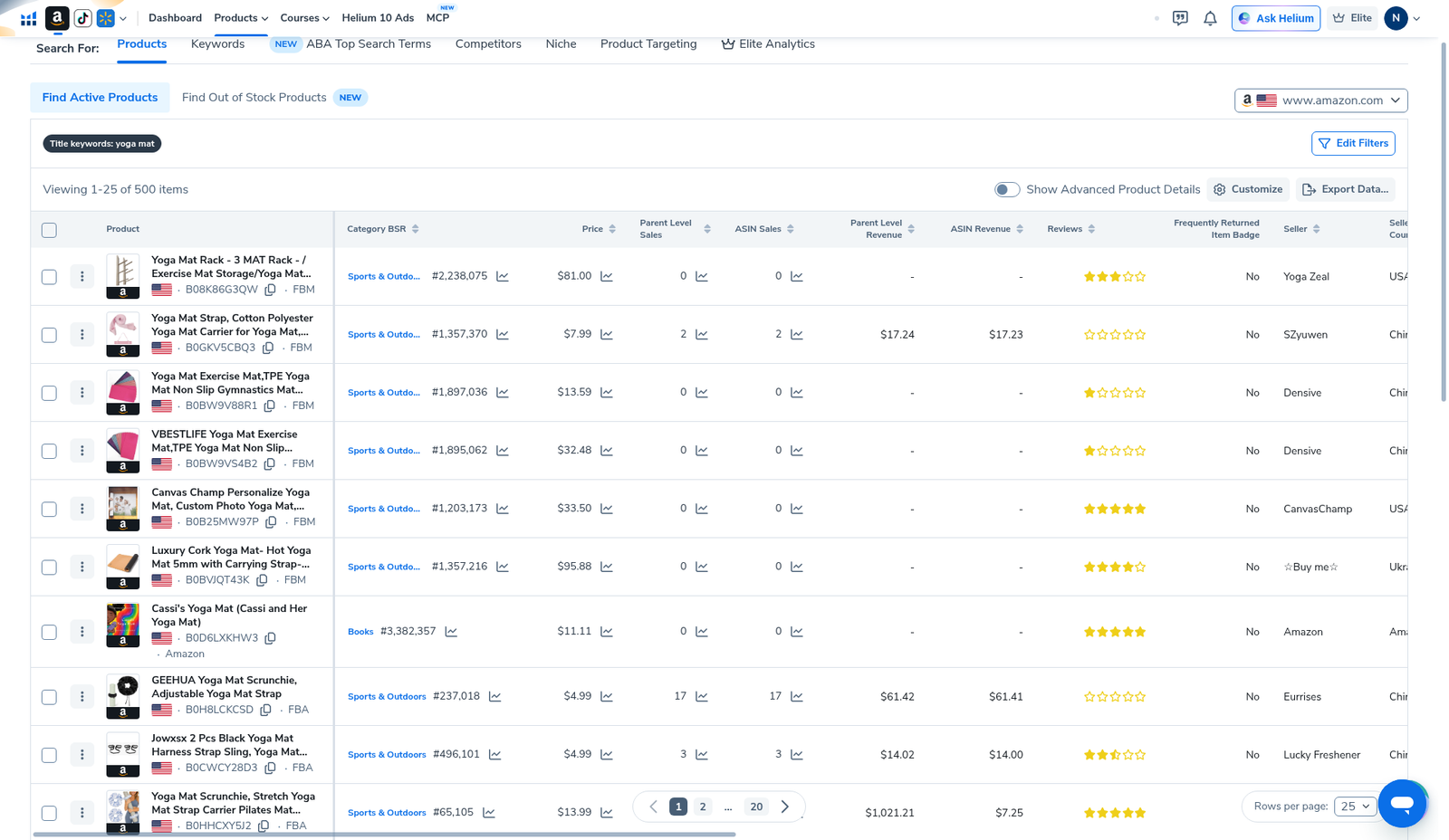
| Worked search | Title keywords: yoga mat → Viewing 1–25 of 500 items |
| Export control | Export Data… (results toolbar, upper right of the grid) |
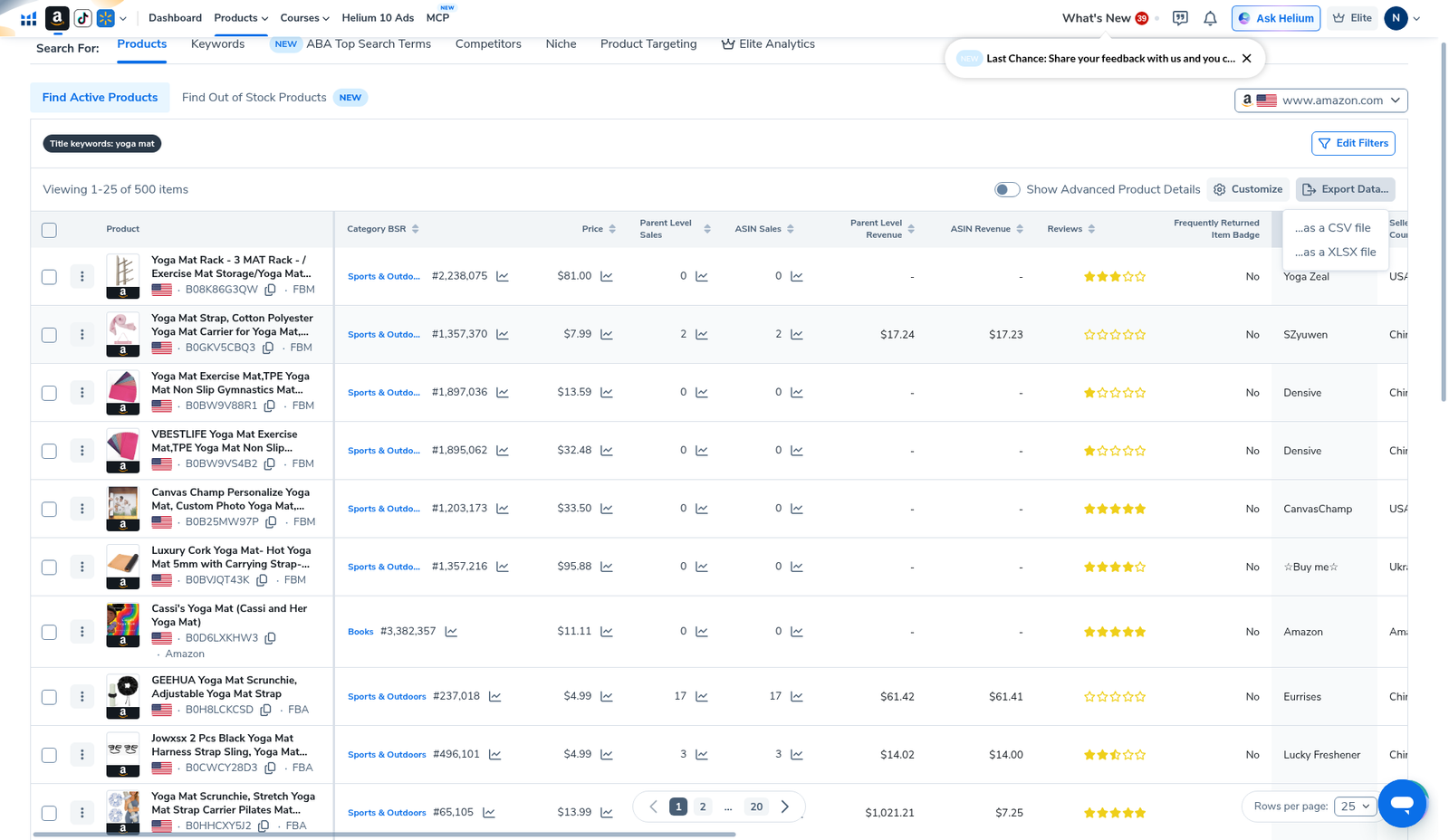
| Menu options | …as a CSV file · …as a XLSX file |
| Download | Menu opened for evidence; file download not confirmed in this package |
| Plan badge in shots | Elite (your limits still come from your plan card) |
Honest takeaway: export once when the list is reviewable. Re-opening the same broad search “just to look again” is how sellers burn daily / plan caps and still walk away with junk. First-session flow: Black Box beginners tutorial.
Related hubs: Black Box beginners tutorial · filters that work · product research · FBA tools · beginners · Cerebro History · worth it · review · coupon.
Pick your Helium 10 plan, then enter your AI Pilot Daily code.
Confirm eligibility, duration, renewal terms and the final amount on your checkout. Existing subscriptions usually cannot apply these codes.
When to export (and when not to)
- Export when the results header shows a finite, pageable list you can finish in one sitting (our yoga-mat title search: 500 items / 20 pages at 25 rows).
- Export when you are near a usage wall—analyze offline, then validate survivors with Xray / Cerebro instead of another Black Box spam search.
- Do not export an empty or still-chaotic filter set. Tighten title / category / review ceiling first (see filters that work and our low-competition filter recipe).
- Do not treat CSV rows as winners. Title-keyword matches pull accessories and off-niche ASINs. Manual reject is part of the job.
Step 1 — Get a results grid worth keeping
Open Black Box → Products on the marketplace you sell in (we used www.amazon.com). Run one concrete search—our evidence set used title keyword yoga mat on Find Active Products. Result header: Viewing 1–25 of 500 items.
If you are still on a blank Advanced grid, set marketplace + one research question first: beginners tutorial.
Step 2 — Open Export Data… (CSV / XLSX)
On the results toolbar (upper right of the product grid), click Export Data…. The menu we captured shows two choices:
- …as a CSV file — best for Google Sheets / quick filters
- …as a XLSX file — best if you live in Excel and want formatted columns
We opened this menu for screenshot evidence. We did not confirm a downloaded file landing on disk in this package—recheck the download in your browser when you export.
Step 3 — What the grid columns mean for a shortlist
Whether you review in-app or in a spreadsheet, use columns as reject filters—not as a “buy this ASIN” signal. On our English-UI yoga-mat grid we saw:
| Column | How we use it for shortlists |
|---|---|
| Product (title + ASIN + FBA/FBM) | First reject pass: off-niche title matches (racks, straps, scrunchies when you wanted mats). Keep ASIN for Xray / Cerebro later. |
| Category BSR | Context only inside that category tree. A “good” BSR in Sports & Outdoors is not the same as in a tiny subcategory. Do not invent a universal BSR cutoff. |
| Price | Must fit your sourcing + shipping + target margin. Trend icons are clues, not forecasts. |
| Parent Level Sales / ASIN Sales | Parent aggregates variations; ASIN is the single listing. Prefer parent when the family is what shoppers actually buy. |
| Parent Level Revenue / ASIN Revenue | Helium 10 estimates—useful for ranking candidates, not a guarantee of your future revenue. We do not invent dollar targets for your niche. |
| Reviews (stars / count) | Competition proxy. Pair with your review ceiling from Simple (Easy 0–200 … Saturated 1000+) or Advanced min/max. |
| Frequently Returned Item Badge | We saw “No” on visible yoga-mat accessory rows. Treat “Yes” as a risk flag to investigate on Amazon, not an auto-kill without reading return reasons. |
| Brand / Seller / Seller Country | Crowd and origin context. Useful when you care about brand density or seller geography—not a green light by itself. |
After the sheet pass: validate survivors on Amazon + Xray, then reverse-ASIN winners in Cerebro. Prefer Load from History on re-opens—see Cerebro History.
Step 4 — Offline shortlist workflow (same afternoon)
- Sort or filter out titles that are clearly off-niche.
- Mark a hard “maybe” cap (e.g. 10–20 ASINs)—finish the list; do not keep paging forever.
- Note price band + parent revenue band you can actually fund. No invented “$X/month guaranteed” claims.
- Open survivors on Amazon; run Xray on the live search page.
- Reverse the keepers in Cerebro; reuse History instead of new searches when you re-check.
- Landed-cost sheet before supplier talks. Only then move to listing / PPC hubs.
CSV vs XLSX — practical pick
- CSV — smaller, opens cleanly in Sheets, fine for filters and ASIN paste lists.
- XLSX — if your team already lives in Excel pivot tables.
- Either format is a snapshot of the search you just ran. If filters change, export again—do not assume yesterday’s file matches today’s marketplace.
Daily / plan limits honesty
Black Box entitlements are plan-tied and can change at renewal. Read the usage card on your account. We will not invent an “X exports per day” or “X searches per day” number we have not screenshot for this page. Export + offline review is how we stretch a session without spam searches.
Cost / promo notes: Helium 10 cost · coupon (AIPILOTDAILY20 monthly / AIPILOTDAILY10 annual via https://i.helium10.com/jR0Z10).
What we tested vs what we did not claim
Tested (English UI, Black Box, Amazon US): yoga-mat title-keyword results (500 items); Export Data… menu with CSV and XLSX options; results columns listed above.
Did not claim: confirmed file download to disk; that every CSV row is profitable; a universal BSR / revenue cutoff; that export replaces Xray, Cerebro, or supplier work. Affiliate only https://i.helium10.com/jR0Z10.
Frequently asked questions
How do I export Helium 10 Black Box results?
Run a Products search, open the results grid, click Export Data…, choose CSV or XLSX. Confirm the download in your browser.
Should I export CSV or XLSX?
CSV for Sheets and quick filters; XLSX if you prefer Excel. Content is the same shortlist snapshot.
What columns matter most for a shortlist?
Title/ASIN (reject junk), price band, parent sales/revenue estimates, reviews, seller context. None of them alone prove a winner.
Does exporting use a Black Box search credit?
Entitlements are plan-tied. Confirm on your usage card. Our practical rule: export the useful list once, then stop re-running the same broad search.
What comes after export?
Manual reject → Amazon + Xray → Cerebro (reuse History) → landed cost. Start here if you are new: beginners tutorial.
Which Helium 10 code should I use?
AIPILOTDAILY20 for monthly (Diamond test due $287.20); AIPILOTDAILY10 for annual or long stays (~10% ongoing). Start at https://i.helium10.com/jR0Z10.
Bottom line
- Export Data… → CSV or XLSX when the list is reviewable.
- Columns are reject tools, not buy signals.
- Download was menu-confirmed here; verify the file on your machine.
- Next: offline shortlist → Xray → Cerebro History → product / FBA hubs.
Next steps: Black Box beginners → filters that work → Xray → Cerebro → Cerebro History → product hub · FBA hub · beginners → worth it → review → coupon → checkout https://i.helium10.com/jR0Z10.
Last verified: 2026-10-30 · Author: Alexander Vance
