
Last verified: 2026-10-30 · Author: Alexander Vance · Human review
Affiliate disclosure: We may earn a commission if you buy Helium 10 through our links, at no extra cost to you. Helium 10 UI notes and screenshots come from our logged-in Helium 10 members account (English UI, Cerebro / Plus Magnet captures 2026-10-29 / verified 2026-10-30). New-customer checkout figures for AIPILOTDAILY20 / AIPILOTDAILY10 come from our 2026-10-28 tests via https://i.helium10.com/jR0Z10 (no payment completed). Platinum Cerebro (Plus Magnet) entitlement language below follows Helium 10 help-center notes (100 uses / billing month; 1 ASIN = 1 use; History reuse does not burn a new use)—confirm the card on your account, because entitlements can change at renewal.
Quick answer
Helium 10 Cerebro History reuse searches: when Cerebro says you have searched a product before, choose Load from History instead of Run New Search unless you truly need fresh data. On Platinum, Cerebro (Plus Magnet) is capped at about 100 uses per billing month, and 1 ASIN = 1 use on multi-ASIN pulls. Re-opening the same ASIN from History is the free path sellers forget—and the fastest way to stop burning the monthly cliff.
| Field | Operator takeaway |
|---|---|
| Tool | Cerebro (Plus Magnet) → Find Keywords |
| Demo ASIN | B0HF4FK2QS (Gruper Yoga Mat workflow) |
| History modal | “You’ve searched this product before” → Load from History vs Run New Search |
| Platinum math | ~100 Cerebro (Plus Magnet) uses / billing month; 1 ASIN = 1 use; unused uses do not roll over |
| History cost | Load from History = free reuse of a prior pull (confirm on your account) |
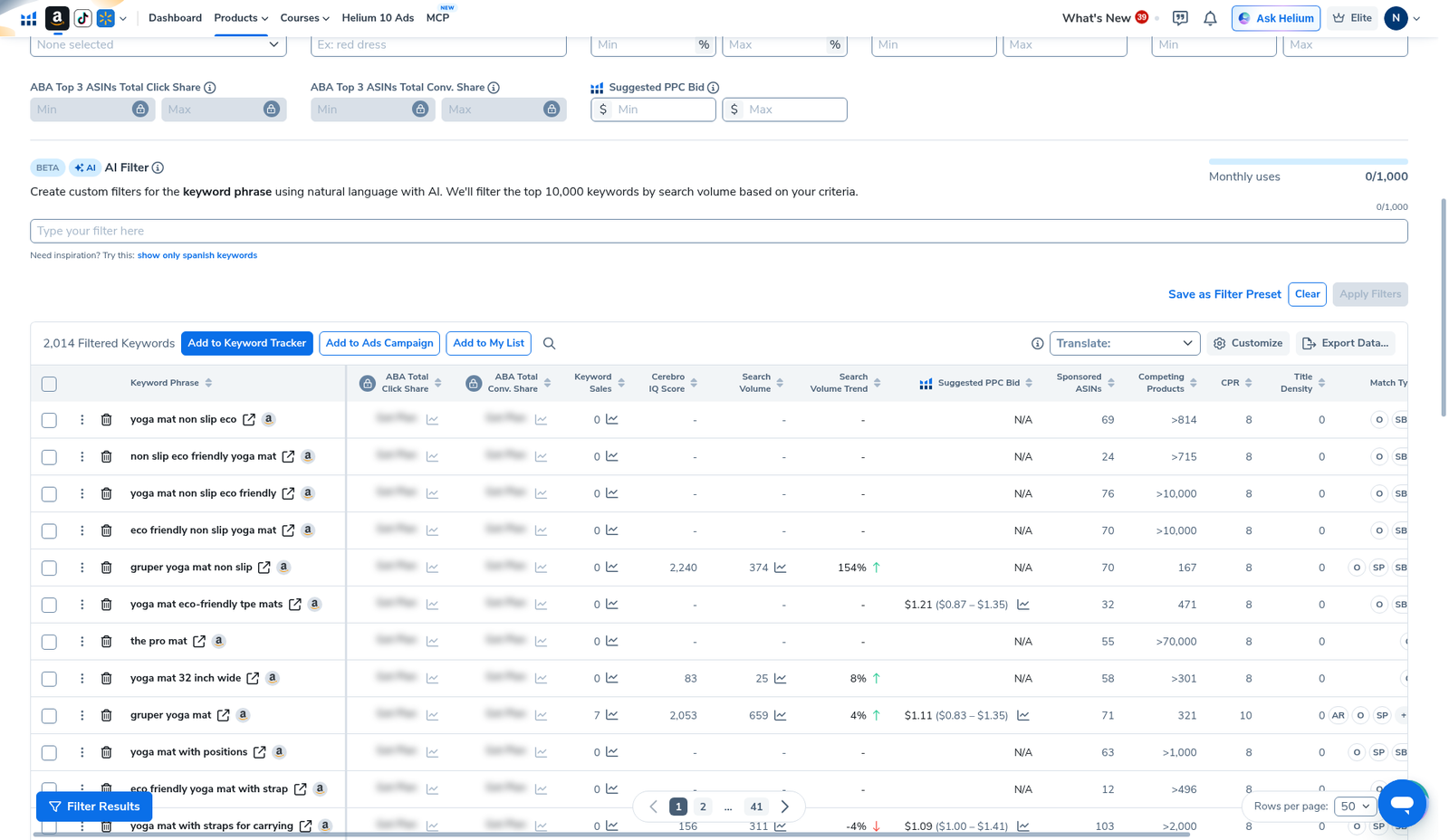
| Our results pull | 2,014 keywords · total SV 1,946,458 · avg SV 966 (prior English-UI capture) |
Honest takeaway: History does not invent new keywords. It saves the search you already paid for with a use. Export once, filter offline, and only hit Run New Search when rankings or seasonality actually changed.
Related: Cerebro for beginners · reverse ASIN · keyword hub · vs Jungle Scout keywords · coupon.
Pick your Helium 10 plan, then enter your AI Pilot Daily code.
Confirm eligibility, duration, renewal terms and the final amount on your checkout. Existing subscriptions usually cannot apply these codes.
Why Platinum sellers care about History
Helium 10’s help center documents a Platinum Cerebro (Plus Magnet) cap of up to 100 uses per billing month (billing month, not calendar month). Multi-ASIN pulls burn that cap faster than the word “search” sounds, because 1 ASIN = 1 use. Unused uses do not roll over.
Forum pattern: sellers reverse five competitors “just to peek,” re-run the same ASINs the next day, then hit the wall mid-launch week. History reuse is the built-in fix—if you click the blue button.
Diamond / higher plans have larger allowances (confirm the exact number on your plan card; we do not invent a daily cap we have not screenshot for this draft). Cost context: Helium 10 cost · suite comparison: vs Jungle Scout 2026.
Step 1 — Open Cerebro Find Keywords
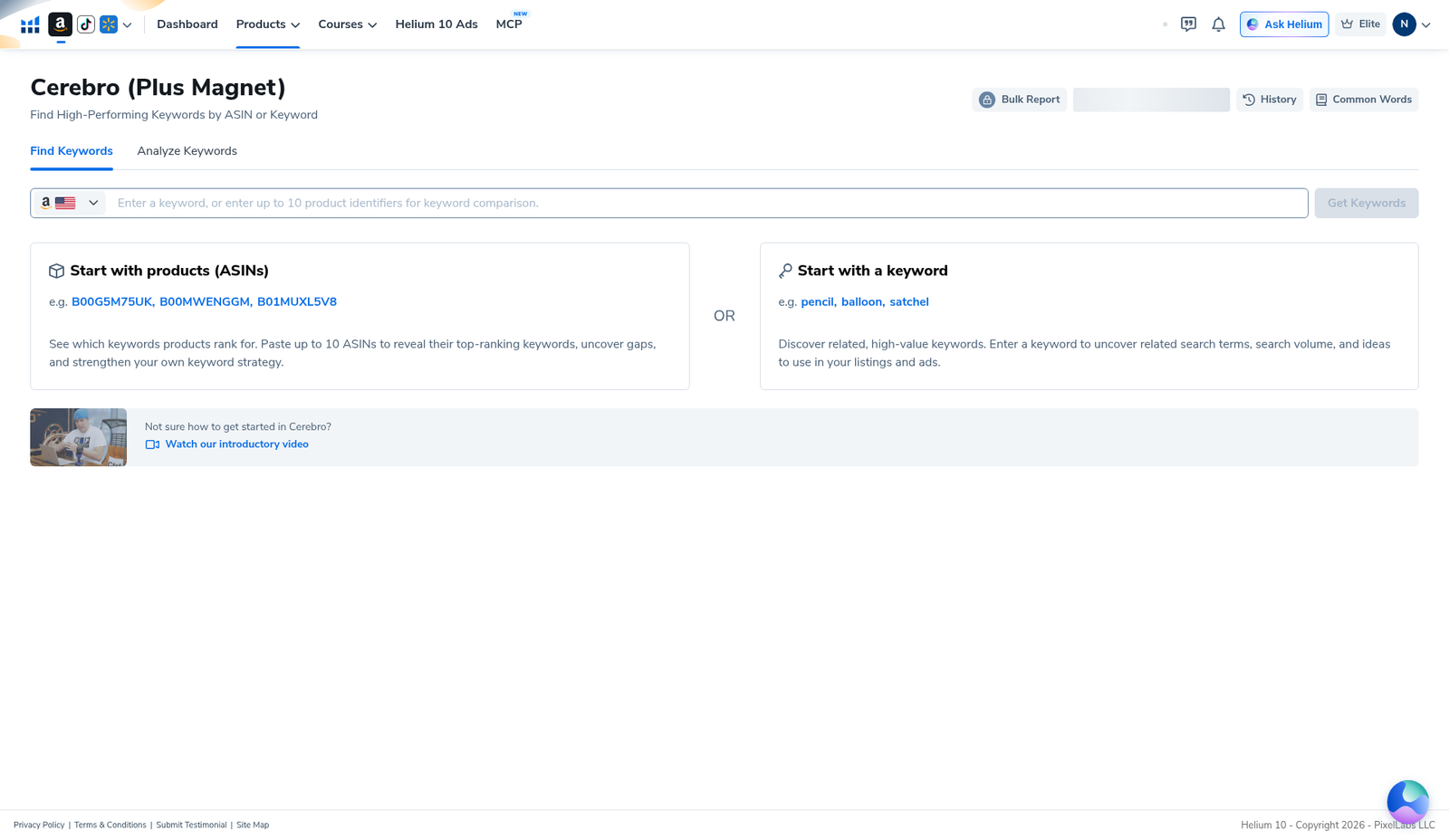
In Helium 10, open Cerebro (Plus Magnet). Stay on Find Keywords. Empty landing: start with ASINs (up to 10) or a seed keyword. Marketplace flag should match the Amazon store you sell in (we used US).
Step 2 — Enter the ASIN you already researched
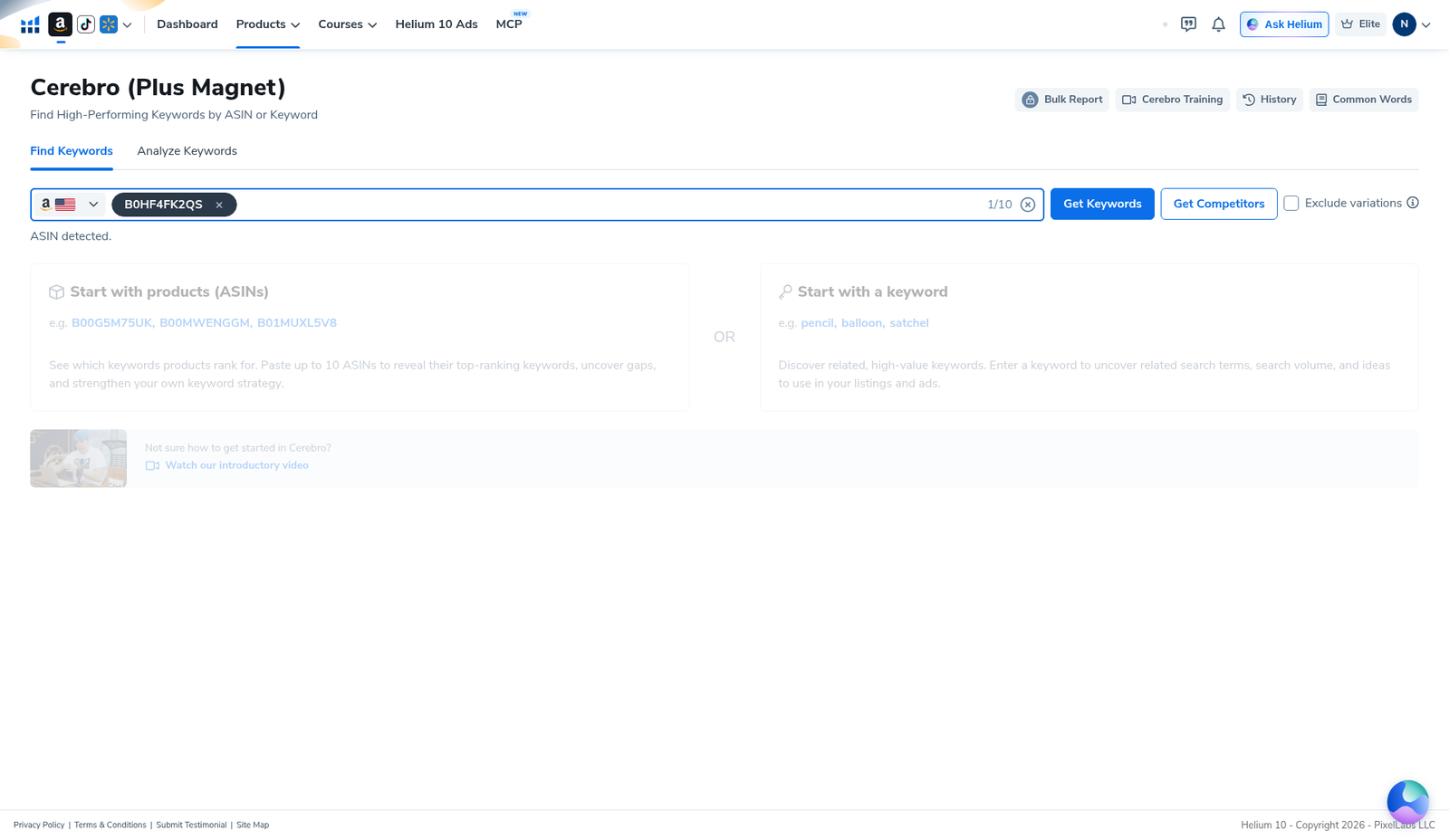
Paste the competitor ASIN (our demo: B0HF4FK2QS). The UI should show ASIN detected and a counter like 1/10. Beginners: reverse one strong competitor deeply before spraying ten. Click path that led to a prior pull—next step is the History modal.
Step 3 — When the History modal appears, default to Load from History
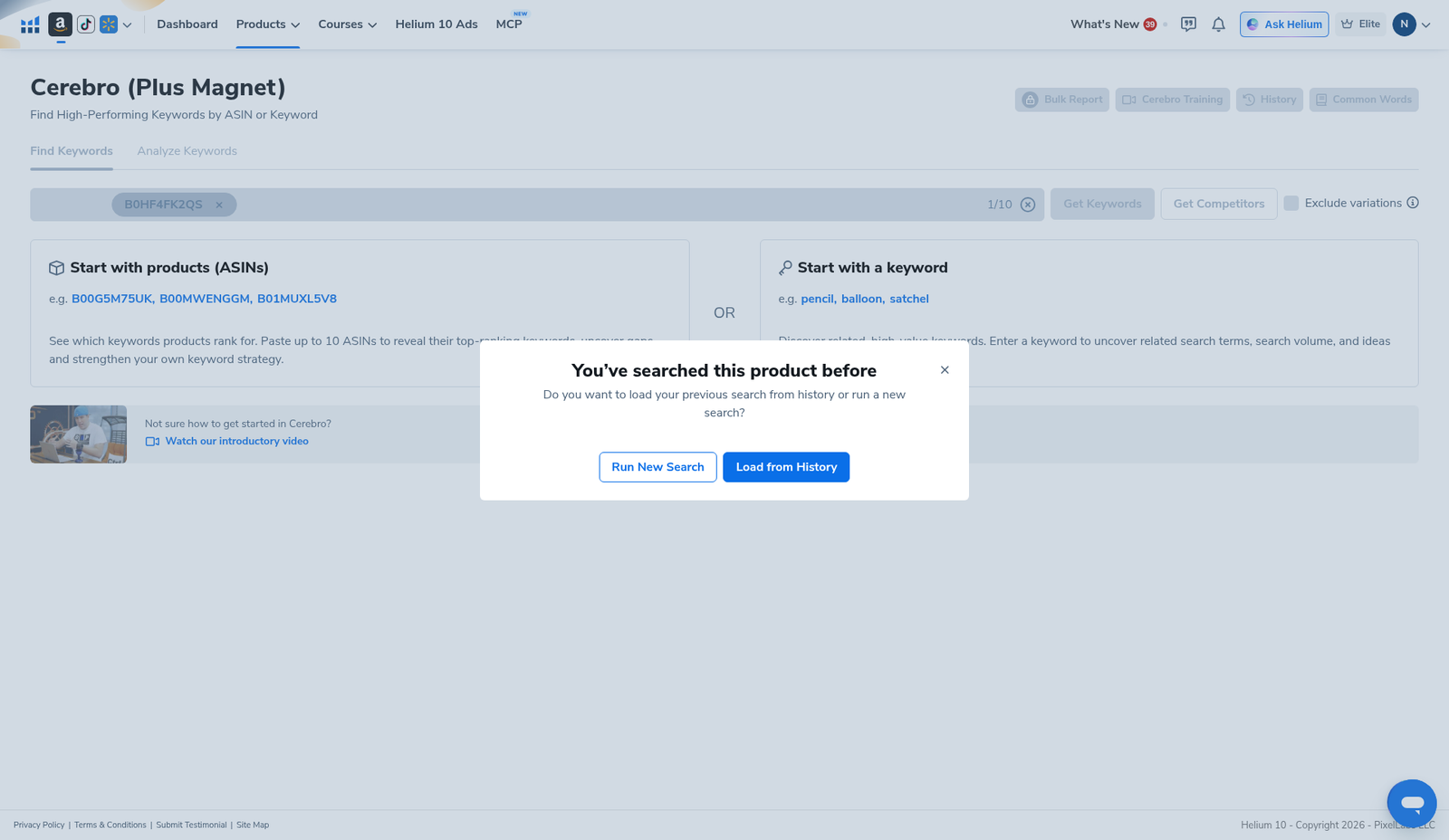
If you searched this product before, Cerebro shows: “You’ve searched this product before” — load previous search from history or run a new search.
- Load from History (blue) — reuse the prior pull. This is the Platinum-friendly default when the old data is still recent enough for your decision.
- Run New Search (outline) — burns a fresh use. Use when you need updated ranks / volumes, not when you only want to re-open the table.
You can also open History from the top actions (Bulk Report / Cerebro Training / History / Common Words) to pick an older pull without guessing.
Step 4 — Read the summary, filter, then export once
After History (or a fresh pull) loads, read the summary card. Our yoga-mat ASIN showed 2,014 keywords and total search volume 1,946,458. Expand Filters: Search Volume floor, Word Count, Match Type, Cerebro IQ Score, Title Density / Competing Products, Brand Name Removal, Exclude Special Characters.
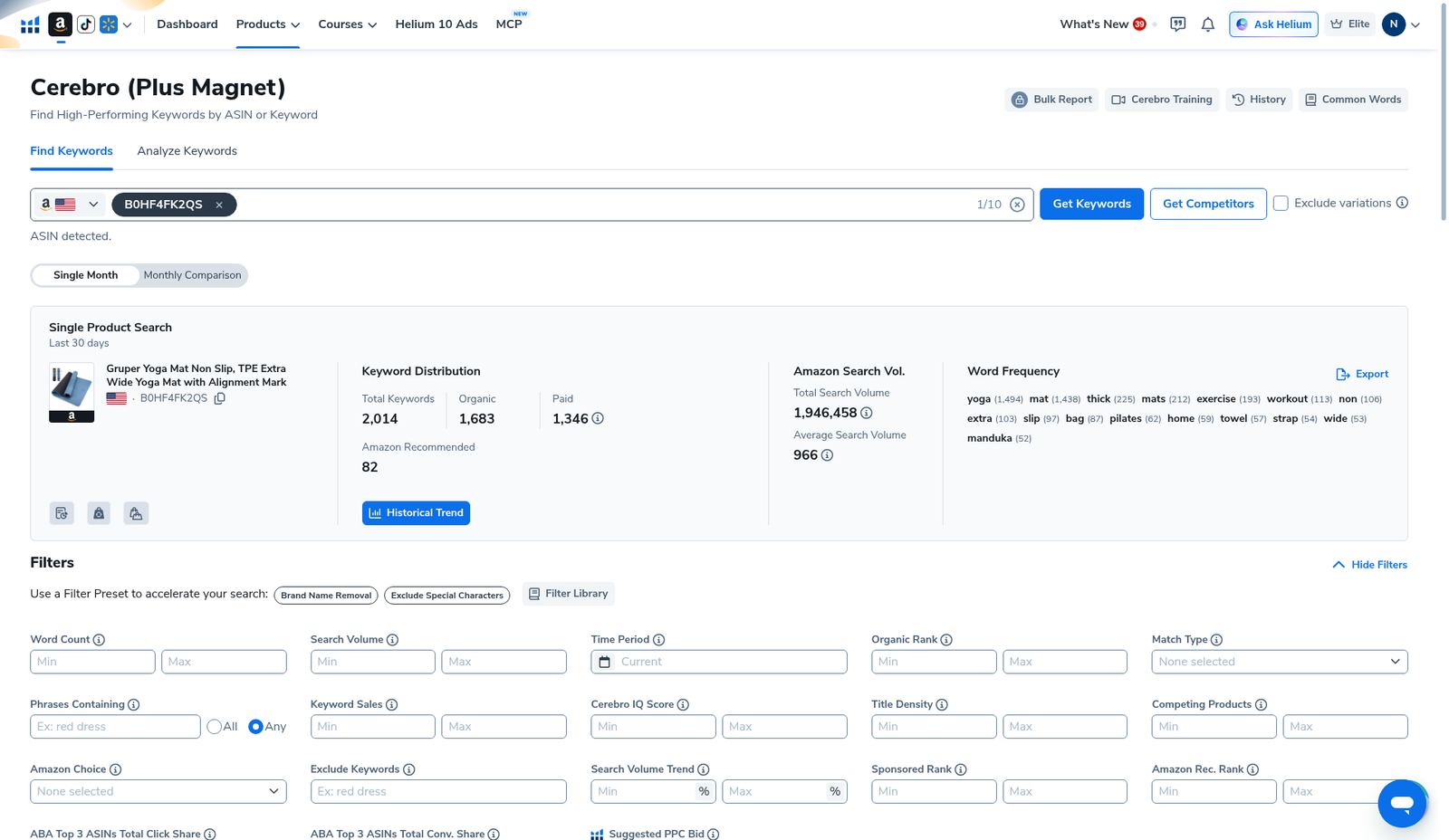
Work the keyword table; use Export Data… before you burn another search “just to look again.”
Operator rules: stretch Platinum’s 100 uses
- 1 ASIN = 1 use — ten ASINs in one Get Keywords click can burn ten uses. Prefer one deep reverse.
- History first — Load from History whenever the modal appears and data is still useful.
- Export once — CSV / sheet offline; do not re-hit Get Keywords to “check the same list.”
- 3–4 core competitors per launch idea is a realistic Platinum month for one product, with Magnet seeds for gaps—not twenty drive-by reverses.
- Upgrade when the wall is weekly — Diamond’s higher allowance is the answer if History discipline still is not enough. Confirm the number on your card. Promo dues: AIPILOTDAILY20 / AIPILOTDAILY10 via https://i.helium10.com/jR0Z10.
Keyword-suite context: best Amazon keyword research tools · vs MerchantWords · vs Jungle Scout for keywords · export walkthrough: Cerebro export.
When Run New Search is the right call
- Competitor listing changed heavily (title, bullets, variations) since your last pull.
- You are checking seasonality or a launch window weeks later.
- History data is missing columns you now need and a fresh pull is the only fix.
- You knowingly spend a use—log it against your monthly 100.
If you only need to re-sort, re-filter, or copy phrases into Listing Builder / Keyword Tracker, History + export is enough.
What we tested vs what we did not claim
Tested (English UI, Cerebro): Find Keywords home; entered B0HF4FK2QS; History modal (Load from History vs Run New Search); loaded results with 2,014 keywords / 1,946,458 total SV; opened Filters; scrolled keyword table with Export actions.
Did not claim: that History refreshes live Amazon ranks by itself; invented blurred ABA share cells; that Platinum and Diamond have the same headroom; that IQ Score alone picks winners. Affiliate only https://i.helium10.com/jR0Z10.
Frequently asked questions
Does Cerebro History use a Platinum search?
Helium 10’s help-center language treats History re-runs as not consuming a new Cerebro (Plus Magnet) use. Confirm on your account. Fresh Run New Search does consume a use.
How many Cerebro uses does Platinum get?
Up to 100 uses per billing month for Cerebro (Plus Magnet), with 1 ASIN = 1 use. Unused uses do not roll over. Entitlements can change—check your plan card.
Is Cerebro the same as reverse ASIN?
Yes in practice: reverse ASIN is Cerebro’s ASIN mode. Deeper walkthrough: reverse ASIN lookup. Beginners path: Cerebro tutorial for beginners.
Should I reverse 10 ASINs at once?
Usually no on Platinum. Ten ASINs can burn ten uses in one click. Master one competitor, export, then decide if a second ASIN is worth another use.
Which Helium 10 code should I use?
AIPILOTDAILY20 for monthly (Diamond test due $287.20); AIPILOTDAILY10 for annual or long stays (~10% ongoing). Start at https://i.helium10.com/jR0Z10.
Bottom line
- Load from History is the default when Cerebro recognizes a prior ASIN pull.
- Platinum math: ~100 uses / billing month · 1 ASIN = 1 use · History reuse free.
- Export once; only Run New Search when you truly need fresh data.
Next steps: Cerebro beginners → export → Listing Builder · Keyword Tracker → keyword hub · PPC hub · beginners hub · FBA hub · vs JS keywords · vs MerchantWords → worth it → review → coupon → checkout https://i.helium10.com/jR0Z10.
Last verified: 2026-10-30 · Author: Alexander Vance
