
Last verified: 2026-10-30 · Author: Alexander Vance · Human review
Affiliate disclosure: We may earn a commission if you buy Helium 10 through our links, at no extra cost to you. Helium 10 UI notes and screenshots come from our logged-in Helium 10 members account (English UI, Cerebro / Plus Magnet captures 2026-10-29 / verified 2026-10-30). New-customer checkout figures for AIPILOTDAILY20 / AIPILOTDAILY10 come from our 2026-10-28 tests via https://i.helium10.com/jR0Z10 (no payment completed). Our captures show a single ASIN entered (counter 1/10) plus the English home copy that says paste up to 10 ASINs—we did not invent a multi-ASIN result table. Always trust the counter and use math on your account.
Quick answer
Helium 10 Cerebro multi-ASIN search: on the English Find Keywords screen you can paste up to 10 ASINs in one reverse. The input counter shows slots like 1/10 when one ASIN is loaded. Helium 10’s own help-center style use math (and what Platinum sellers feel on forums) is blunt: 1 ASIN = 1 Cerebro (Plus Magnet) use, so a full 10-ASIN batch burns 10 uses against Platinum’s ~100 uses / billing month. Compare a short competitor list, filter once, export once—do not “just add two more” out of curiosity.
| Field | What we saw (English UI) |
|---|---|
| Tool | Cerebro (Plus Magnet) → Find Keywords |
| Capacity on screen | Counter 1/10 with ASIN B0HF4FK2QS; home copy: “Paste up to 10 ASINs…” |
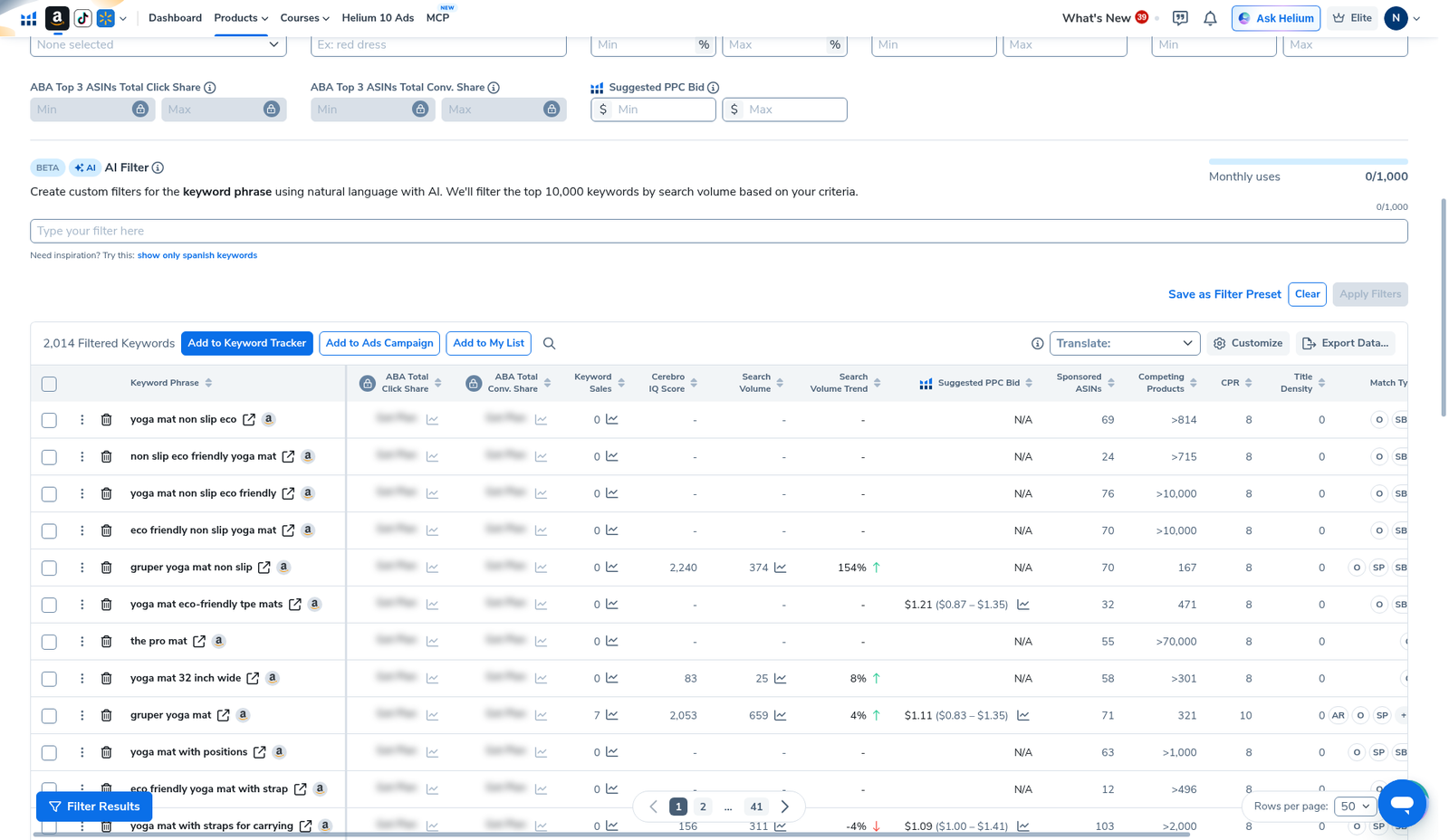
| Demo single pull | Gruper Yoga Mat → 2,014 keywords · SV 1,946,458 · Amazon Recommended 82 |
| Use math | 1 ASIN = 1 use · 10 ASINs = 10 uses (Platinum ~100/month) |
| After the pull | Filters (Search Volume · Competing Products · Title Density · Exclude Keywords) → Export |
| Sibling guides | History · listing optimization · Competing Products |
Honest takeaway: Multi-ASIN is for intersection research—shared keywords across winners—not a license to empty your monthly Cerebro bucket in one afternoon.
Related: Cerebro History · irrelevant keywords filter · Amazon Recommended Rank · Title Density explained · keyword hub · coupon.
Pick your Helium 10 plan, then enter your AI Pilot Daily code.
Confirm eligibility, duration, renewal terms and the final amount on your checkout. Existing subscriptions usually cannot apply these codes.
What multi-ASIN search is for
Single-ASIN Cerebro answers “what does this listing rank for?” Multi-ASIN answers “what do these 3–5 winners have in common?” Operators use batches to:
- Find shared high-intent phrases across top competitors (gap / overlap research).
- Spot brand spam and off-niche junk that only one odd ASIN carries—then kill it with Exclude Keywords (irrelevant keywords filter).
- Feed a cleaner sheet into listing buckets (title / bullets / backend / PPC)—see listing optimization with Cerebro.
- Sanity-check whether a “must-have” phrase is actually common among winners—or just one loud listing’s brand defense.
It is not a substitute for reading the product pages. If two ASINs are different products wearing the same category, the “shared” keyword pile will be noise. Shortlist offline in Black Box (beginners) before you burn Cerebro uses.
When to stay on one ASIN instead
Multi-ASIN is optional. Stay on a single reverse when:
- You are still learning Filters, Match Type, and Export—start with Cerebro for beginners.
- You only need depth on the #1 substitute (our yoga-mat demo alone already returned 2,014 rows).
- You are near the end of the Platinum month and cannot afford a 5-use batch.
- The “competitors” are not true substitutes (different size, material, or buyer job).
Batching bad ASINs just amplifies junk. Fix the shortlist first.
Step 1 — Open Find Keywords and read the 10-ASIN capacity
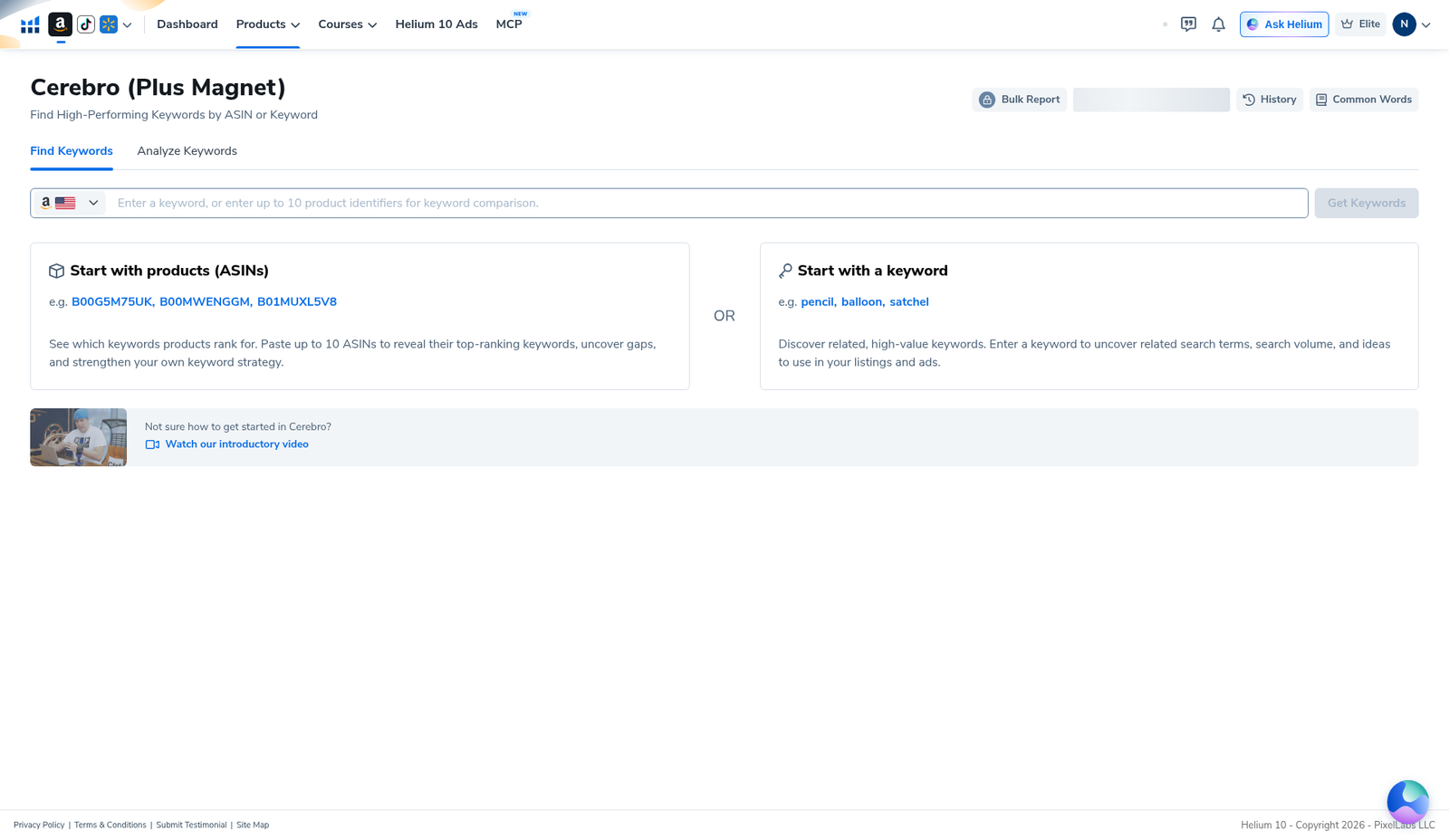
Open Cerebro (Plus Magnet) → tab Find Keywords. The English home still explains two paths: start with products (ASINs) or start with a keyword. Under the ASIN path, Helium 10’s own instructional card says to paste up to 10 ASINs to reveal top-ranking keywords, uncover gaps, and strengthen your keyword strategy. Marketplace context in our capture was US Amazon (flag in the input).
Step 2 — Enter ASINs and watch the n/10 counter
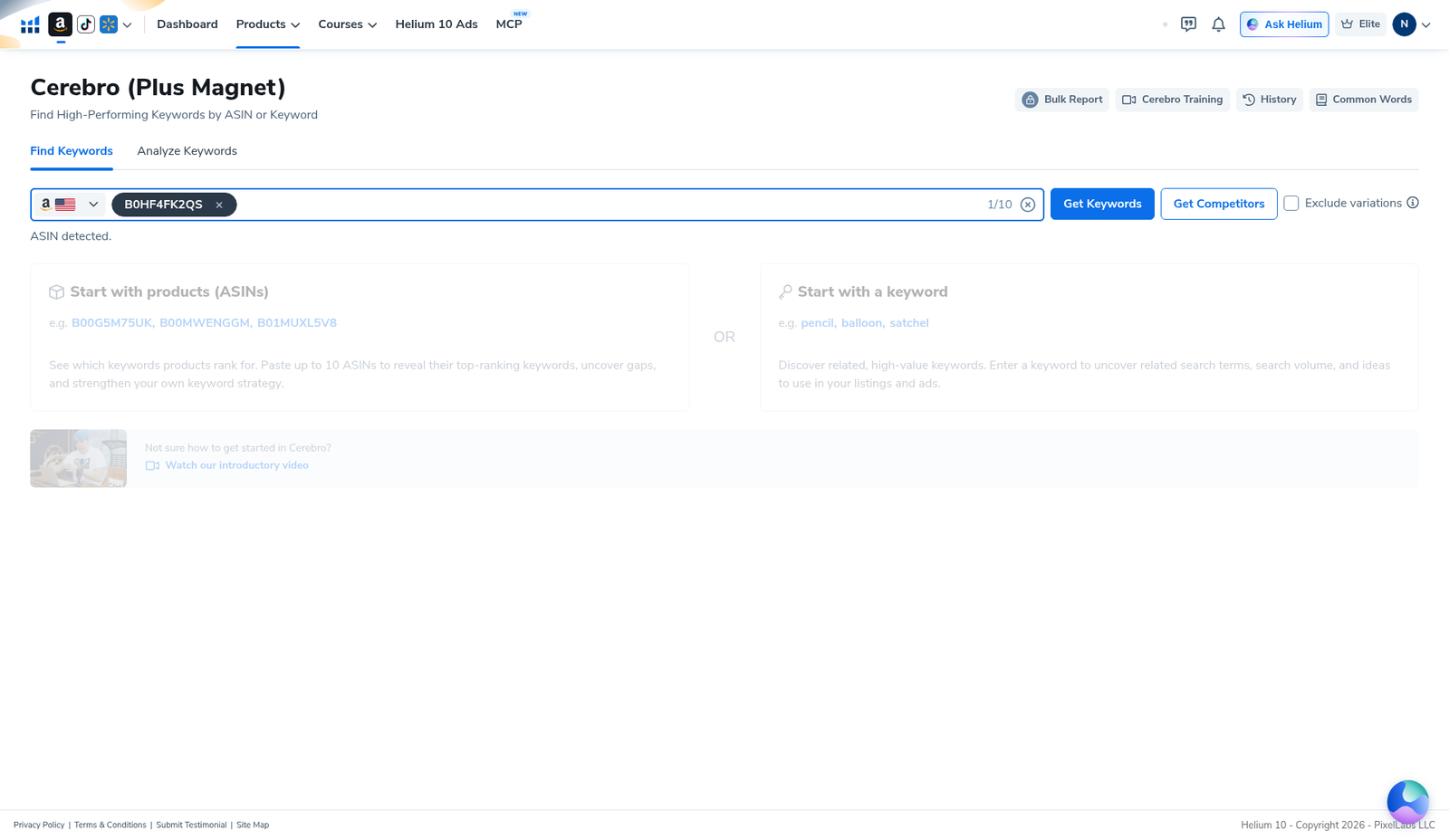
Paste your first competitor. Our demo used B0HF4FK2QS (Gruper Yoga Mat). The English UI confirmed ASIN detected and showed the slot counter at 1/10. Blue Get Keywords, white Get Competitors, and Exclude variations sit beside the field.
To compare competitors, keep pasting ASINs until the counter climbs (2/10, 3/10…). Stop at the list you actually need—usually 3–5 close substitutes, not ten random bestsellers. Each additional ASIN is another use on Platinum. Prefer ASINs that share the same primary shopper job (same core product type, similar price band, similar bullet promises).
Step 3 — History before Run New Search (quota survival)
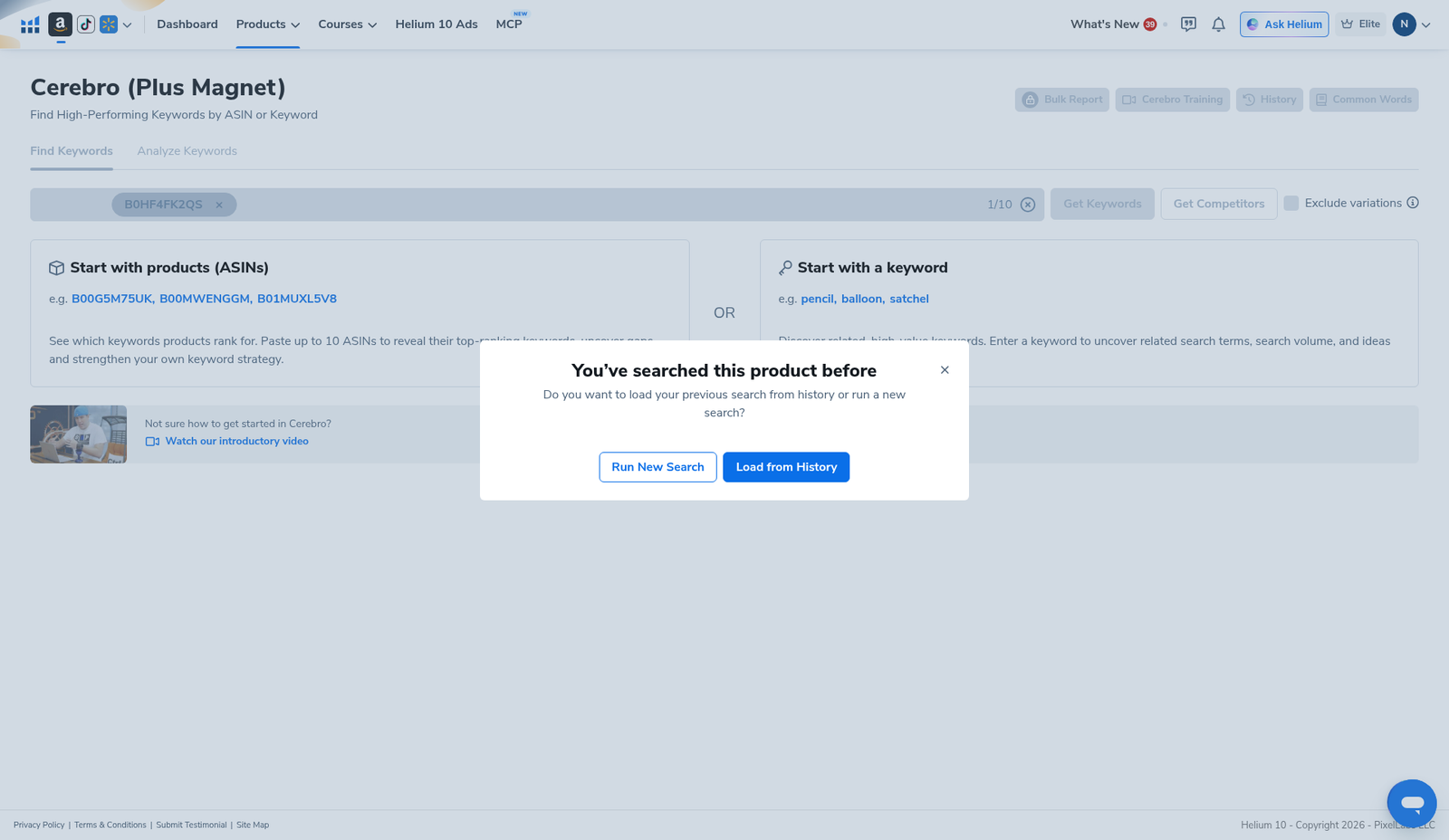
If you already reversed these ASINs this month, prefer Load from History when Cerebro offers it. Re-opening a saved pull is how Platinum operators keep the ~100 Cerebro (Plus Magnet) uses alive. Full workflow: Cerebro History reuse searches.
Operator math (Platinum-style):
- 1 ASIN reverse ≈ 1 use
- 5-ASIN multi reverse ≈ 5 uses
- 10-ASIN multi reverse ≈ 10 uses
- Re-filter / export on an already-loaded pull ≈ 0 new uses
Forum pattern we cited in the keyword research tools hub: sellers burn the month by stacking multi-ASIN curiosity pulls, then blame the plan. The counter and use math were always there. If you truly need heavy weekly multi-ASIN research, price Diamond (or accept a split stack)—see also is Helium 10 worth it.
Step 4 — Pull, then shrink with Filters (same panel as single ASIN)
After Get Keywords, our single-ASIN demo summarized 2,014 keywords · Organic 1,683 · Paid 1,346 · Amazon Recommended 82 · total SV 1,946,458. A multi-ASIN pull will look denser—more rows, more brand collisions—so Filters matter more, not less. On a single-ASIN pull the overview can label the card as a single-product search; the Filters controls themselves stay the same family you will use after a batch.
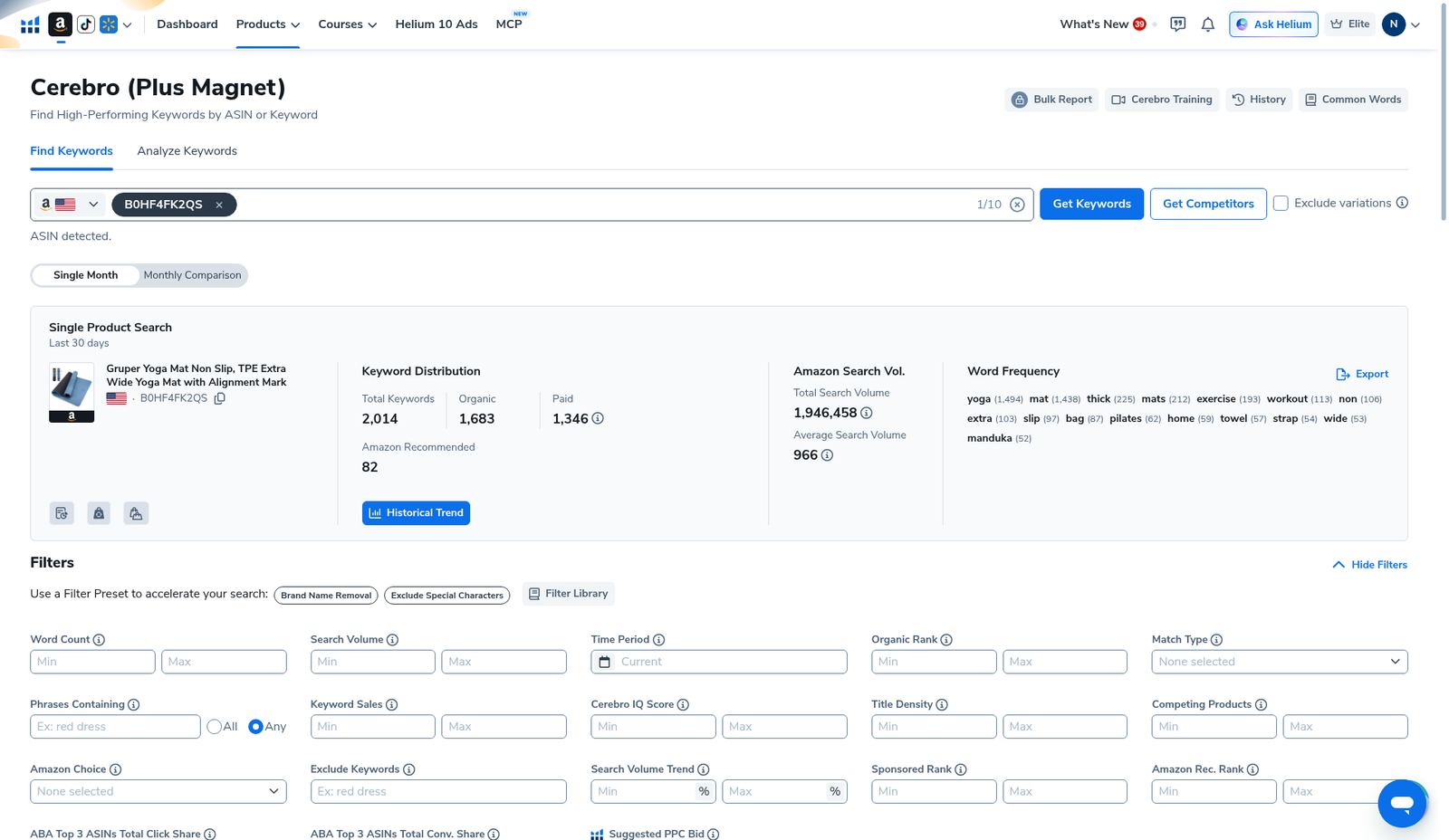
Practical multi-ASIN filter sequence:
- Brand Name Removal + Exclude Special Characters.
- Exclude Keywords — drop every brand string from the ASINs you just pasted (irrelevant keywords filter).
- Search Volume min — kill empty / vanity rows.
- Competing Products max — cut stratosphere heads (Competing Products filter).
- Title Density — see which shared phrases already own page-one titles (Title Density explained).
- Optional adjacency: Amazon Recommended Rank.
- Apply Filters → skim → Export Data… once.
If the list collapses to near-zero after a batch, you probably set Competing Products max like a fantasy niche. Loosen the ceiling before you panic-upgrade the plan or re-burn uses.
Step 5 — Read the table for overlap, then stop re-pulling
On the keyword table, look for phrases that survive filters across the batch: real Search Volume, sane Competing Products, Title Density that is not already maxed, Match Type that fits your plan. Map keepers into title / bullets / backend / PPC-only—do not paste the union dump into a title draft (listing optimization). Export notes: Cerebro export keywords.
Three-bucket sheet after a multi-ASIN pull:
| Bucket | Meaning | Action |
|---|---|---|
| Shared keepers | Phrases that make sense for every ASIN you pasted | Title / bullets / PPC shortlist |
| One-off noise | Brand, gift, wrong-category phrases from a single odd ASIN | Exclude Keywords + kill bucket |
| PPC-only heads | High SV + absurd Competing Products | Buy later; do not force into title |
Optional fourth note: phrases that only one ASIN owns and that look like a real differentiator (material, size, use-case) can still deserve a bullet—just do not treat them as “universal niche language.”
A simple weekly cadence that does not nuke Platinum
- Monday: shortlist 3–5 ASINs in Black Box / Xray notes offline.
- One Cerebro multi reverse (or History reload) for that shortlist.
- Filter + export once the same day.
- Write listing / PPC changes from the sheet the rest of the week.
- Do not re-pull “to see if numbers changed” without a reason—re-open History.
That cadence keeps multi-ASIN useful without turning Cerebro into a daily lottery ticket.
Honest limits
- We captured 1/10, not a 10/10 results table. Capacity and instructional copy are verified on English UI; do not treat our single-ASIN summary numbers as “what a 5-ASIN pull always returns.”
- Multi-ASIN burns multi uses. Platinum ~100/month is a hard constraint if you batch carelessly.
- More ASINs ≠ better strategy. Three close substitutes beat ten unrelated bestsellers.
- Filters do not refund uses. They only rescue the pull you already paid for.
- ABA share cells were blurred on our capture—left undisclosed.
- Get Competitors is a separate button on the English UI; this guide is about multi-ASIN keyword reverse via Get Keywords, not a promise about every Competitor-mode layout.
What we tested vs what we did not claim
Tested (English UI, Cerebro): Find Keywords home with “Paste up to 10 ASINs” instructional copy; ASIN B0HF4FK2QS entered with counter 1/10; History prompt; single-product summary 2,014 / SV 1,946,458 / Amazon Recommended 82; Filters including Competing Products + Title Density; keyword table + Export.
Did not claim: a universal “always use 10 ASINs” rule; that multi-ASIN is free on Platinum; invented multi-ASIN result counts; Chinese UI screenshots. Affiliate only https://i.helium10.com/jR0Z10.
Frequently asked questions
How many ASINs can Helium 10 Cerebro search at once?
Up to 10 on the English Find Keywords screen we verified (counter format n/10).
Does a multi-ASIN Cerebro search count as one use?
No. Plan for 1 ASIN = 1 use. A 5-ASIN batch ≈ 5 uses toward Platinum’s Cerebro (Plus Magnet) monthly cap.
Should beginners start with multi-ASIN?
Usually no. Reverse one strong competitor, learn Filters + Export, then batch 3–5. Start here: Cerebro for beginners.
How do I avoid burning uses when comparing competitors?
Shortlist ASINs offline first, prefer History, export once, re-filter the CSV. Guide: History reuse.
Can I mix my own ASIN with competitors?
Yes—many operators include their live ASIN plus 2–4 rivals to see overlap. Still count every ASIN as a use.
Which Helium 10 code should I use?
AIPILOTDAILY20 for monthly (Diamond test due $287.20); AIPILOTDAILY10 for annual or long stays (~10% ongoing). Start at https://i.helium10.com/jR0Z10.
Bottom line
- Multi-ASIN Cerebro = overlap research across ≤10 competitors, not quota suicide.
- English UI shows 1/10 slots and “paste up to 10 ASINs” copy—verify your counter.
- Batch 3–5 close substitutes → filter → export → write listing buckets.
Next steps: Title Density explained → listing optimization → irrelevant keywords → Competing Products → ARR → History → keyword hub · Black Box beginners → worth it → review → coupon → checkout https://i.helium10.com/jR0Z10.
Last verified: 2026-10-30 · Author: Alexander Vance
