
Last verified: 2026-10-30 · Author: Alexander Vance · Human review
Affiliate disclosure: We may earn a commission if you buy Helium 10 through our links, at no extra cost to you. Helium 10 UI notes and screenshots come from our logged-in Helium 10 members account (English UI, Black Box captures 2026-10-29 / verified 2026-10-30). New-customer checkout figures for AIPILOTDAILY20 / AIPILOTDAILY10 come from our 2026-10-28 tests via https://i.helium10.com/jR0Z10 (no payment completed). Always trust your order summary and the usage / entitlement card on your account before you pay or burn searches.
Quick answer
Helium 10 Black Box tutorial for beginners: open Black Box → Products on Amazon US, start in Simple if the Advanced grid feels loud, then switch to Advanced once you know which dimensions matter. Run one concrete search (we used title keyword yoga mat), review a shortlist you can finish in one sitting, export CSV/XLSX when useful, then validate survivors with Xray and Cerebro. Black Box builds a candidate list—it does not prove a product will sell.
| Field | What we saw (English UI) |
|---|---|
| Where | Black Box → Products · marketplace www.amazon.com |
| Modes | Advanced filter grid · Simple wizard |
| Worked search | Title keywords: yoga mat |
| Results | Viewing 1–25 of 500 items (Find Active Products) |
| Export | CSV / XLSX menu opened; file download not confirmed in this package |
| Plan badge in shots | Elite (your limits still come from your plan card) |
Honest takeaway: start wide, tighten one filter at a time, reject off-niche title matches, export once, then leave Black Box. Spamming broad searches is how sellers burn daily / plan limits and still walk away with junk.
Related hubs: product research · beginners · FBA tools · filters that work · worth it · review · coupon.
Pick your Helium 10 plan, then enter your AI Pilot Daily code.
Confirm eligibility, duration, renewal terms and the final amount on your checkout. Existing subscriptions usually cannot apply these codes.
Before you click Search (first-session checklist)
- Language = English – EN so menus match these screenshots.
- Marketplace = the store you sell in (we used www.amazon.com).
- One research question — e.g. “yoga-mat accessories under a reviewable list,” not “find me a winner.”
- Open your usage / entitlement card — Black Box daily or plan caps are plan-tied and can change. We do not invent a “X searches per day” number we have not screenshot for this page. If you are near a wall, export and stop.
- Have a sheet ready — you will reject most rows. Black Box is a shortlist tool.
Step 1 — Open Black Box Products (Advanced view)
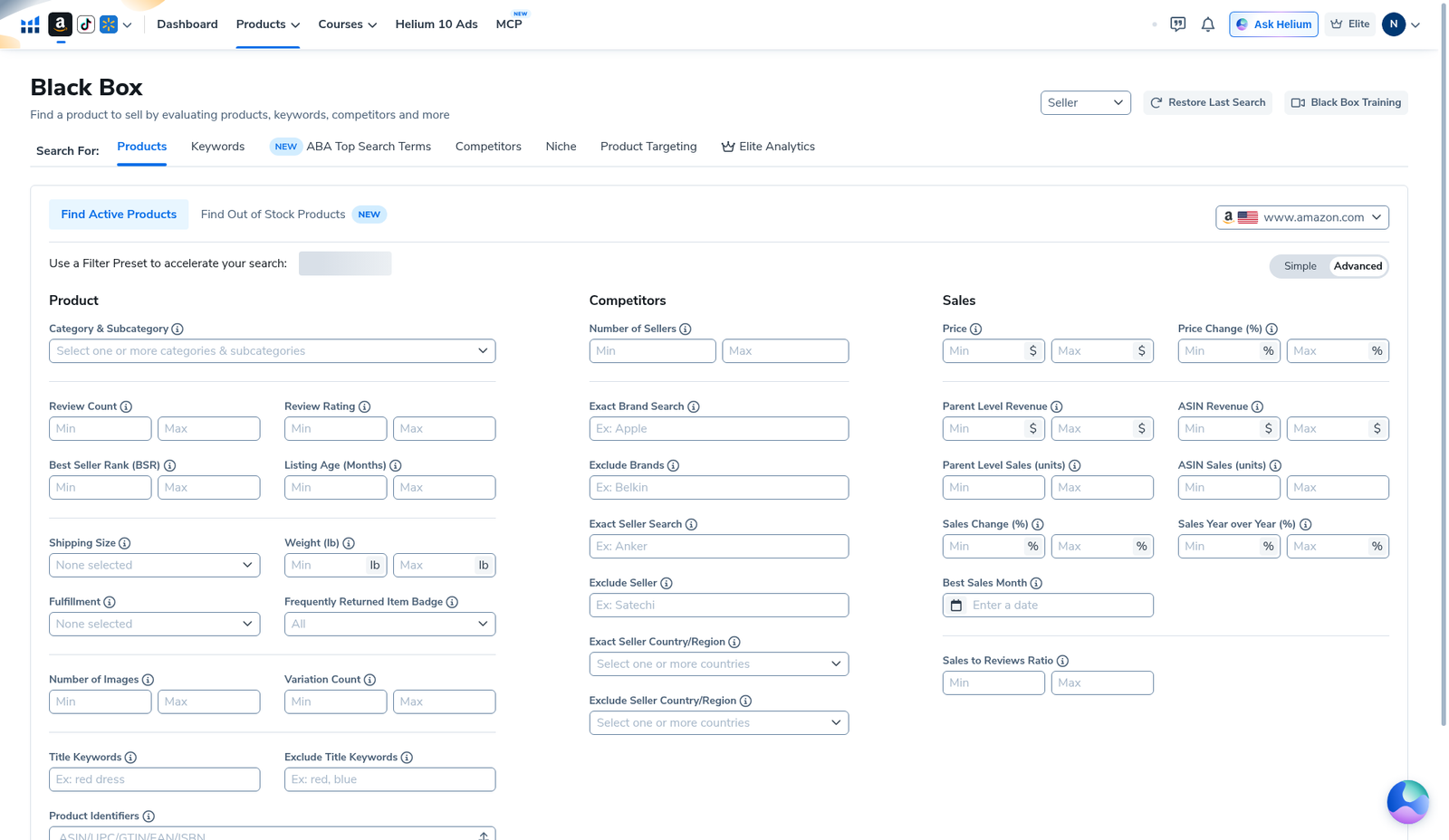
In Helium 10, open Black Box. Stay on the Products tab. Toggle Advanced. You get three filter columns:
- Product — category, reviews, rating, BSR, listing age, size/weight, fulfillment, images/variations, title keywords / exclude, identifiers
- Competitors — seller count, brand/seller include-exclude, seller country/region
- Sales — price, revenue, units, sales change / YoY, best sales month, sales-to-reviews ratio
Also available: Restore Last Search, Black Box Training, Seller dropdown. Marketplace flag should show the Amazon site you care about.
Step 2 — Try Simple first if Advanced feels loud
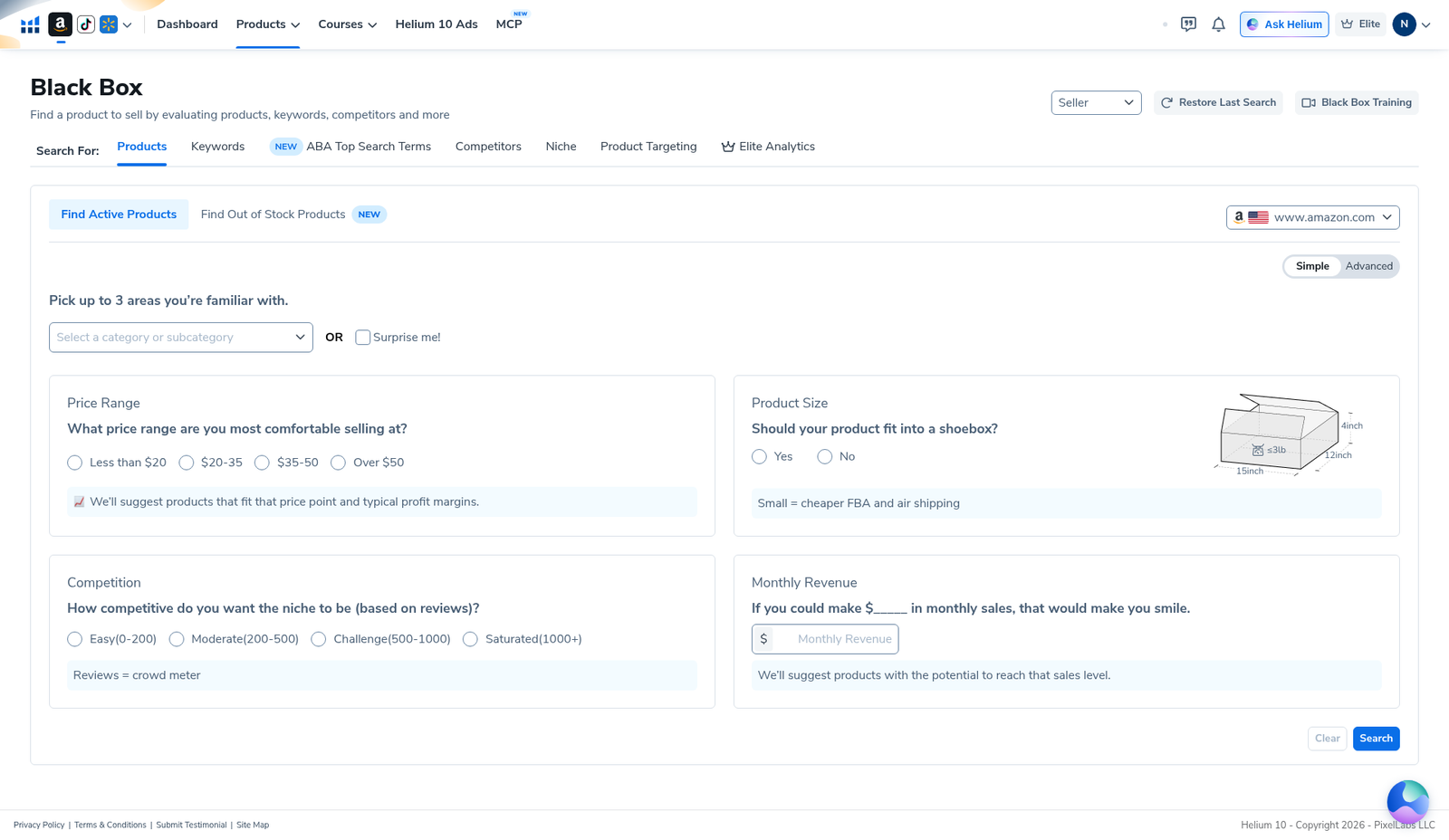
Toggle Simple for a guided path: up to 3 familiar categories (or Surprise me!), price bands (<$20 / $20–35 / $35–50 / Over $50), shoebox-fit question, review-competition tiers (Easy 0–200 through Saturated 1000+), and a monthly revenue target. Then Search or Clear.
Beginner rule we follow: use Simple to learn the shape of a niche, then switch to Advanced when you need title keywords, seller country, revenue floors, or exclude lists.
Step 3 — Run one concrete search (yoga mat → 500 results)
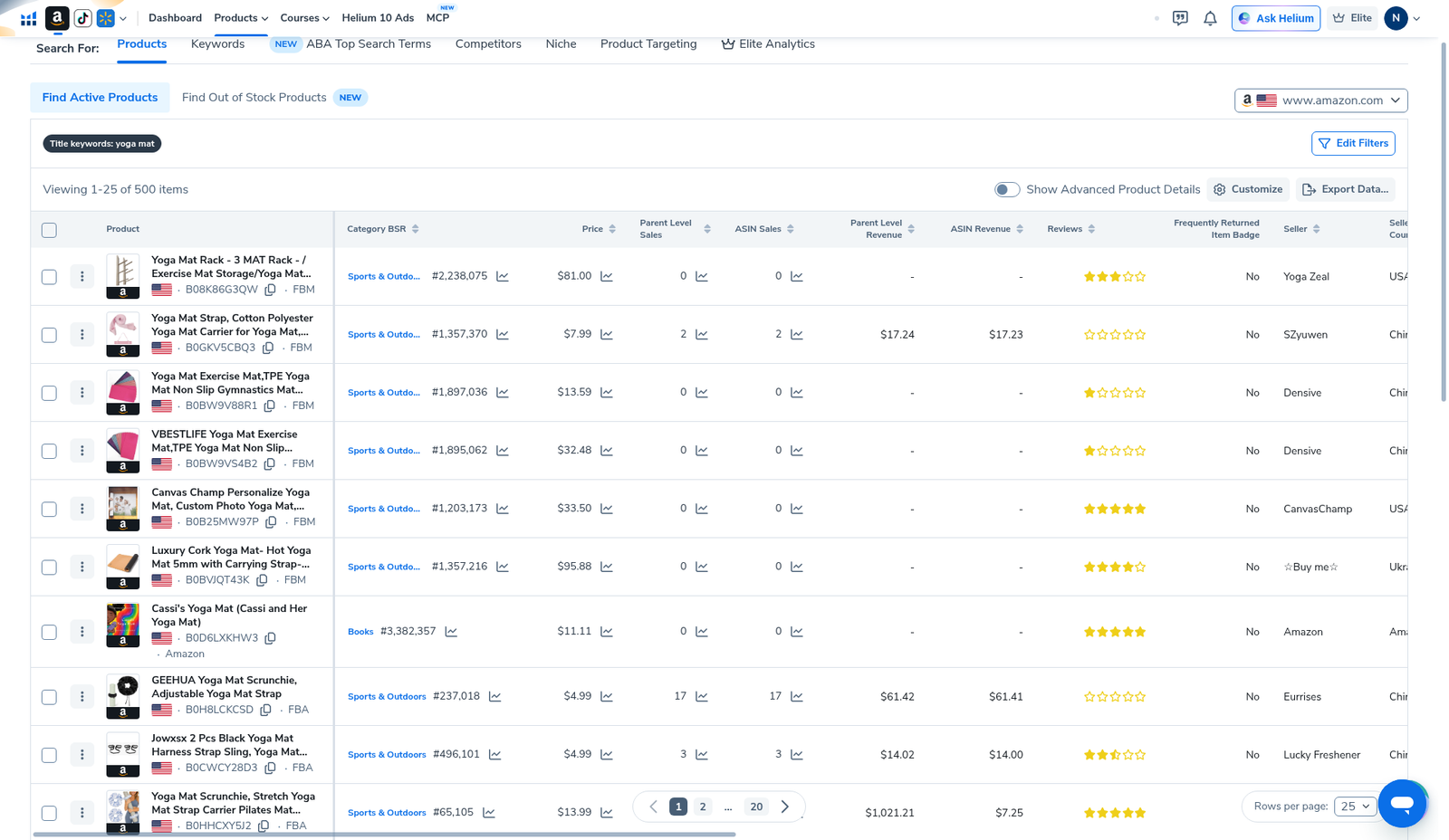
Our worked English-UI example used title keyword yoga mat on Find Active Products. Result header: Viewing 1–25 of 500 items. Table columns included Product (ASIN + FBA/FBM), Category BSR, Price, Parent/ASIN Sales & Revenue, Reviews, Frequently Returned Item Badge, Seller, Seller Country.
Example rows included accessories (racks, straps)—title-keyword search is broad. Manually reject off-niche ASINs before you call anything a candidate.
Step 4 — Filters that actually work (seller talk)
There is no universal “profitable product” preset. Filters that work are boring constraints that leave a list you can finish in one work block.
- Marketplace first — wrong store = wasted search.
- Title / category focus — one phrase or category tree, not five stacked niches.
- Review ceiling that leaves room to compete (tighten later; do not start at zero).
- Price band your sourcing and shipping can hit.
- Parent revenue / units floor matched to your capital—not a guru’s screenshot from another category.
- Tighten one control at a time until the list is reviewable. Our yoga-mat title search still returned 500 rows—pageable, not empty, not “infinite junk.”
Filters we stopped overusing: stacking every metric until zero results, then blaming Helium 10; copying someone else’s exact numbers for a different category; treating seller count alone as a green light.
Deeper recipes: Black Box filters that work. After the shortlist: Xray · Black Box vs Xray · Cerebro reverse ASIN.
Step 5 — Export Data (CSV / XLSX) when the list is useful
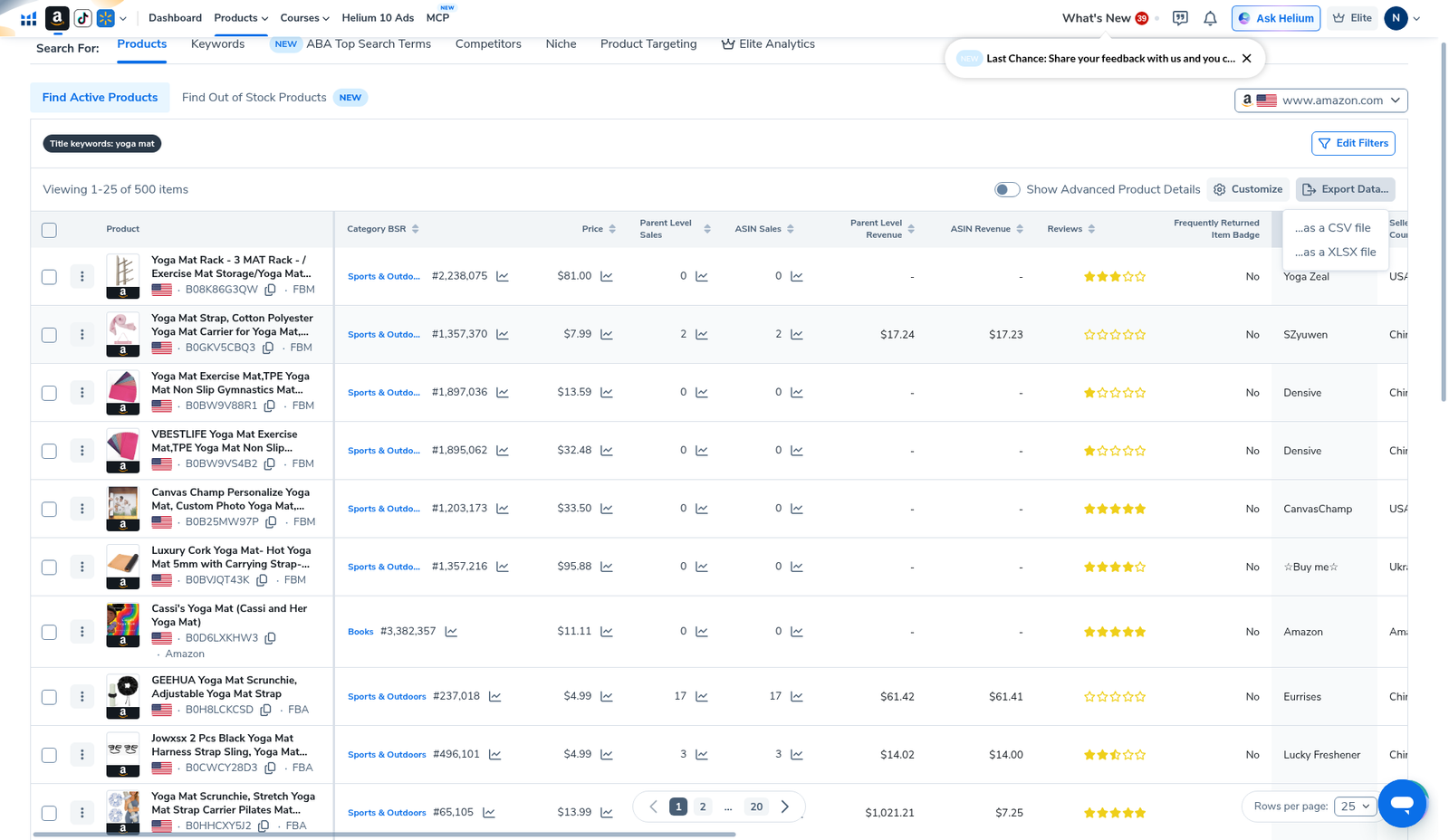
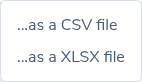
Click Export Data…. Menu options: …as a CSV file and …as a XLSX file. We opened the menu for evidence; we did not confirm a downloaded file in this package. Prefer export + offline review when you are near plan limits—re-running the same broad search “just to look again” is how sellers burn the day.
Daily / plan limits honesty
Sellers publicly complain about Black Box daily or plan limits when they spam empty broad searches. On Helium 10, entitlements are plan-tied and can change at renewal. Read the usage / entitlement UI on your account the same week you budget. We will not invent an “X searches per day” figure we have not captured for this page.
Practical rules we follow on a first session:
- One marketplace, one research question, one primary search.
- Tighten filters instead of launching five new searches.
- Export when the list is good enough; analyze offline.
- Validate survivors on Amazon + Xray; reverse winners in Cerebro (and reuse Cerebro History—see our History guide).
- If you hit the wall mid-session, stop. Upgrade only when the wall is a real weekly pattern, not day-one panic. Cost / promo notes: Helium 10 cost · coupon (AIPILOTDAILY20 monthly / AIPILOTDAILY10 annual via https://i.helium10.com/jR0Z10).
What to do after Black Box (same afternoon)
- Reject off-niche title matches in the results table.
- Validate survivors on Amazon + Xray.
- Reverse-ASIN the shortlist in Cerebro (we use B0HF4FK2QS in sibling guides)—prefer Load from History on re-opens.
- Landed-cost spreadsheet before supplier talks.
- Only then move to listing / PPC hubs: keyword hub · PPC hub.
What we tested vs what we did not claim
Tested (English UI, Black Box, Amazon US): Advanced empty filter grid; Simple wizard; yoga-mat title-keyword results (500 items); Export Data CSV/XLSX menu.
Did not claim: a universal filter recipe for every category; confirmed export file download; that 500 rows are profitable; an invented daily search cap; that Black Box replaces Xray, Cerebro, or supplier work. Affiliate only https://i.helium10.com/jR0Z10.
Frequently asked questions
What is Helium 10 Black Box?
Black Box is Helium 10’s product-discovery database. You filter Amazon products by category, price, revenue, reviews and more to build a private-label shortlist. It is discovery—not a buy button.
Should beginners start in Simple or Advanced?
Start in Simple if the Advanced grid is overwhelming. Switch to Advanced when you need title keywords, exclude lists, seller country, or tighter sales floors.
What are the best Black Box filters in 2026?
No universal best set. Marketplace, title/category, price band, review ceiling, and a demand band—then tighten one control at a time. See filters that work.
Does Black Box have a daily limit?
Entitlements are plan-tied. Confirm the usage card on your account. Do not invent a number from a blog. Stretch searches with tighter filters and exports instead of spam.
Black Box vs Xray—which first?
Black Box finds candidates from filters. Xray validates demand on a live Amazon search page. Most private-label sessions use both. Overview: Black Box vs Xray.
Which Helium 10 code should I use?
AIPILOTDAILY20 for monthly (Diamond test due $287.20); AIPILOTDAILY10 for annual or long stays (~10% ongoing). Start at https://i.helium10.com/jR0Z10.
Bottom line
- First session: marketplace → Simple or Advanced → one concrete search → reject junk → export → leave.
- Filters that work are boring constraints, not magic presets.
- Limits: read your entitlement card; do not invent daily caps; stop when the wall hits.
Next steps: filters that work → Xray → Cerebro → product hub · FBA hub · beginners · keyword hub · PPC hub · vs Jungle Scout · vs SellerAmp → worth it → review → coupon → checkout https://i.helium10.com/jR0Z10.
Last verified: 2026-10-30 · Author: Alexander Vance
