
Last verified: 2026-10-30 · Author: Alexander Vance · Human review
Affiliate disclosure: We may earn a commission if you buy Helium 10 through our links, at no extra cost to you. Helium 10 UI notes and screenshots come from our logged-in Helium 10 members account (English UI, Black Box captures 2026-10-29 / verified 2026-10-30). New-customer checkout figures for AIPILOTDAILY20 / AIPILOTDAILY10 come from our 2026-10-28 tests via https://i.helium10.com/jR0Z10 (no payment completed). Always trust your order summary and the usage / entitlement card on your account before you pay or burn searches.
Quick answer
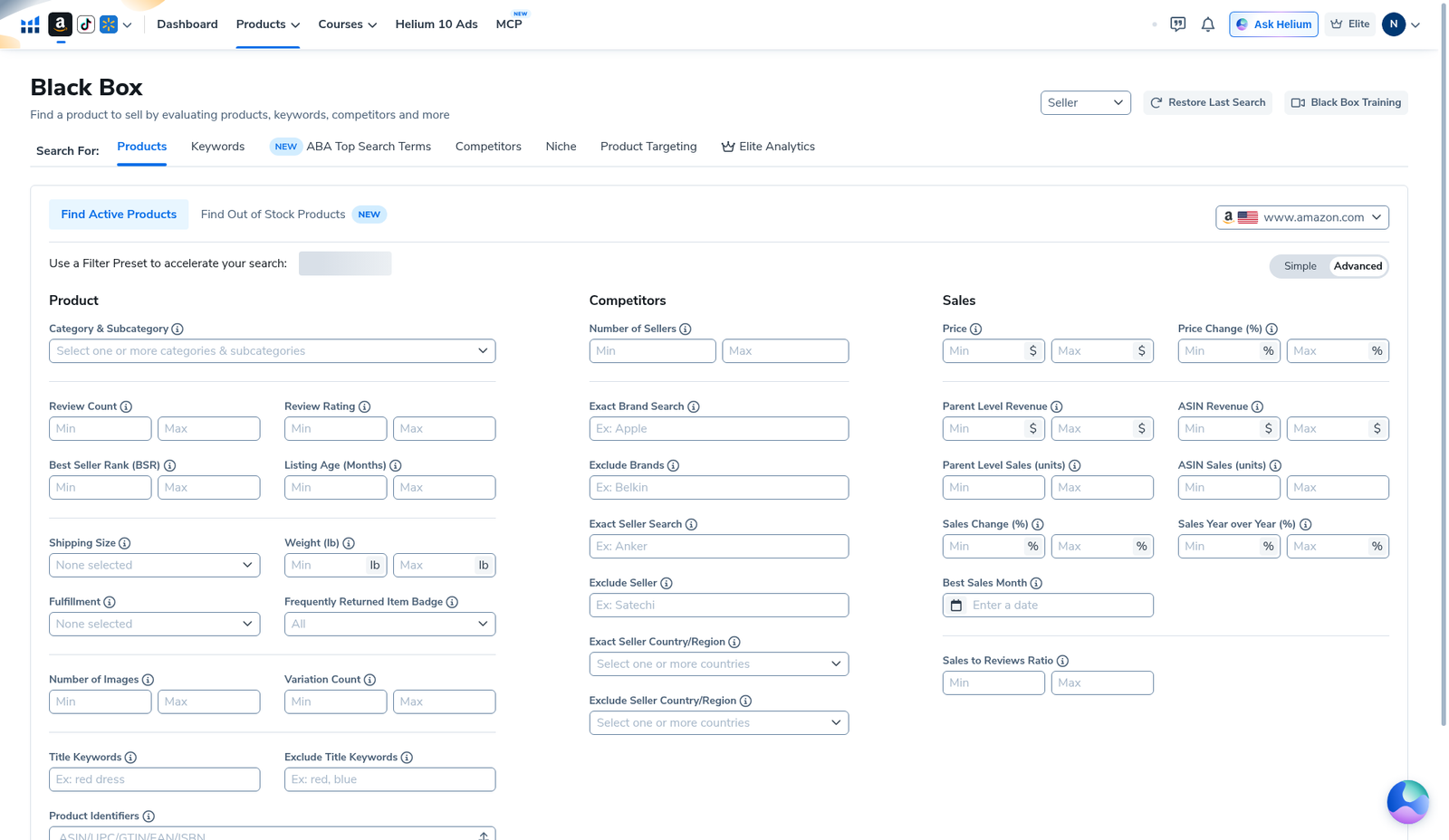
Helium 10 Black Box seasonality filter: in Advanced → Sales, use Best Sales Month (date picker) when you intentionally want products whose Helium 10 sales history peaks in a chosen month—holiday gifts, summer outdoor gear, back-to-school, etc. Pair it with niche title/category, price band, and a demand floor; do not treat “best month = November” as a buy signal by itself. On our English-UI Advanced grid (2026-10-29) Best Sales Month sits at the bottom of the Sales column next to Sales Year over Year and Sales to Reviews Ratio. Honest gap: we do not have a dedicated screenshot with Best Sales Month filled and results re-run—this guide uses the Advanced empty-grid capture plus a worked yoga-mat results grid for context. Simple mode has no Best Sales Month control.
| Field | What we saw (English UI) |
|---|---|
| Where | Black Box → Products · Advanced · Sales column |
| Seasonality control | Best Sales Month (date picker) |
| Nearby Sales knobs | Price · Parent/ASIN Revenue & Units · Sales Change % · Sales Year over Year % · Sales to Reviews Ratio |
| Simple mode | No Best Sales Month — price / shoebox / review tiers / revenue smile only |
| Evidence package | Advanced filter grid (control visible) · yoga-mat results (no seasonality applied in that run) |
| Honest limit | No dedicated applied-seasonality results shot in this package |
Honest takeaway: seasonality filtering is a deliberate inventory / cash-flow choice, not a growth cheat code. Evergreen PL passes often leave Best Sales Month blank. First-session path: Black Box beginners (WP 92274). Private-label shortlist context: sibling Black Box for private label guide.
Related: Black Box beginners · Black Box export · low competition · product research hub · Cerebro for listing optimization · FBA hub · worth it · review · coupon.
Pick your Helium 10 plan, then enter your AI Pilot Daily code.
Confirm eligibility, duration, renewal terms and the final amount on your checkout. Existing subscriptions usually cannot apply these codes.
What “seasonality” means in Black Box (seller talk)
Sellers usually mean: demand concentrates in part of the year, so inventory timing, PPC spend, and cash risk change. In Black Box Advanced, the labeled control we captured is Best Sales Month—a filter for products Helium 10 associates with a peak month in its sales history estimates. Nearby percentage fields (Sales Change %, Sales Year over Year %) help you read momentum, but they are not a calendar picker.
We will not invent which month is “best” for your niche, claim Best Sales Month predicts 2026 holiday sell-through, or publish a seasonal product list with fake profit.
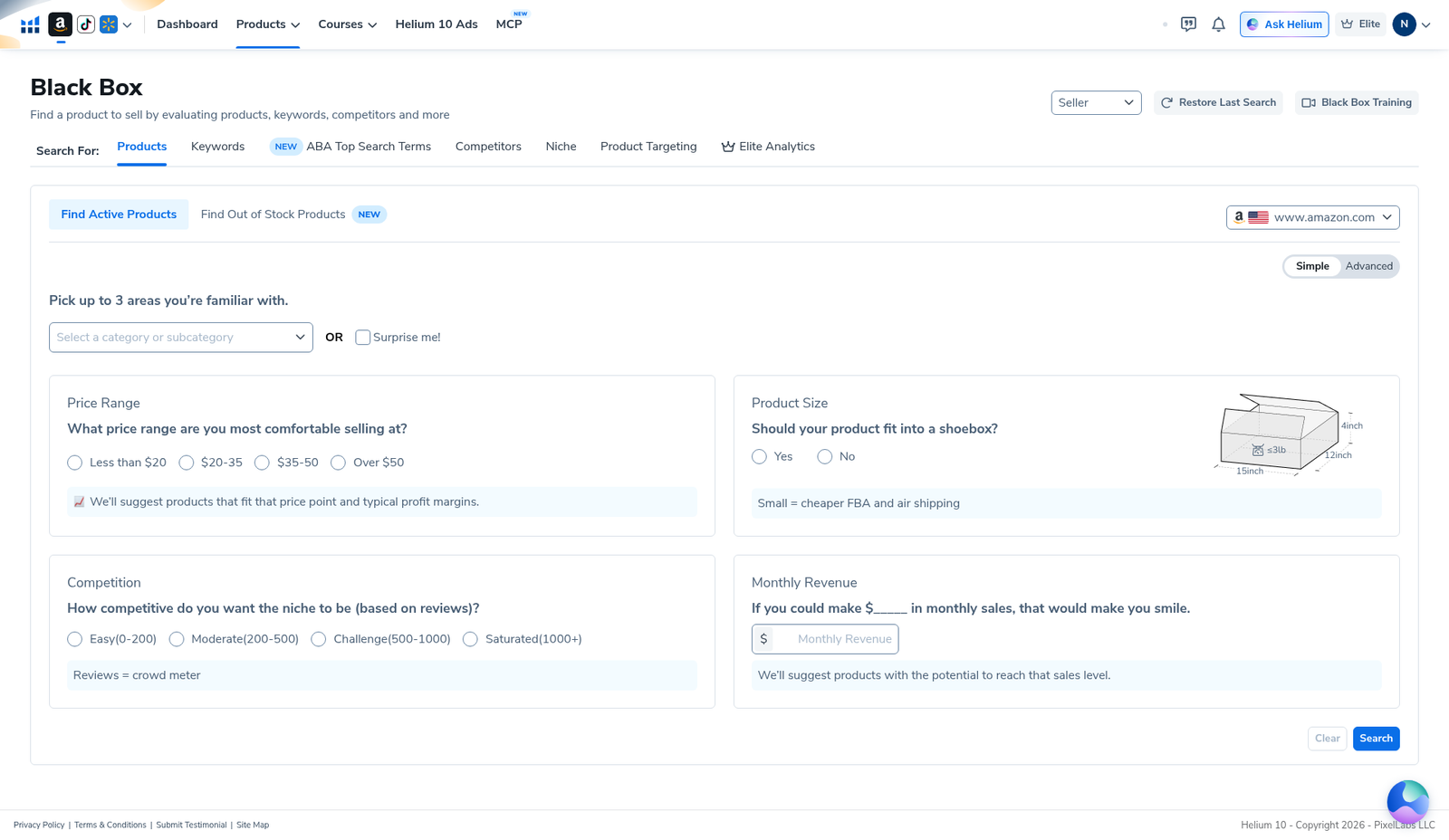
Step 1 — Advanced only (Simple has no seasonality picker)
Open Black Box → Products on your marketplace (we used www.amazon.com). Toggle Advanced. Simple mode—useful for guided private-label starts—does not expose Best Sales Month. If you only see the questionnaire cards (price / shoebox / review tiers / revenue), flip to Advanced.
Step 2 — Find Best Sales Month in the Sales column
On the Advanced filter grid, scroll the right-hand Sales column. In our English-UI capture the order includes Price, Price Change (%), Parent Level Revenue, ASIN Revenue, Parent Level Sales (units), ASIN Sales (units), Sales Change (%), Sales Year over Year (%), then Best Sales Month, then Sales to Reviews Ratio.
Operator sequence we use when we want seasonal candidates:
- Set marketplace + niche Category or Title keywords first (so seasonality is not applied to the whole catalog).
- Add a Price band and a Parent Level Revenue / Units floor you can fund.
- Optional: Review Count Max / Number of Sellers for competition (see low-competition recipe).
- Set Best Sales Month to the month you are planning inventory for.
- Click Find Active Products / Search. If zero results, loosen one control—usually revenue floor or month—before adding five new filters.
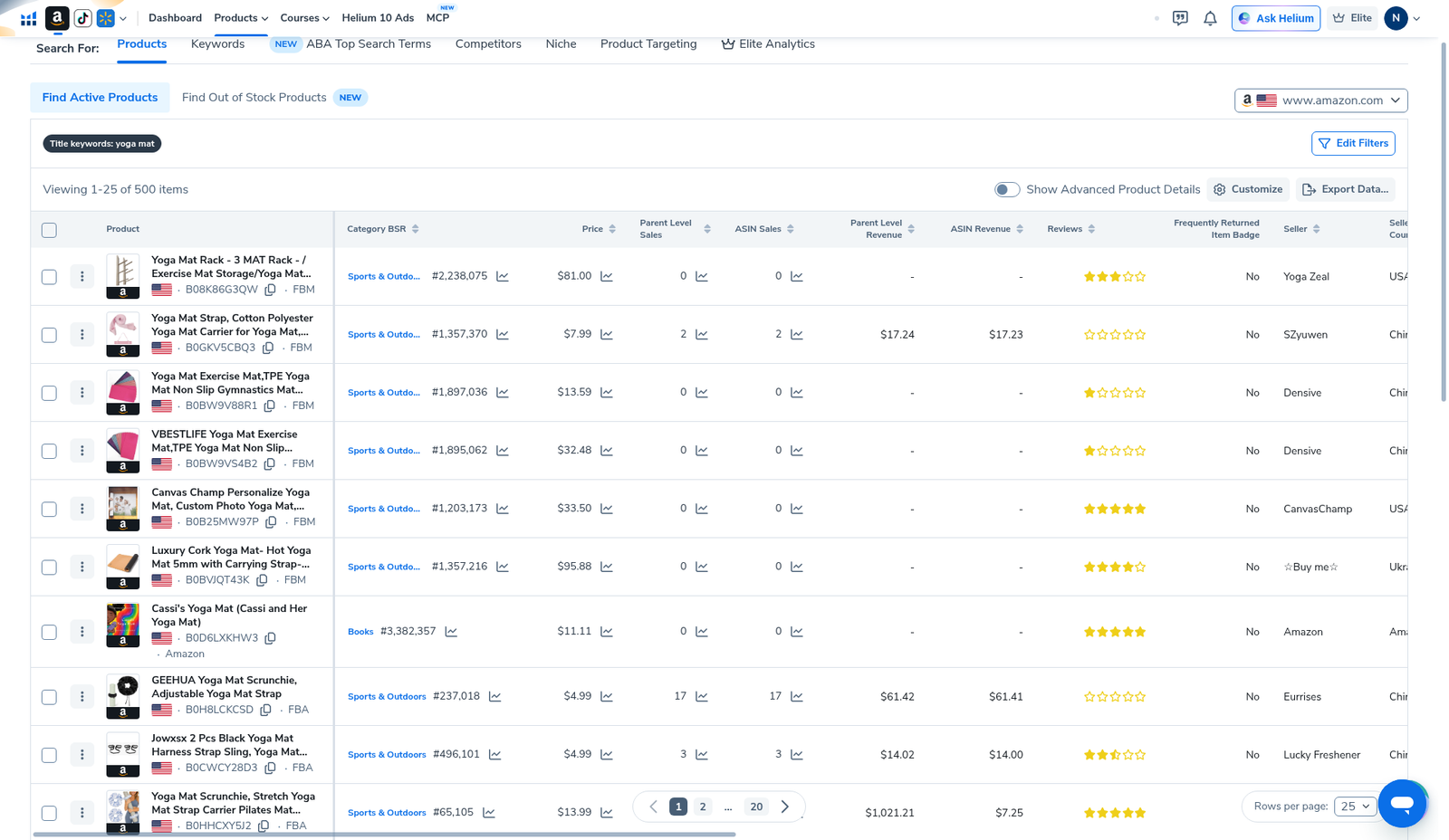
Evidence note: our package shows the empty Advanced grid with Best Sales Month visible. We did not capture a follow-up shot with a month selected and a filtered results header. Do not treat the yoga-mat 500-item grid below as a seasonality-filtered run—it was a broad title-keyword search with seasonality left blank.
Step 3 — Read results as cash-flow risk, not as a trophy list
Even after a seasonal filter, the results grid still needs the same human reject pass as any Black Box search. Our broad yoga-mat evidence run (Viewing 1–25 of 500 items) showed accessory junk, wide BSR spreads, and Helium 10 revenue estimates—useful context for what “a list” looks like, not proof of a seasonal winner.
Seasonal shortlist checks:
- Lead time — can you receive FBA inventory before the peak month?
- Dead stock risk — what happens in the off months?
- PPC — seasonal CPCs and conversion can spike; budget accordingly.
- Evergreen alternative — if Best Sales Month filtering empties the list, your niche may be year-round; leave the control blank.
Step 4 — Export once, validate outside Black Box
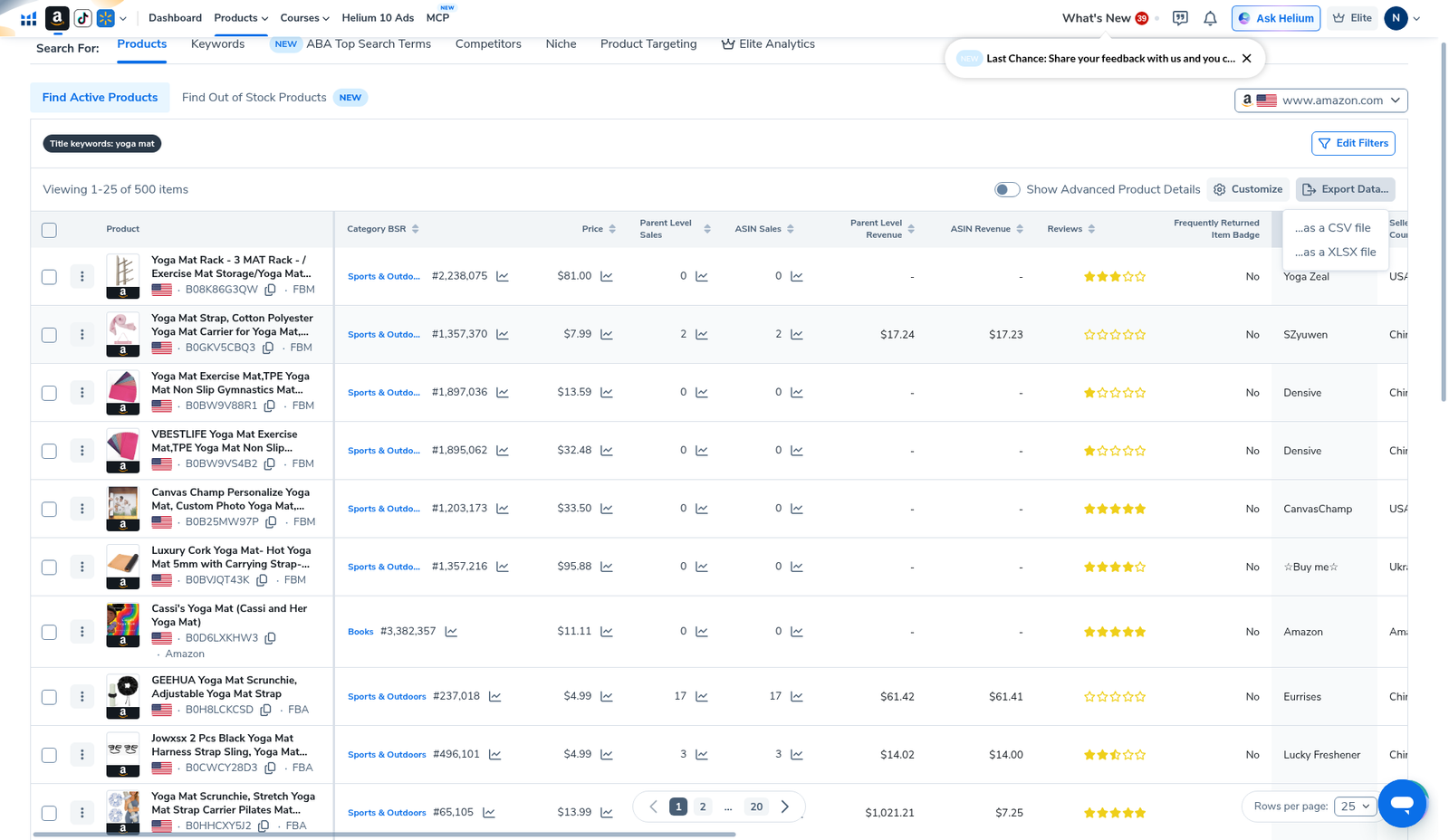
When the seasonal list is finishable, Export Data… → CSV/XLSX and score offline (lead time notes, landed cost, reject column). Export guide: Black Box export (WP 92278).
Then: Amazon + Xray → reverse keepers in Cerebro → map listing keywords via Cerebro for listing optimization (WP 92286) → landed-cost sheet. Broader research context: product research hub.
Seasonality filter mistakes
- Applying Best Sales Month with no niche focus — you get random holiday-adjacent junk across categories.
- Treating peak month as guaranteed sell-through for your new ASIN.
- Ignoring Sales YoY / Sales Change when the “best month” looks strong but trend is collapsing.
- Stacking every Sales field until zero results, then blaming Helium 10.
- Looking for a Simple-mode seasonality toggle — it is Advanced-only in our captures.
- Burning searches re-running the same month filter without exporting—read your plan usage card.
What we tested vs what we did not claim
Tested / visible: Advanced Sales column includes Best Sales Month date picker; Simple mode lacks it; yoga-mat title results grid (seasonality not applied); Export menu.
Did not claim / missing evidence: a filled Best Sales Month + filtered results screenshot; that any month filter guarantees profit; invented seasonal niches or revenue. Affiliate only https://i.helium10.com/jR0Z10.
When to use Best Sales Month vs leave it blank
Use Best Sales Month when:
- You already know you are building inventory for a calendar event (e.g. gifts peaking in Q4, outdoor gear peaking in summer).
- Your cash and warehouse plan can absorb off-season dead stock.
- You have niche title/category + price + demand floor set first—so the month filter is a refinement, not a fishing net.
Leave Best Sales Month blank when:
- You want evergreen private-label candidates (most first-session PL work).
- You are still learning Black Box filters—add seasonality after you can finish a non-seasonal list without burning searches.
- Zero-result loops appear after stacking Sales fields; loosen month before inventing five new Advanced controls.
Private-label shortlist without seasonality: sibling Black Box for private label guide. Competition ceilings: low competition (WP 92280).
How we would recapture a dedicated seasonality proof shot (later)
For a future English-UI evidence upgrade (not in this package), the capture checklist is:
- Black Box → Products → Advanced → marketplace www.amazon.com.
- Set one niche Title keyword or Category.
- Open Sales → set Best Sales Month to a concrete month; leave a screenshot of the filled control.
- Run Find Active Products; capture results header (Viewing X–Y of Z) with the seasonality chip/tag visible if the UI shows one.
- Export menu optional; keep UI language English.
Until that recapture exists, this article stays honest: control location documented from the Advanced empty grid; results behavior described; yoga-mat grid used only as non-seasonal layout context. Do not invent a filled-month screenshot.
Seasonality + listing / PPC handoff
Seasonal ASINs still need keyword work. After export:
- Reverse keepers in Cerebro; reuse History.
- Map seasonal modifiers carefully (gift, Christmas, summer) into bullets / backend / PPC—not every modifier belongs in the title.
- Full triage: Cerebro for listing optimization (WP 92286).
- Research hub: best Amazon product research tools.
Black Box seasonality does not replace a PPC calendar or inventory planner. It only helps you shortlist products whose historical peak month matches the inventory window you are willing to fund.
Frequently asked questions
Where is the Helium 10 Black Box seasonality filter?
Advanced → Sales → Best Sales Month. Not present in Simple mode on our English UI (2026-10-29).
Is Best Sales Month the same as a trend chart?
No. It is a filter control for peak-month association in Helium 10’s data. Pair with Sales Change % / YoY when those fields matter to you—and always re-check live Amazon demand.
Should private-label beginners always use seasonality?
Usually no for a first evergreen pass. Use it when you intentionally accept seasonal inventory risk. PL workflow: sibling Black Box for private label guide + beginners tutorial.
Why is there no screenshot with a month selected?
Honest gap in this evidence package. We reused the Advanced empty-grid capture where Best Sales Month is visible, plus non-seasonal yoga-mat results for grid context. Recapture later if you need an applied-month proof shot.
What after a seasonal shortlist?
Export → Xray → Cerebro listing optimization → landed cost with lead-time notes. Hub: product research.
Which Helium 10 code should I use?
AIPILOTDAILY20 for monthly (Diamond test due $287.20); AIPILOTDAILY10 for annual or long stays (~10% ongoing). Start at https://i.helium10.com/jR0Z10.
Bottom line
- Seasonality in Black Box ≈ Advanced → Sales → Best Sales Month.
- Simple mode has no seasonality picker in our captures.
- Pair month filter with niche + price + demand floor; reject junk; export once.
- Evidence gap disclosed: no dedicated applied-month results screenshot in this package.
- No revenue guarantees from seasonal filters.
Next steps: Black Box beginners → low competition → export → Xray → Cerebro listing optimization → product hub · FBA hub → worth it → review → coupon → checkout https://i.helium10.com/jR0Z10.
Last verified: 2026-10-30 · Author: Alexander Vance
