
Last verified: 2026-10-30 · Author: Alexander Vance · Human review
Affiliate disclosure: We may earn a commission if you buy Helium 10 through our links, at no extra cost to you. Helium 10 UI notes and screenshots come from our logged-in Helium 10 members account (English UI, Black Box captures 2026-10-29 / verified 2026-10-30). New-customer checkout figures for AIPILOTDAILY20 / AIPILOTDAILY10 come from our 2026-10-28 tests via https://i.helium10.com/jR0Z10 (no payment completed). Always trust your order summary and the usage / entitlement card on your account before you pay or burn searches.
Quick answer
Helium 10 Black Box for private label: use Black Box → Products on the marketplace you sell in to shortlist ASINs you might brand and source—not to “find a guaranteed winner.” Start in Simple (price / shoebox / review-competition / revenue smile) or jump to Advanced (Product · Competitors · Sales columns). Run one concrete search, reject off-niche titles by hand, export survivors, then validate with Xray and reverse keepers in Cerebro before you talk to suppliers. Black Box is a research shortlist tool. It does not guarantee sales, margins, or inventory turns.
| Field | What we saw (English UI) |
|---|---|
| Where | Black Box → Products · marketplace www.amazon.com |
| Modes | Simple wizard · Advanced (Product / Competitors / Sales) |
| PL-relevant controls | Price · Review Count · Number of Sellers · Parent Level Revenue/Units · Title keywords · Exclude Title Keywords · Fulfillment · Shipping Size / Weight |
| Worked evidence search | Title keywords: yoga mat → Viewing 1–25 of 500 items |
| Next handoffs | Export CSV/XLSX → Xray → Cerebro listing buckets |
| Honest limit | No invented “private label goldmine” list; title matches pull accessories |
Honest takeaway: private-label research with Black Box is filter discipline + human reject + offline shortlist—not a one-click niche finder. First-session path: Black Box beginners tutorial (WP 92274). Lower-competition recipe: low-competition filter (WP 92280).
Related: Black Box beginners · Black Box export · low competition · product research hub · Cerebro for listing optimization · FBA hub · worth it · review · coupon.
Pick your Helium 10 plan, then enter your AI Pilot Daily code.
Confirm eligibility, duration, renewal terms and the final amount on your checkout. Existing subscriptions usually cannot apply these codes.
What “Black Box for private label” actually means
Private-label sellers use Black Box to answer a narrow question: which existing Amazon products look fundable enough to study for branding and sourcing? The tool surfaces candidates from Helium 10’s product database. You still own:
- Rejecting accessory / off-niche title matches
- Checking landed cost, MOQ, and shipping size against your capital
- Validating demand on the live Amazon page (Xray) and keywords (Cerebro)
- Deciding whether branding differentiation is real or wishful
We will not publish a “top 10 private label products” table, invent monthly profit, or claim Black Box replaces supplier diligence.
Step 1 — Marketplace + mode (Simple first for PL beginners)
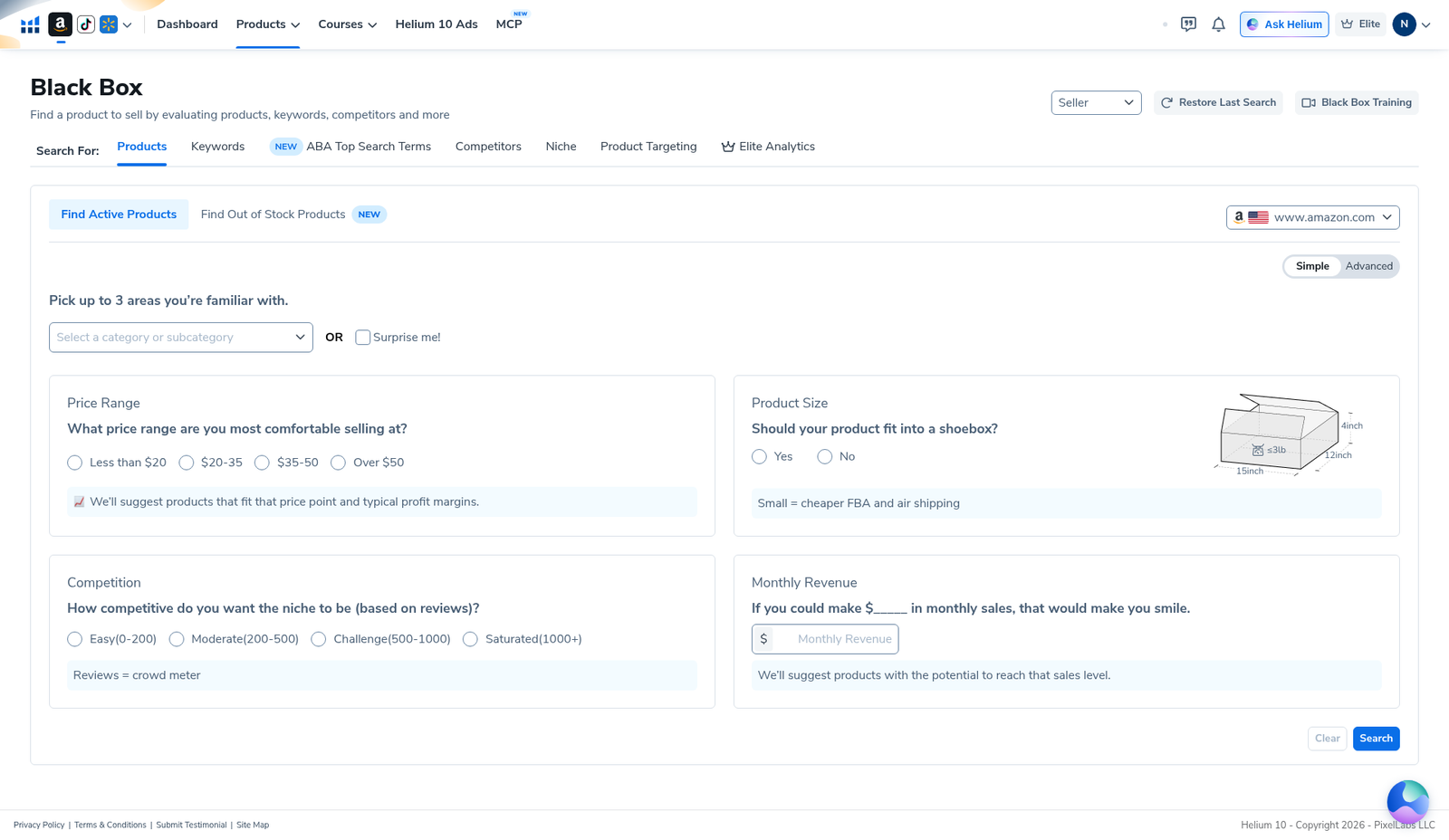
Open Black Box → Products. Confirm marketplace (www.amazon.com in our captures). Toggle Simple if you want the guided private-label questionnaire:
- Pick up to 3 familiar categories (or Surprise me!)—only categories you can source.
- Price range you can land (Less than $20 / $20–35 / $35–50 / Over $50).
- Shoebox fit Yes/No when FBA dimensional weight matters.
- Competition (reviews) — Easy (0–200) / Moderate (200–500) / Challenge / Saturated. Pair with a demand band; Easy alone is not a green light (see low-competition recipe).
- Monthly revenue smile number — a target that matches your budget. Helium 10 uses it as a suggestion band, not a promise you will hit it.
- Click Search. If empty, loosen one control—do not slam five new searches and burn entitlements.
Step 2 — Advanced filters private-label operators actually touch
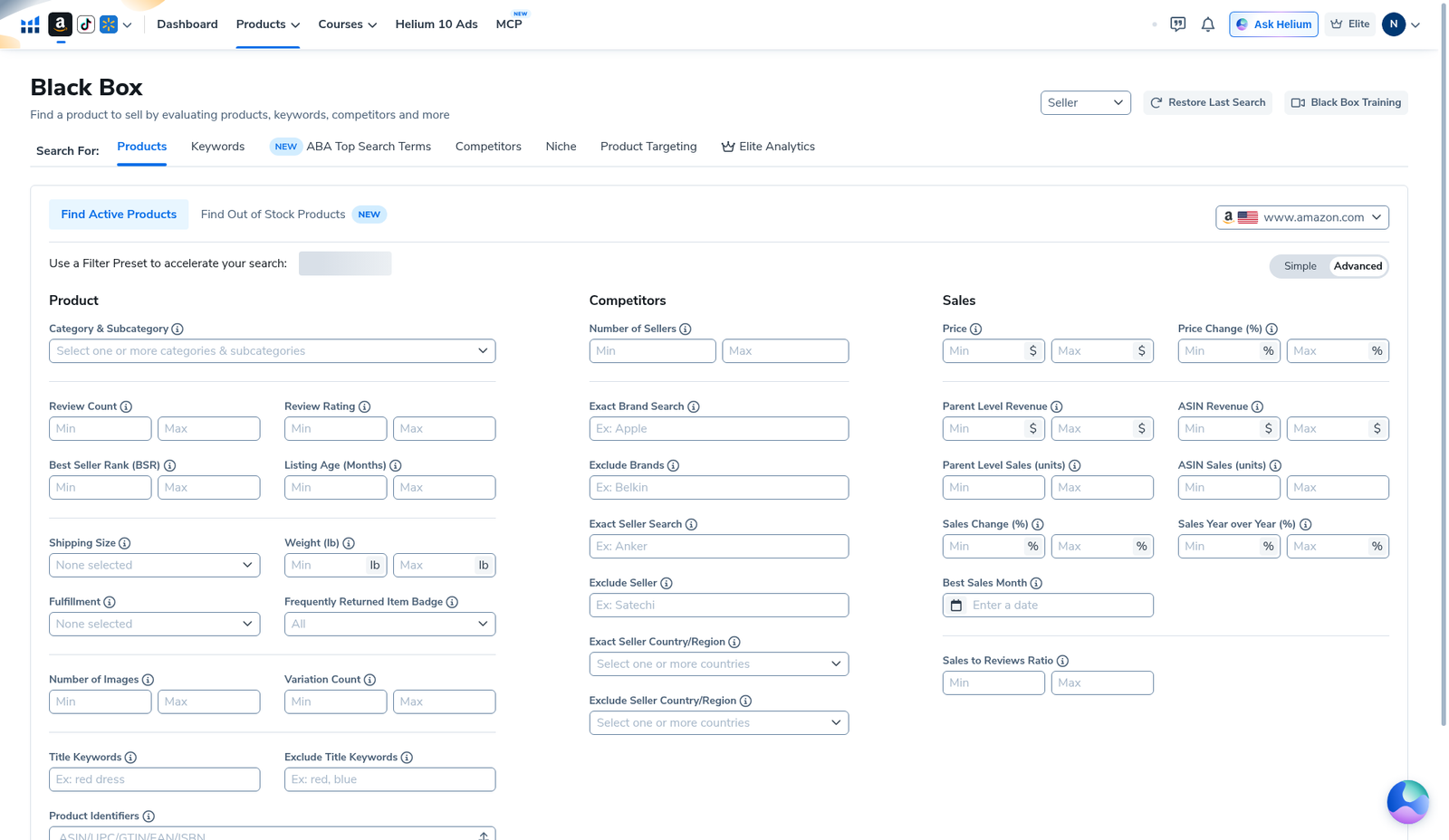
Toggle Advanced. Three columns—Product, Competitors, Sales—are what serious PL shortlists use. Starting template (adjust to your niche; do not cargo-cult numbers):
- Product → Category / Title keywords / Exclude Title Keywords — one niche phrase; exclude obvious accessory junk (rack, strap, cover) when you want the core SKU.
- Product → Review Count Max — competition ceiling you can finish reviewing.
- Product → Shipping Size / Weight / Fulfillment — FBA economics and packaging reality.
- Competitors → Number of Sellers — optional Max when offer density matters.
- Competitors → Exact Brand / Exclude Brands — only with a concrete brand-density reason.
- Sales → Price Min/Max — band you can source and ship.
- Sales → Parent Level Revenue / Units — demand floor matched to capital. Estimates only—no revenue guarantees.
- Sales → Best Sales Month — seasonality adjacent control (dedicated walkthrough: sibling seasonality guide). Leave blank on a first evergreen PL pass unless you intentionally want seasonal inventory.
Rule: tighten one control at a time until the list is finishable in one work block. Full first-session walkthrough: beginners tutorial.
Step 3 — Worked evidence: yoga mat title search (reject before you brand)
On English UI we ran title keyword yoga mat → Viewing 1–25 of 500 items. The grid showed Category BSR, Price, Parent/ASIN Sales & Revenue, Reviews, Frequently Returned Item Badge, Brand/Seller. Visible rows included racks, straps, and scrunchies alongside mats—exactly why private-label operators cannot treat “title keyword hit” as a product idea.
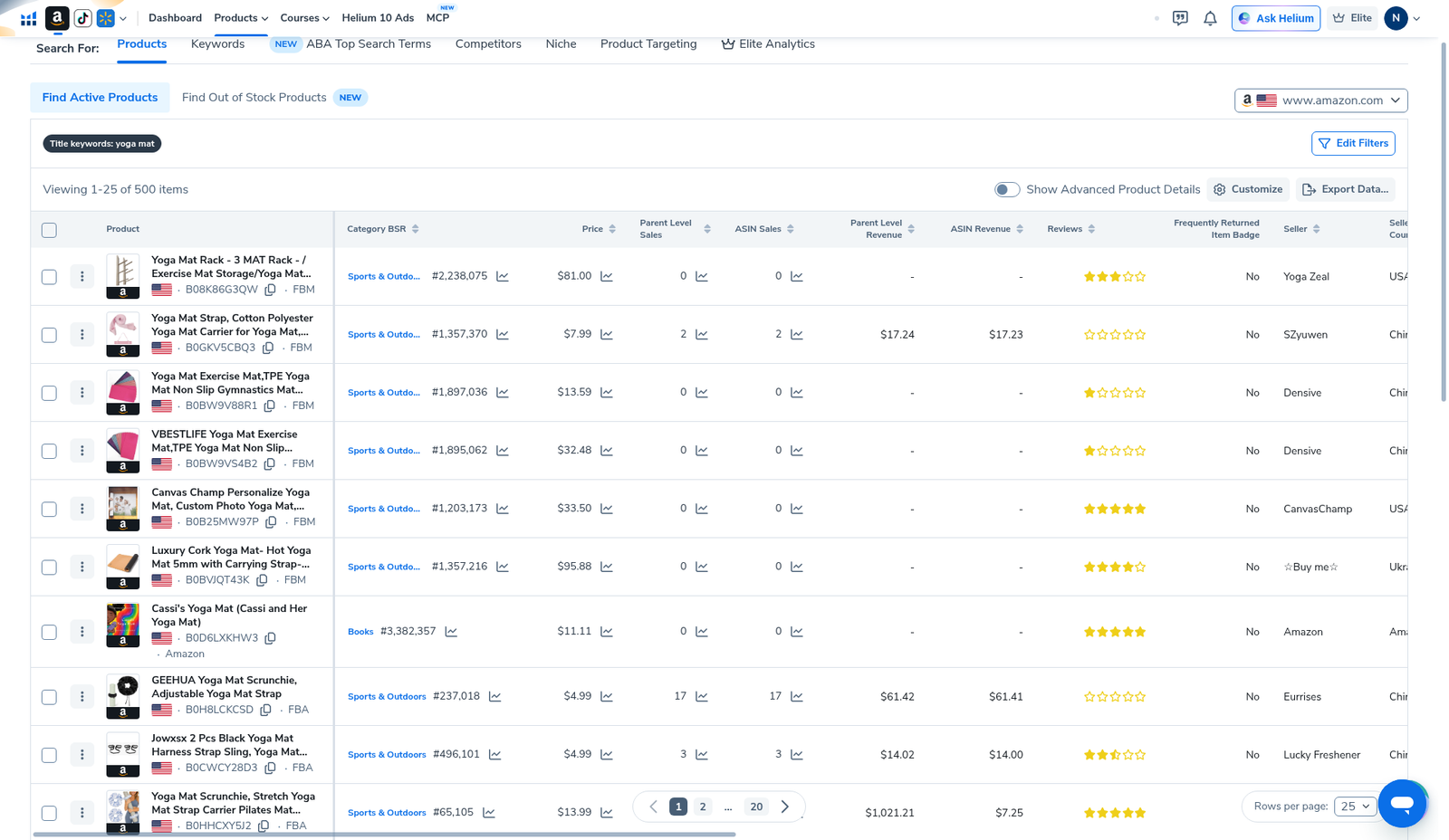
Private-label reject pass (same afternoon):
- Kill off-niche titles (accessories when you wanted the core product).
- Cap “maybe” ASINs (e.g. 10–20)—finish the list; do not page forever.
- Note price + parent revenue bands you can fund. No invented “$X/month guaranteed.”
- Flag Frequently Returned Item = Yes for Amazon-side investigation—not an auto-kill without reading return reasons.
Step 4 — Export the shortlist, then leave Black Box
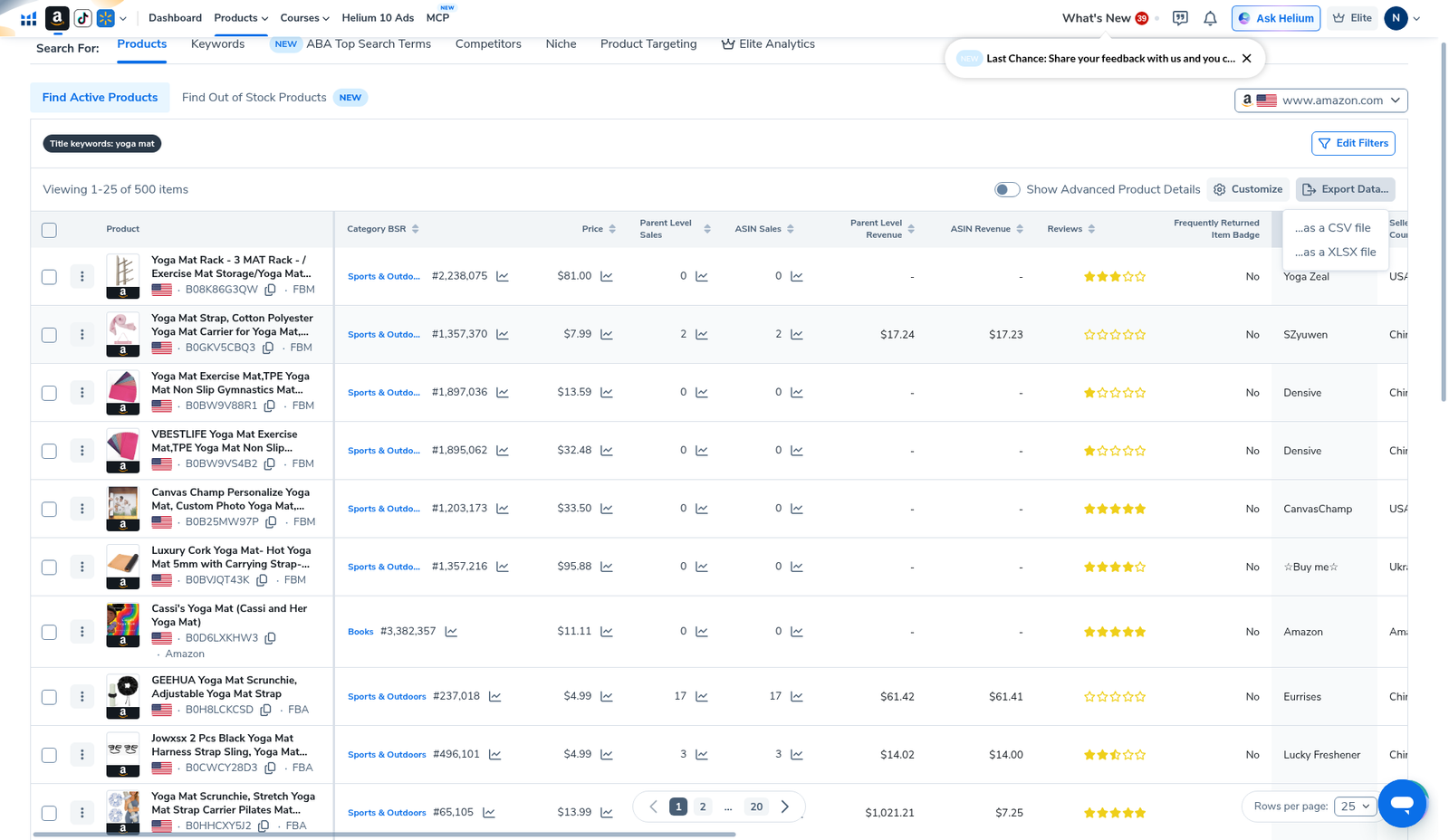
When the list is reviewable, click Export Data… → CSV or XLSX and score offline. Do not re-burn the same broad search “just to look again.” Export workflow: Black Box export (WP 92278).
After the sheet:
- Validate survivors on Amazon + Xray.
- Reverse keepers in Cerebro; map keywords into title / bullets / backend / PPC buckets—see Cerebro for listing optimization (WP 92286). Prefer History on re-opens.
- Landed-cost spreadsheet before supplier talks.
- Only then listing / PPC hubs: keyword hub · PPC hub.
Private-label mistakes Black Box will not save you from
- Treating parent revenue estimates as your future P&L
- Ignoring packaging / weight until after you order samples
- Copying someone else’s exact filter numbers from another category or year
- Skipping Cerebro / listing work and dumping a mediocre title on a “low review” ASIN idea
- Spamming new Black Box searches instead of tightening one filter—entitlements are plan-tied; read your usage card
What we tested vs what we did not claim
Tested: Simple wizard (price / shoebox / review tiers / revenue); Advanced empty filter grid (PL-relevant fields including Best Sales Month); yoga-mat title search (500 items); Export Data… menu CSV/XLSX.
Did not claim: a universal profitable private-label niche; that Easy (0–200) reviews equals easy money; invented revenue or ROI; that Black Box replaces Xray, Cerebro, or supplier diligence. Affiliate only https://i.helium10.com/jR0Z10.
A realistic private-label afternoon with Black Box
Here is the same-day sequence we recommend when the goal is a branded FBA candidate—not browsing for entertainment:
- 30 minutes — Black Box: marketplace locked, one niche phrase or category, Simple pass or Advanced with Review Max + price + parent demand. Stop when you have a finishable list (our yoga-mat evidence hit 500 rows—too broad for branding; tighten title/exclude keywords).
- 20 minutes — reject + export: kill accessories and off-niche titles; export CSV/XLSX once (export guide).
- 30 minutes — Amazon + Xray: open survivors on the live SERP; check offer density, images, and whether differentiation is plausible.
- 30 minutes — Cerebro: reverse 1–3 keepers; filter junk; map keepers into title / bullets / backend / PPC (listing optimization). Prefer History on re-opens.
- Landed-cost sheet: units, shipping, prep, PPC test budget. Only then message suppliers.
If you skip steps 2–5 and treat Black Box parent revenue as “my future sales,” you are not doing private-label research—you are screenshot collecting. Product-research context: product research hub.
Which Black Box columns matter for branding decisions
| Column / control | Private-label use |
|---|---|
| Title + ASIN + FBA/FBM | First reject: accessories vs core SKU; keep ASIN for Xray/Cerebro. |
| Category BSR | Context inside that tree only—not a universal “good BSR” cutoff. |
| Price | Must fit sourcing + shipping + target margin before you fall in love with demand. |
| Parent vs ASIN sales/revenue | Parent aggregates variations; prefer parent when the family is what shoppers buy. Estimates only. |
| Reviews | Competition proxy—pair with your Review Max / Simple Easy–Saturated tier. |
| Frequently Returned Item Badge | “Yes” = investigate return reasons on Amazon; not an auto-kill without reading. |
| Brand / Seller / Seller Country | Brand density and origin context—not a green light alone. |
| Shipping Size / Weight / Fulfillment | FBA fee reality for a branded SKU you will restock. |
Lower-competition filter companion: low-competition products (WP 92280). Beginners chrome: tutorial (WP 92274).
Frequently asked questions
How do I use Helium 10 Black Box for private label?
Set marketplace → Simple or Advanced filters → one niche search → reject off-niche titles → export → Xray → Cerebro listing buckets → landed cost. Beginners: tutorial.
Is Black Box only for private label?
No. Wholesale / arbitrage sellers use it too. This guide focuses on the PL shortlist workflow (branding + sourcing candidates).
Simple or Advanced for private label?
Simple for a first guided pass; Advanced when you need Review Max, seller count, parent revenue floor, exclude-title keywords, or Best Sales Month.
Will Black Box tell me what to brand?
No. It ranks database candidates. Differentiation, compliance, and sourcing are still your job.
What after the private-label shortlist?
Export → Xray → Cerebro listing optimization → landed cost. Broader context: product research hub.
Which Helium 10 code should I use?
AIPILOTDAILY20 for monthly (Diamond test due $287.20); AIPILOTDAILY10 for annual or long stays (~10% ongoing). Start at https://i.helium10.com/jR0Z10.
Bottom line
- Black Box for private label = shortlist candidates you might brand—not guaranteed winners.
- Simple for guided price/competition/revenue; Advanced for tighter PL knobs.
- Reject accessory title matches; export; validate with Xray / Cerebro.
- No revenue guarantees from any filter recipe.
Next steps: Black Box beginners → low competition → export → Xray → Cerebro listing optimization → product hub · FBA hub → worth it → review → coupon → checkout https://i.helium10.com/jR0Z10.
Last verified: 2026-10-30 · Author: Alexander Vance
