
Last verified: 2026-10-29
Affiliate disclosure: We may earn a commission if you subscribe to Helium 10 through our links. Screenshots and workflow notes come from our own signed-in Helium 10 account (English UI, Listing Builder / AI Listing Builder). Codes: AIPILOTDAILY20 and AIPILOTDAILY10 via https://i.helium10.com/jR0Z10. Offers change, so recheck before paying.
Quick answer
Helium 10 Listing Builder (menu label: Listing Builder / Build & Optimize Listings) is the draft workspace where you build Amazon listing copy—title, item highlight, bullets, description, and generic (backend) keywords—inside Helium 10 before you sync anything to Seller Central.
On 2026-10-29 we opened Listing Builder on Amazon US (www.amazon.com), created a scratch draft from scratch, and typed manual yoga-mat copy. We did not run AI, generate AI images, apply keyword-bank results, connect Seller Central, or publish to Amazon:
| Field | What we saw |
|---|---|
| Tool | Listing Builder (members.helium10.com/listing-builder) |
| Marketplace | Amazon US (www.amazon.com) |
| Draft listing id | 990639 |
| Status | Draft — unlinked / not synced / not published |
| Hand-typed title | Extra Thick Non Slip Yoga Mat for Home Gym |
| Listing Quality Score | 10 / 10 (after manual copy + checklist greens) |
| Keyword Performance Score | 0 (keyword bank empty; no competitors added) |
| Listings used | 3 / 300 (this draft + two older drafts) |
| AI listing workflow | Listings Used 0 / 100 — Start AI Work not clicked |
| Keyword sources / Apply | Opened Build Keyword Bank; sources left unchecked; no Apply |
| Seller Central | Left disconnected (“Optimize your listing” still shows Connect Now) |
| Last saved (editor) | 10/29/2026, 12:15 am |
| Character meters (captured) | Title 42/75; Item Highlight 117/125; Description 1294/2000; Generic Keyword 81/500 |
Honest takeaway: this yoga-mat draft is a workflow demo only—not a product we are recommending you sell, and not a live Amazon listing. Score 10/10 reflects Helium’s built-in Best Practices checklist after we filled long enough manual copy; it is not proof of Amazon ranking or conversion. We left AI credits at 0 on purpose so this guide shows the manual path and the real meters before anyone burns GPT / keyword Apply quota.
Stack order we recommend: find candidates in Black Box → pull keyword universe with Cerebro reverse ASIN → score rivals in Listing Analyzer → draft your own copy here → monitor ranks in Keyword Tracker. Plan limits: pricing. More walkthroughs: guides. Coupons: coupon code page.
Ready to try Helium 10?
New checkout codes we verified 2026-10-28:
Monthly: AIPILOTDAILY20 (20% off for 6 months) · Annual: prefer AIPILOTDAILY10 (≈10% forever on our annual test). Confirm on your own summary.
What I tested vs what I did not claim
Tested in-account (2026-10-29, English UI):
- Opening Listing Builder on a signed-in Elite members session; marketplace www.amazon.com. Tool was not plan-locked.
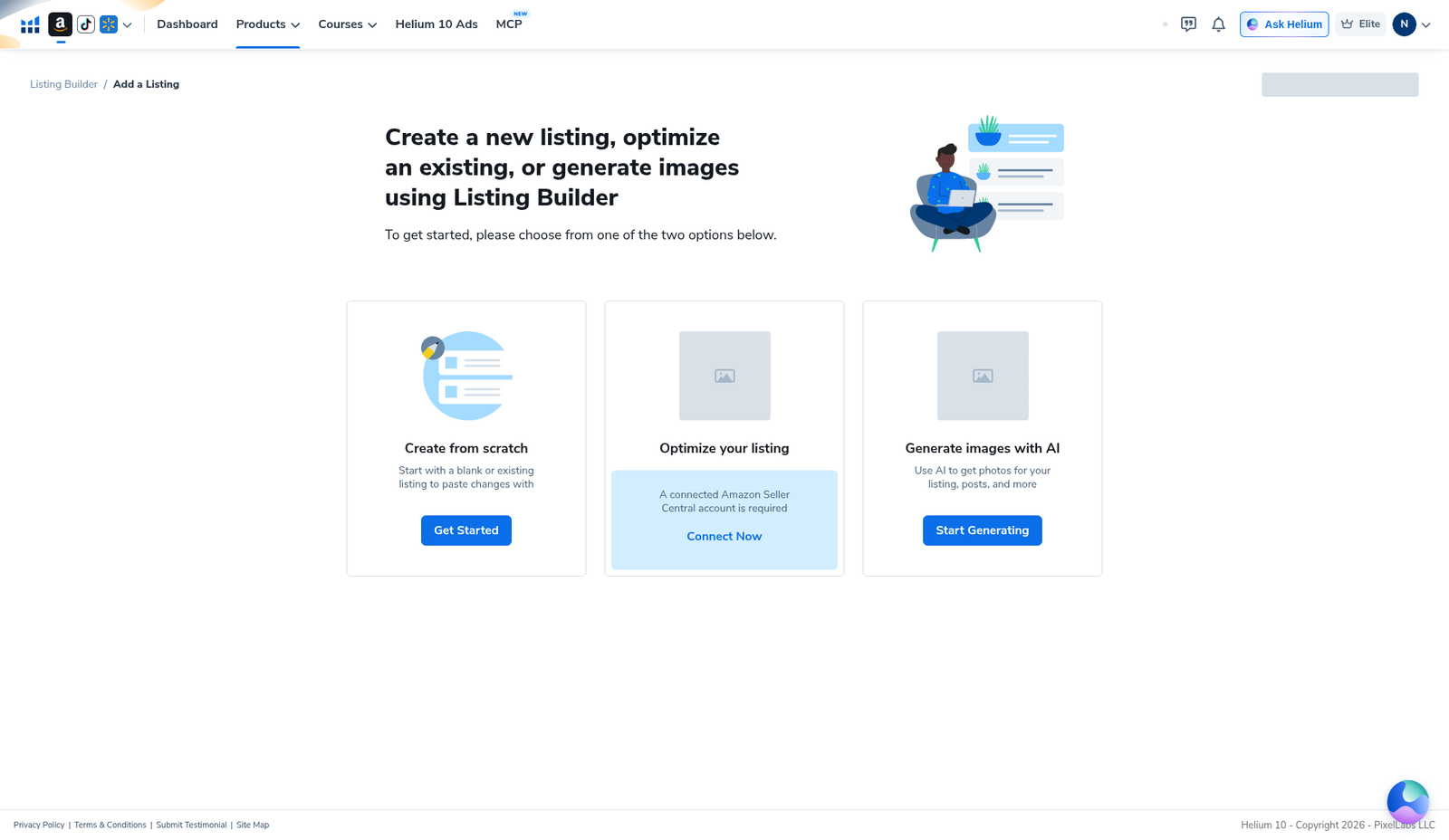
- Add-listing landing: Create from scratch (Get Started), Optimize your listing (Seller Central lock / Connect Now), and Generate images with AI (Start Generating).
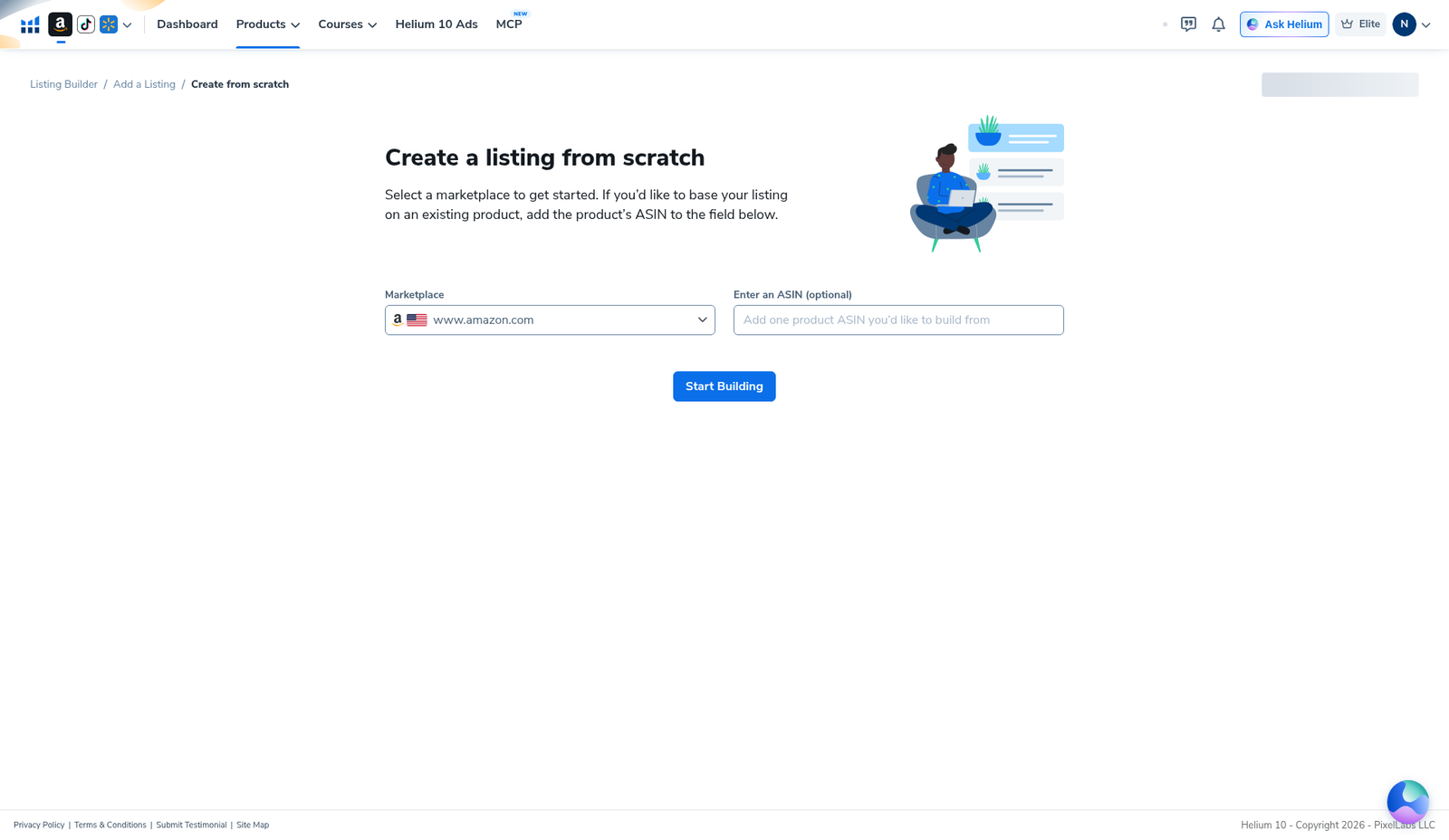
- Creating a scratch draft for Amazon US via marketplace picker (
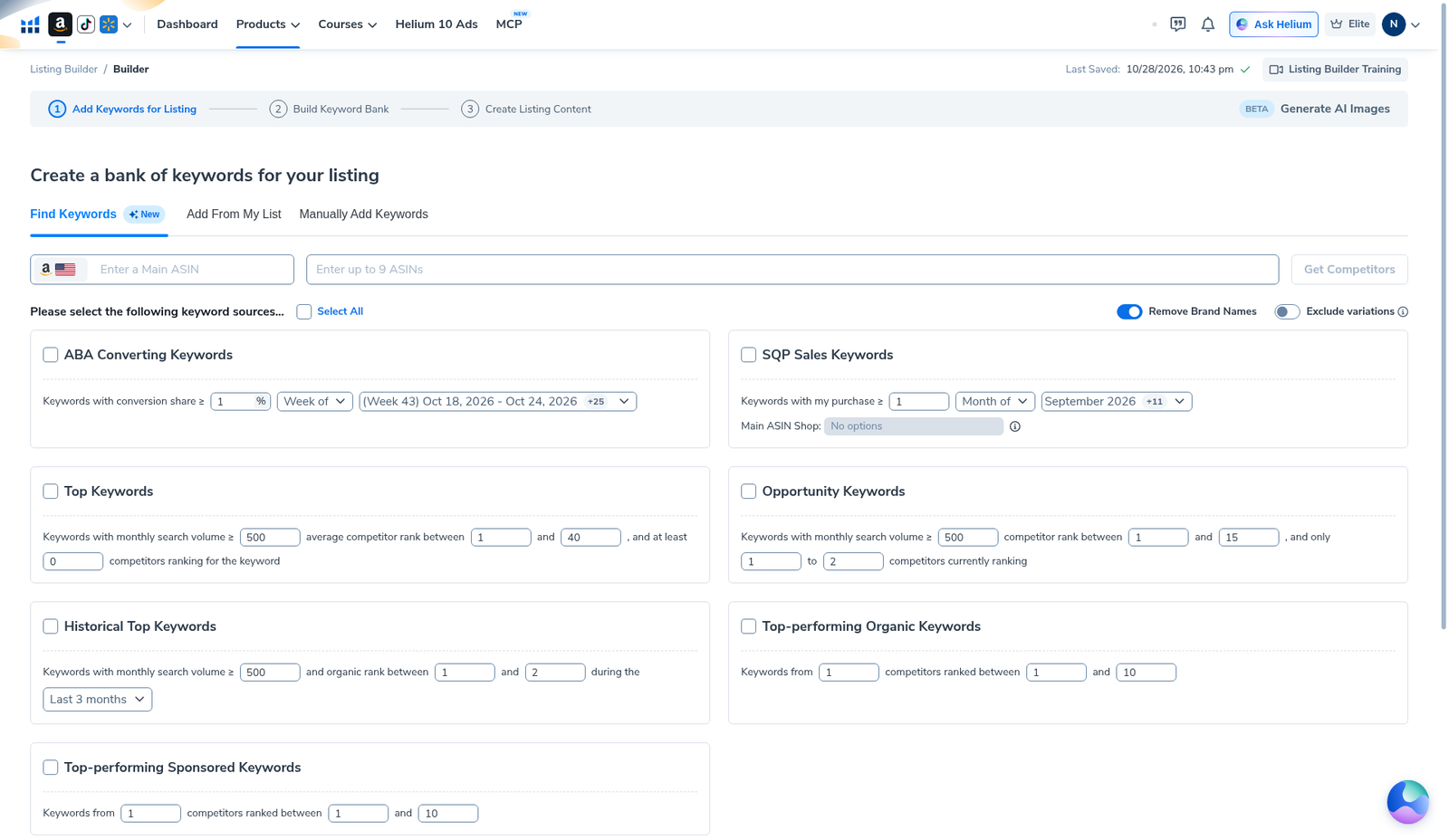
www.amazon.com, US flag); optional ASIN left blank; Start Building. - Opening Step 2 Build Keyword Bank (Find Keywords tab): ABA / SQP / Top / Opportunity / Historical / Organic / Sponsored source modules visible; Main ASIN blank; Remove Brand Names ON; sources left unchecked; Get Competitors disabled without ASINs.
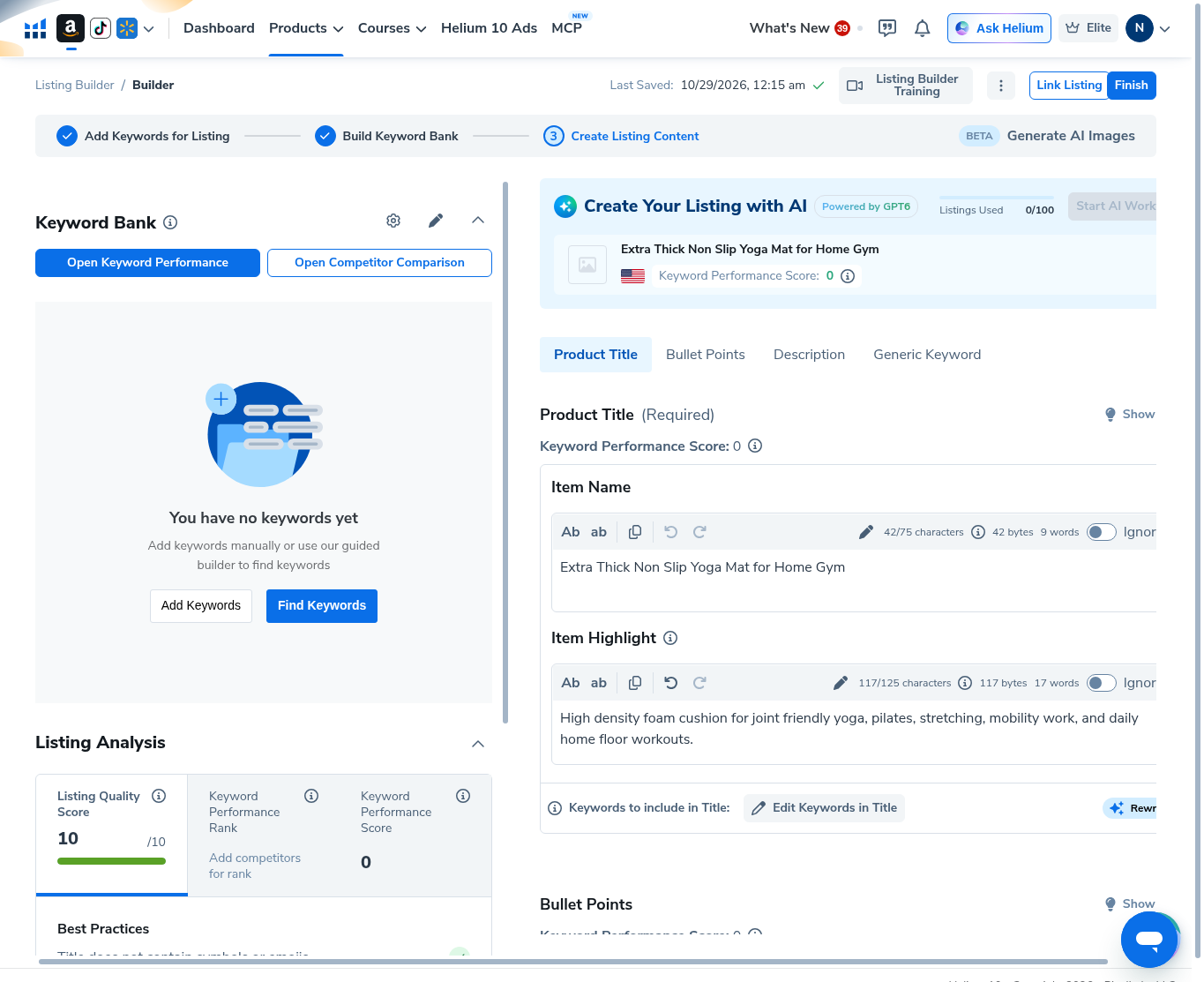
- Opening Step 3 Create Listing Content with AI panel visible (Create Your Listing with AI, Powered by GPT4, Listings Used: 0/100, Start AI Work present but unused); Keyword Bank empty.
- Hand-typing title
Extra Thick Non Slip Yoga Mat for Home Gym(42/75) and item highlight (117/125). - Filling four yoga-mat bullet slots (roughly 167–191 / 700 each).
- Filling product description (1294/2000) and generic keyword / search terms (81/500).
- Reading Listing Quality Score 10/10 plus the Best Practices checklist (all greens after long enough copy).
- Confirming My Listings: yoga-mat draft status Draft, Unlinked, site US, Images Generated 0, Listings Used 3/300.
Did not test / will not claim:
- That the yoga-mat draft is a product you should sell—workflow only.
- Running Start AI Work, AI image generation, Rewrite, keyword bank Apply, or Get Competitors.
- Connecting Seller Central / Link Listing / syncing or publishing to Amazon.
- That 10/10 means Amazon will index or convert—checklist only.
- That annual AIPILOTDAILY20 works (annual prefers AIPILOTDAILY10). No CN11 / R0D4XN claims. Affiliate link only https://i.helium10.com/jR0Z10.
Step 1 — Open Listing Builder and choose how to create
From Products → Listing Optimization → Listing Builder (subtitle: Build & Optimize Listings), open the tool. Breadcrumb: Listing Builder / Add a Listing.
The add-listing landing shows three paths:
- 1. Create from scratch — blank or existing-paste draft (Get Started; what we used).
- 2. Optimize your listing — requires a connected Amazon Seller Central account (Connect Now). We left this disconnected.
- 3. Generate images with AI — AI image entry (Start Generating); we did not open it.
Listing Builder itself was not plan-locked on this Elite account. The Seller Central gate only blocks the “optimize your existing listing” path—not create-from-scratch.
Step 2 — Create from scratch on Amazon US
Choose Create from scratch. Set the marketplace picker to www.amazon.com (United States flag). Optional ASIN field can stay blank for a pure scratch draft—we left it empty and clicked Start Building.
Workflow tip: mismatch marketplace here and every keyword / character rule later will be for the wrong site. Confirm US (or your real target) before you type a word.
Step 3 — Build Keyword Bank (sources left unused)
Step 2 is Build Keyword Bank. Under Find Keywords you can paste a Main ASIN, up to 9 competitor ASINs, and toggle sources such as ABA Converting Keywords, SQP Sales Keywords, Top Keywords, Opportunity Keywords, Historical Top Keywords, and top-performing organic / sponsored keywords. Remove Brand Names was ON in our capture; sources stayed unchecked. Get Competitors stayed disabled with empty ASIN fields.
We did not run a keyword pull or Apply anything into the bank—so later screens still show You have no keywords yet.
Step 4 — Create Listing Content (AI panel visible, unused)
Step 3 is Create Listing Content. The left rail shows an empty Keyword Bank (Add Keywords / Find Keywords) plus Listing Analysis. The top of the editor shows Create Your Listing with AI (Powered by GPT4) with Listings Used: 0/100 and Start AI Work present but unused.
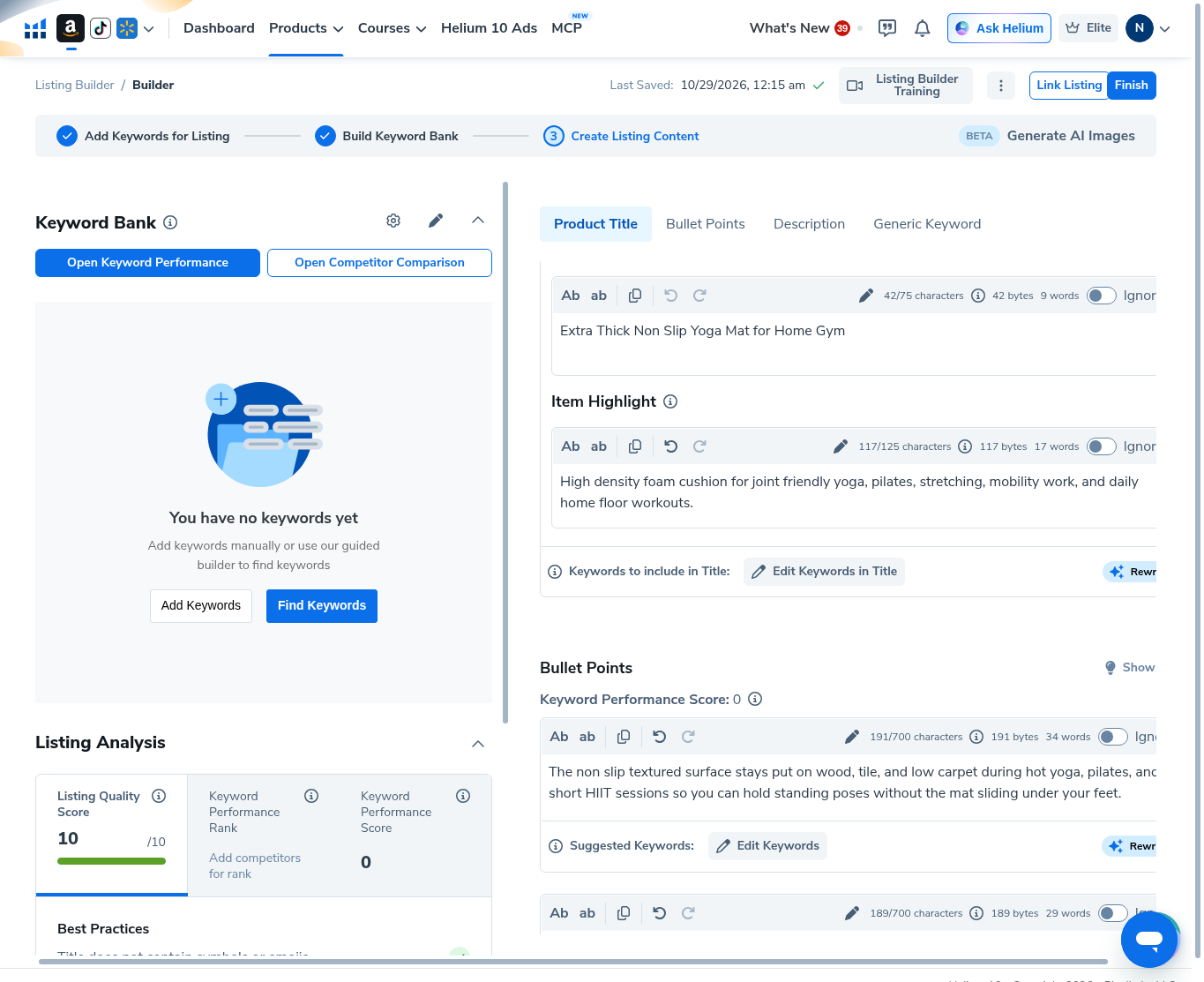
We typed the yoga-mat title and highlight manually. Listing Quality Score already showed 10/10 once enough Best Practices items passed; Keyword Performance Score stayed 0 because the bank was empty.
Step 5 — Fill title and item highlight (manual)
Product Title tab:
- Item name:
Extra Thick Non Slip Yoga Mat for Home Gym— 42/75 characters - Item highlight: high-density foam cushion copy — 117/125 characters
We did not click Rewrite or Edit Keywords in Title. Last saved stamped 10/29/2026, 12:15 am.
Step 6 — Fill bullet points (manual)
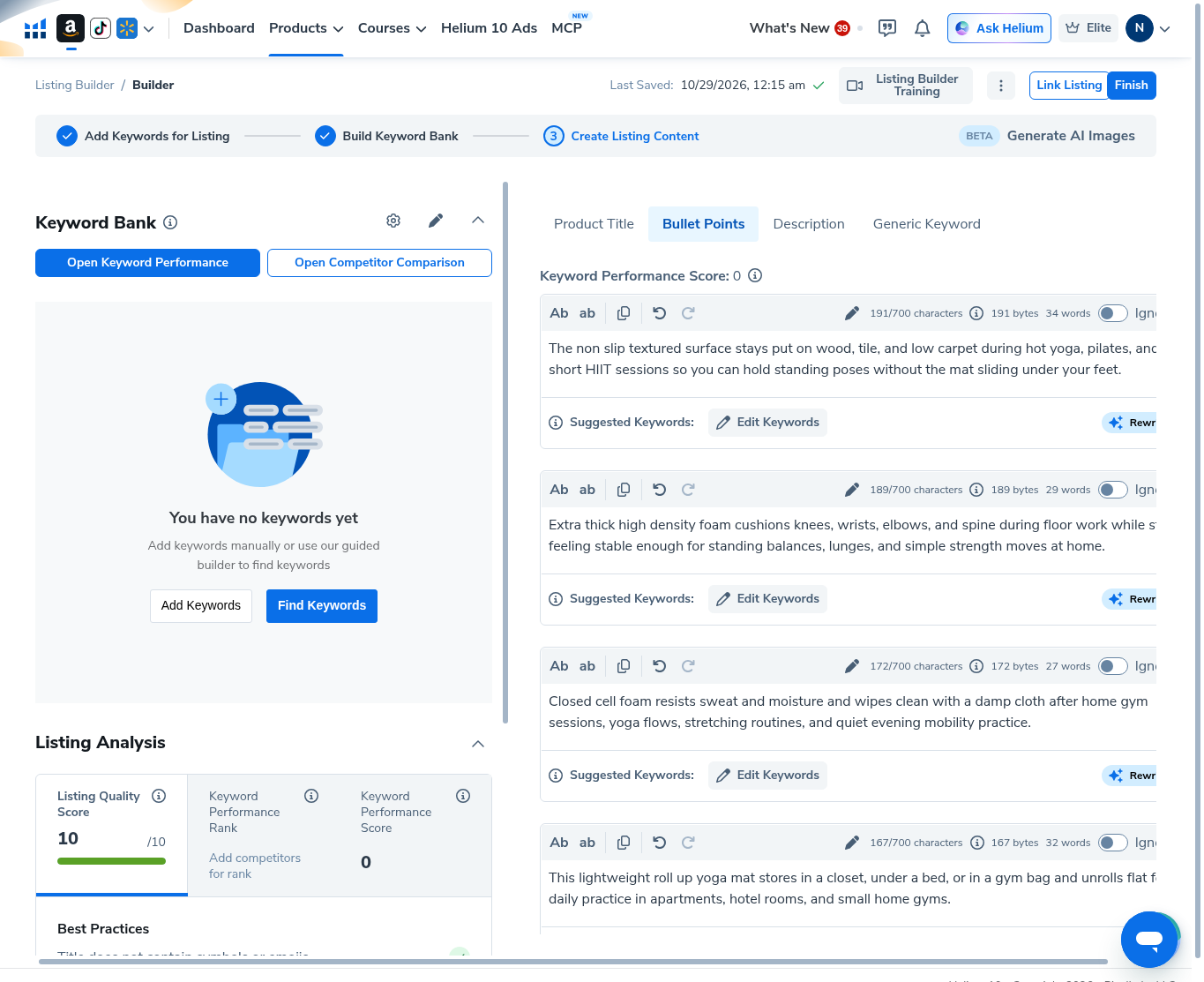
Bullet Points tab with four filled slots (each under the 700 character meter):
- 1. Non-slip textured surface for wood / tile / low carpet (~191/700)
- 2. Extra thick high-density foam cushioning (~189/700)
- 3. Closed-cell foam wipe-clean copy (~172/700)
- 4. Lightweight roll-up storage copy (~167/700)
Rewrite sparkle buttons were visible; we did not use them. Keyword Performance Score on bullets stayed 0.
Step 7 — Description and generic keywords (manual)
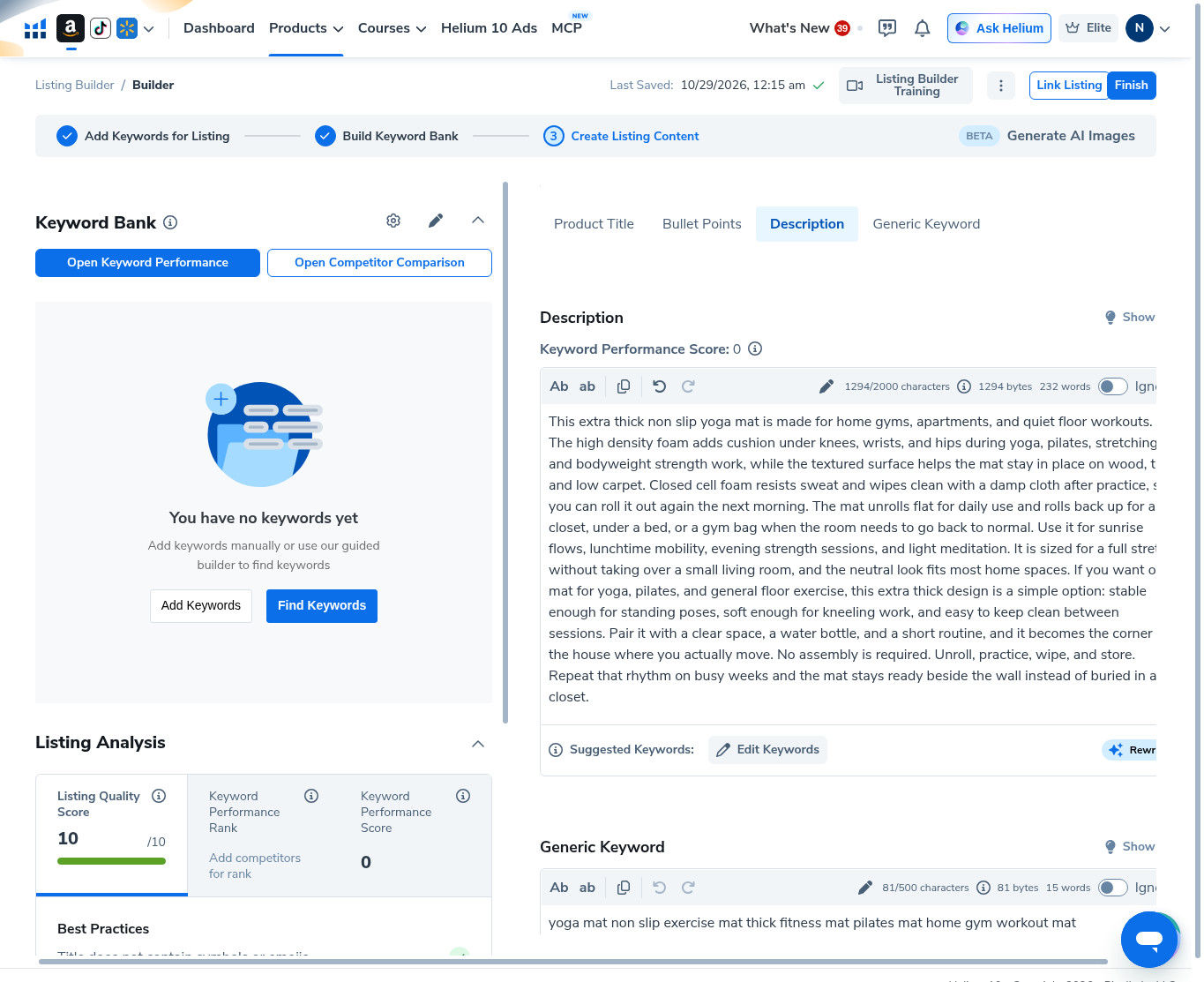
Description tab: long-form yoga-mat copy at 1294/2000 characters (232 words). Generic Keyword field: yoga mat non slip exercise mat thick fitness mat pilates mat home gym workout mat — 81/500 characters.
Step 8 — Read Listing Quality Score and Best Practices
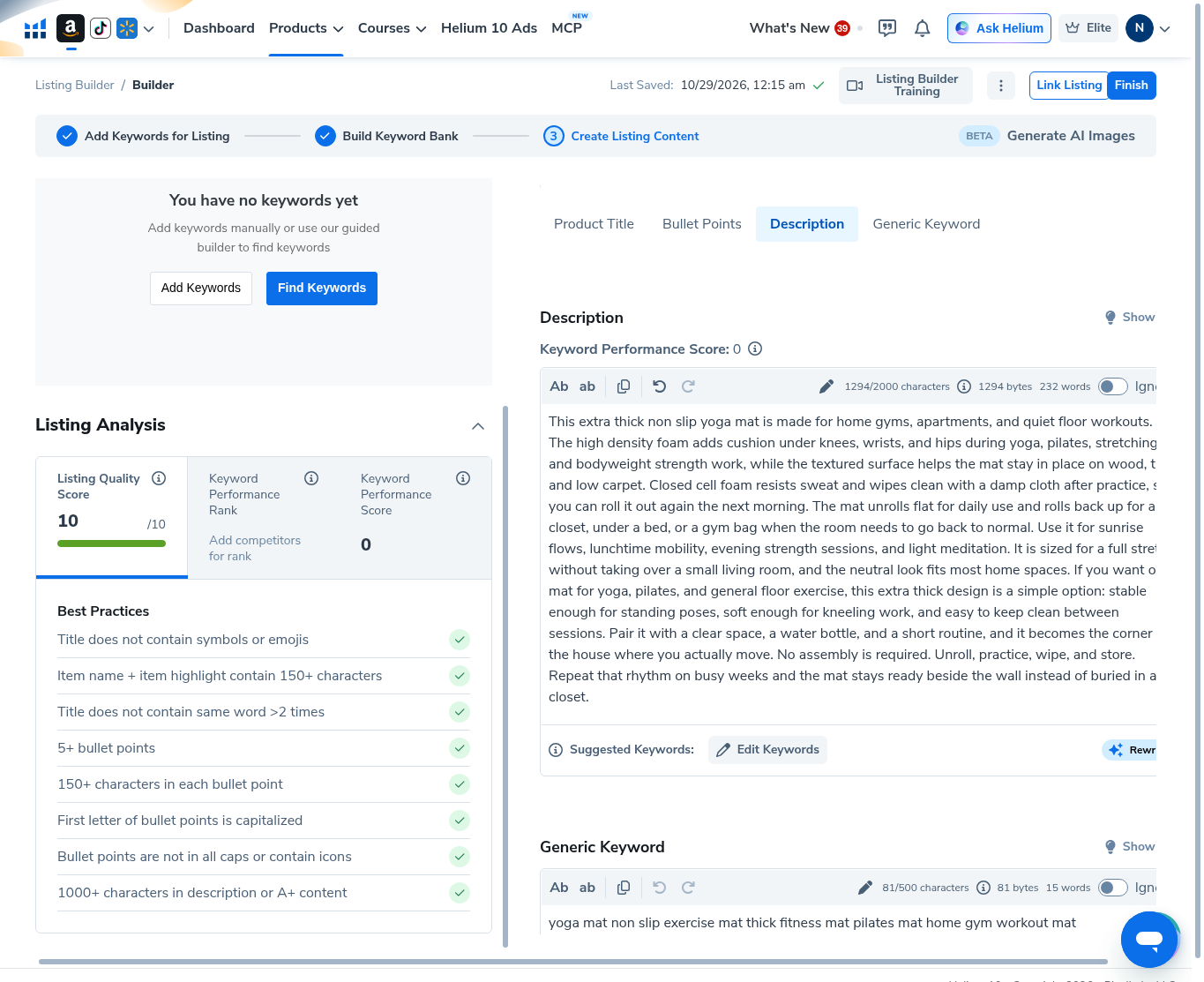
With long enough manual copy, Listing Quality Score read 10/10 and the Best Practices checklist showed greens such as:
- Title does not contain symbols or emojis
- Item name + item highlight contain 150+ characters
- Title does not contain same word >2 times
- 5+ bullet points / 150+ characters per bullet / first letter capitalized / not all caps
- 1000+ characters in description or A+ content
Keyword Performance Rank still asked to add competitors; Keyword Performance Score stayed 0. Treat 10/10 as Helium’s checklist—not Amazon SEO proof.
Step 9 — Confirm the draft on My Listings
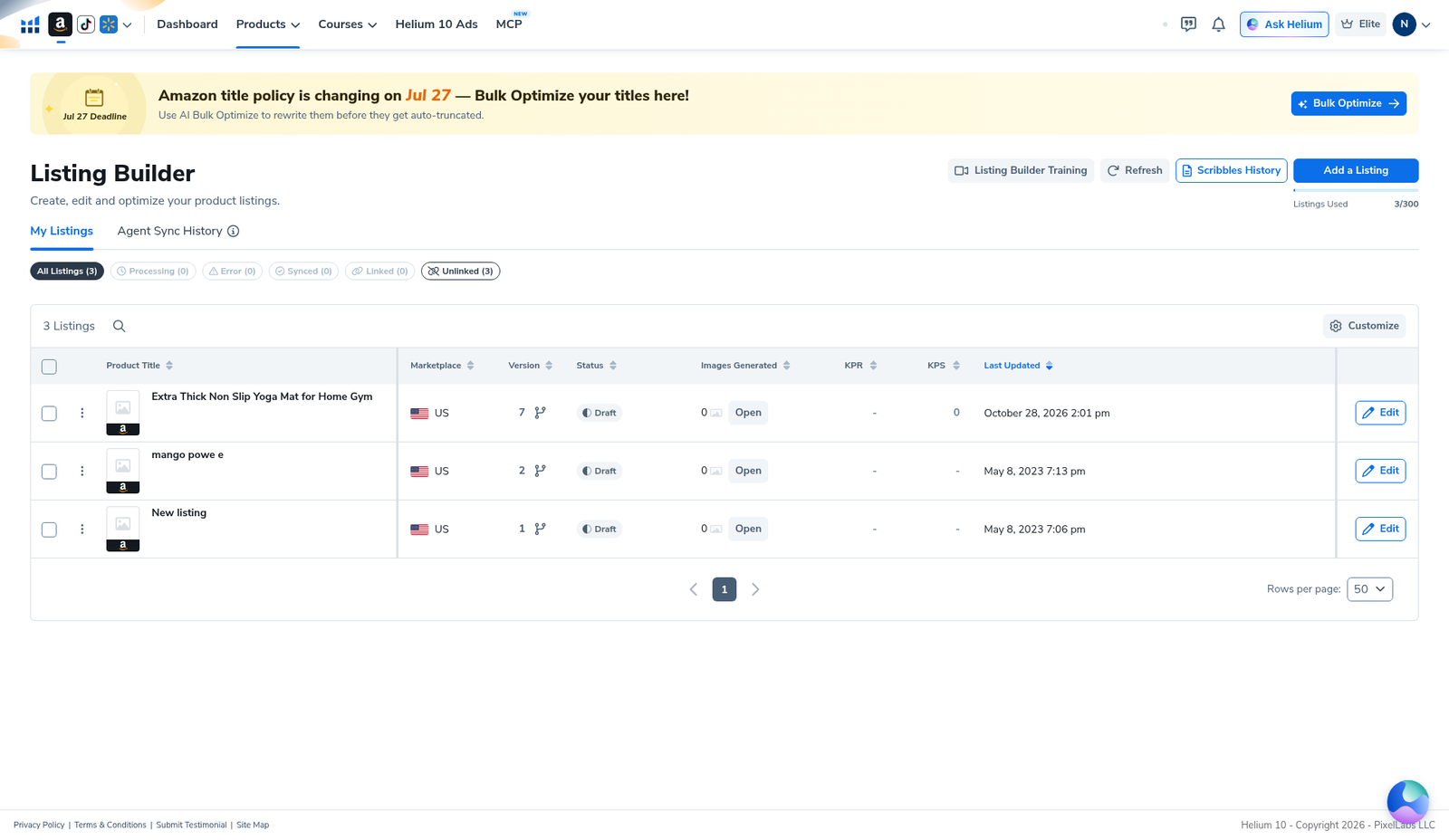
Back on My Listings we saw Listings Used 3/300, filter Unlinked (3), and our yoga-mat row:
- Title: Extra Thick Non Slip Yoga Mat for Home Gym
- Marketplace: US
- Status: Draft
- Images Generated: 0
- Draft id (from our session notes): 990639
Two older draft rows from 2023 also counted toward the 3/300 quota. Nothing was Synced or Linked.
When to use Listing Builder (and when not to)
Use this path when you want a structured title / bullets / description draft with character meters and a checklist before touching Seller Central, or when you want to see AI and keyword-bank limits before spending credits.
Don’t use this article as proof that AI wrote the copy (it did not), that 10/10 guarantees ranking, or that Optimize-your-listing works without Seller Central.
Related: Listing Analyzer · Frankenstein / Keyword Processor · Index Checker.
Common mistakes
- Burning Start AI Work before you know your angle—watch the 0/100 meter first.
- Expecting Optimize your listing to work without Seller Central—Connect Now is required for that card.
- Leaving marketplace wrong (non-US when you sell US)—character and keyword rules follow the picker.
- Treating 10/10 as Amazon approval—it is Helium’s Best Practices checklist only.
- Assuming Keyword Performance Score moves with empty Keyword Bank—ours stayed 0.
Ready to try Helium 10?
New checkout codes we verified 2026-10-28:
Monthly: AIPILOTDAILY20 (20% off for 6 months) · Annual: prefer AIPILOTDAILY10 (≈10% forever on our annual test). Confirm on your own summary.
FAQ
Where is Helium 10 Listing Builder?
Products → Listing Optimization → Listing Builder (Build & Optimize Listings). Direct path: members.helium10.com/listing-builder.
Did you use AI to write the yoga-mat listing?
No. AI panel showed Listings Used 0/100. All copy in this guide was typed manually. We did not click Start AI Work, Rewrite, or Generate images with AI.
Why is the Listing Quality Score 10/10?
After we filled title, highlight, four long bullets, and a 1000+ character description, Helium’s Best Practices checklist went green. That is a tool checklist, not an Amazon ranking or conversion claim.
What is draft 990639?
The scratch Amazon US yoga-mat draft we created for this walkthrough. Status stayed Draft / Unlinked. It is not a live ASIN you should copy as a product pick.
Do I need Seller Central?
Not for Create from scratch. You do need a connected Seller Central account for Optimize your listing / Link Listing sync paths. We left Seller Central disconnected.
Which coupon code should I use?
Monthly: AIPILOTDAILY20 (20% off for 6 months). Annual: prefer AIPILOTDAILY10. Annual is not 20%. Details: coupon page; link: https://i.helium10.com/jR0Z10.
Bottom line
Open Listing Builder, Create from scratch on the right marketplace, optionally skip keyword-bank Apply, write (or later AI-assist) your copy while watching the 0/100 AI meter, and read Listing Quality Score as a checklist—not Amazon proof. Confirm the row stays Draft on My Listings until you intentionally link or sync. For research before drafting, see Xray and Cerebro. Need Helium 10 access? Use AIPILOTDAILY20 (monthly) or AIPILOTDAILY10 (annual) at https://i.helium10.com/jR0Z10. More: Helium 10 guides.

Leave a Reply