
Last verified: 2026-10-29
Affiliate disclosure: We may earn a commission if you subscribe to Helium 10 through our links. Screenshots and workflow notes come from our own signed-in Helium 10 account (English UI, Xray Chrome extension). Codes: AIPILOTDAILY20 and AIPILOTDAILY10 via https://i.helium10.com/jR0Z10. Offers change, so recheck before paying.
Quick answer
Helium 10 Xray is the Chrome extension overlay on Amazon search and product pages. It shows niche summaries, per-ASIN sales estimates, fulfillment, and shortcuts into other Helium tools—without leaving amazon.com.
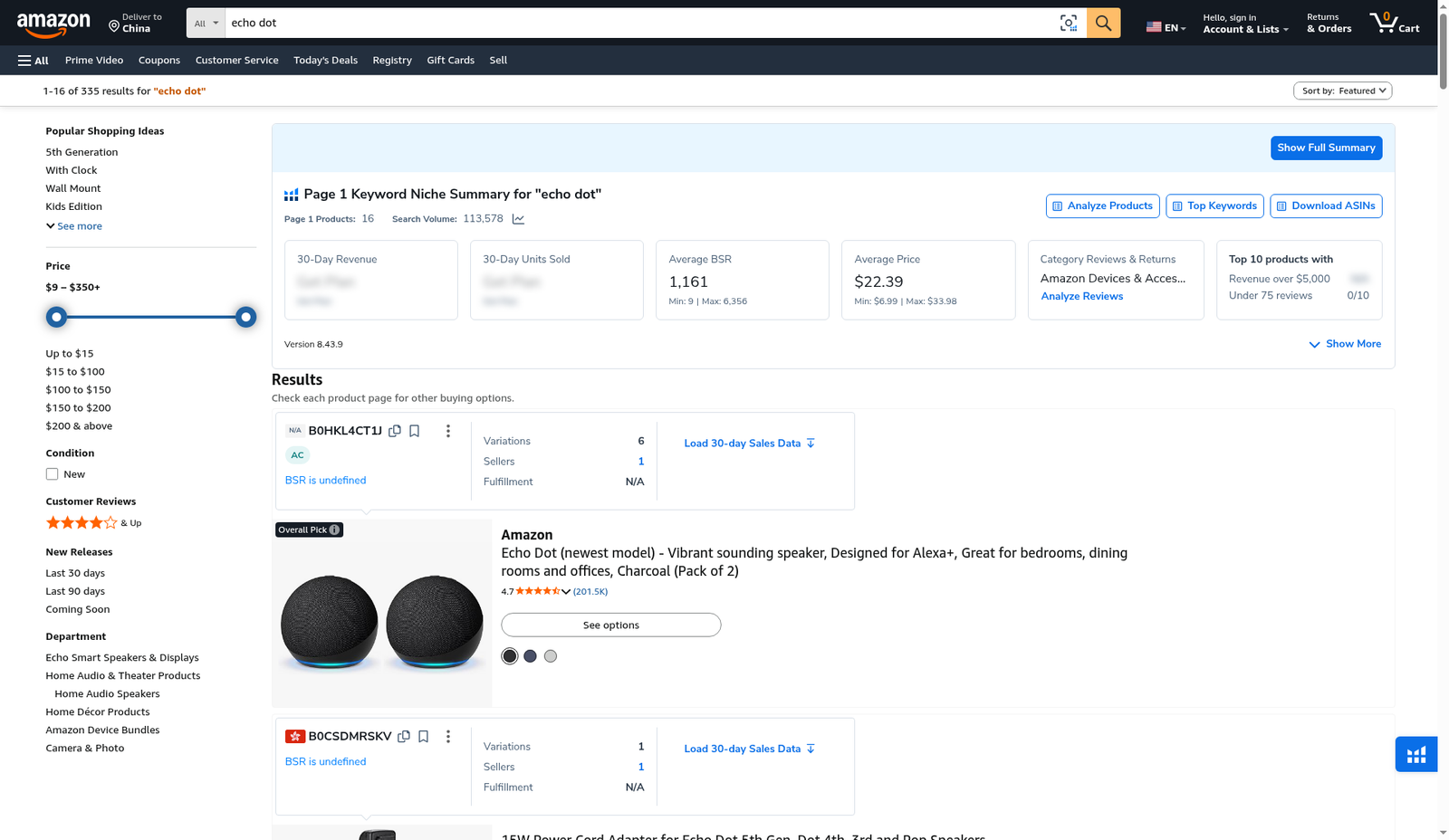
On 2026-10-29 (English UI, extension Version 8.43.9) we searched echo dot on Amazon US. Page 1 niche summary showed search volume 113,578, average BSR 1,161 (min 9 / max 6,356), average price $22.39 (min $6.99 / max $33.98), and 16 page-1 products. Product cards included ASIN B0CSDMRSKV at ~$27,651 / 3,956 units (30-day) and B0FRRMD96F at ~$830,970 / 24,771 units. Deliver-to showed China, but Amazon + Xray UI stayed English.
| Field | What we saw |
|---|---|
| Where | Chrome extension on amazon.com search for “echo dot” |
| Extension version | 8.43.9 |
| Niche summary | Search volume 113,578 · Avg BSR 1,161 · Avg price $22.39 · 16 page-1 products |
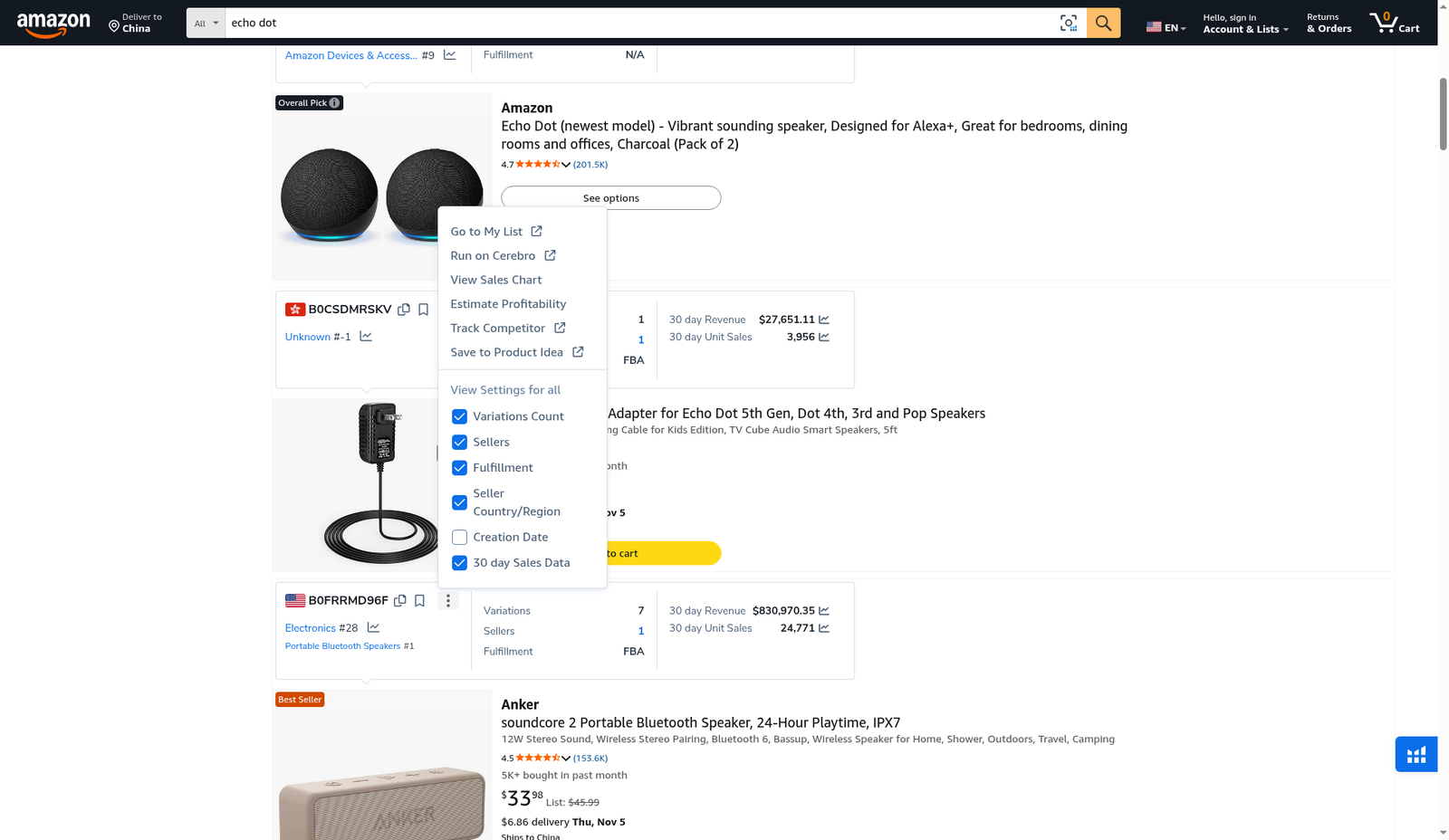
| Example card A | B0CSDMRSKV — 30-day revenue $27,651.11 · 3,956 units · FBA |
| Example card B | B0FRRMD96F — 30-day revenue $830,970.35 · 24,771 units · Electronics #28 |
| Row menu | Cerebro, Sales Chart, Estimate Profitability, Track Competitor, column toggles |
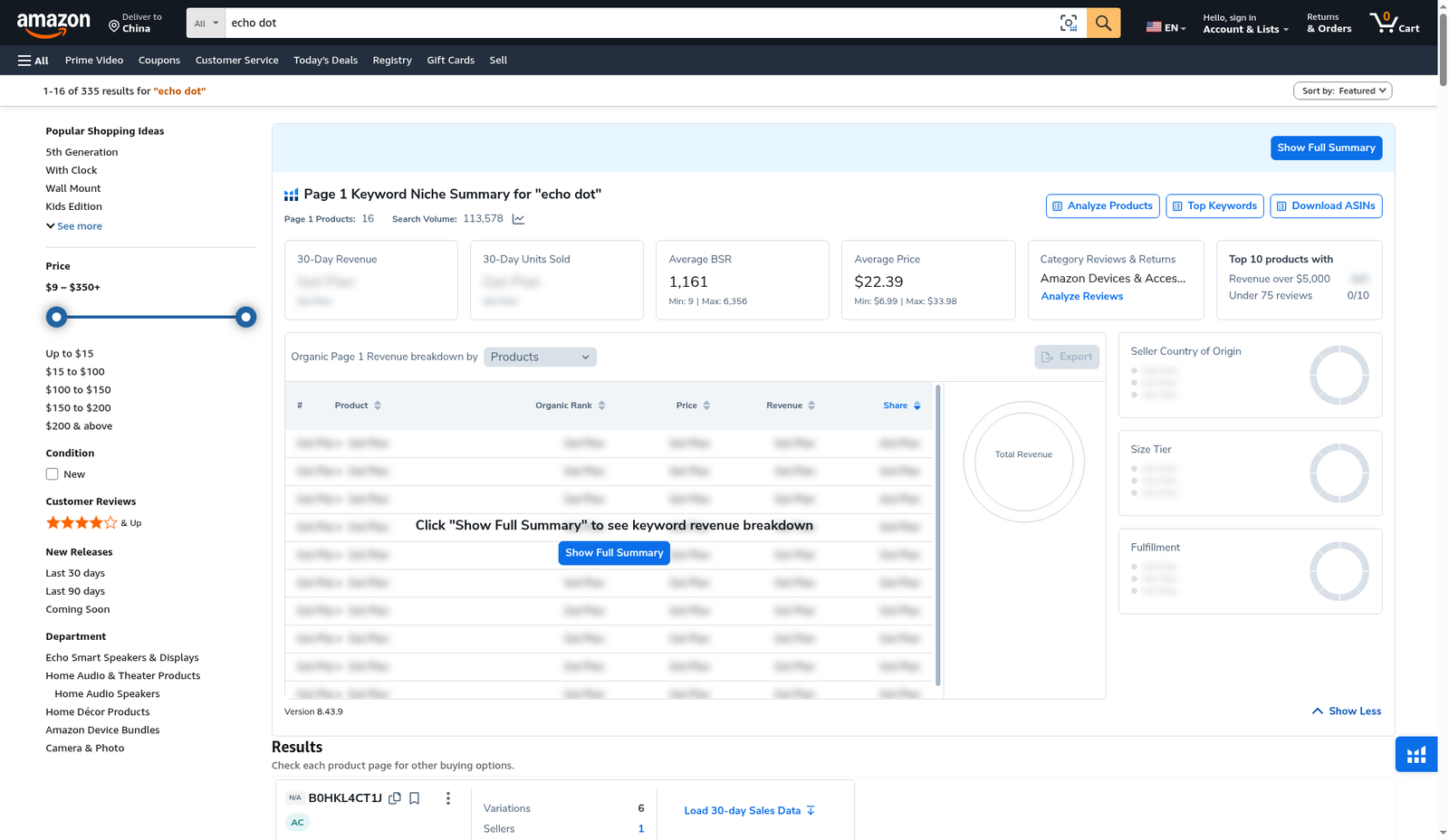
| Blurred tiles | Some niche 30-day revenue / units tiles blurred in our capture—do not invent them |
Honest takeaway: Xray validates live SERP economics after a database shortlist. It is not a substitute for Black Box discovery or Seller Central truth. Some summary tiles were blurred in our shot—we only quote numbers that are visible on the product cards.
Related: Black Box · Cerebro · Index Checker · coupons.
Ready to try Helium 10?
New checkout codes we verified 2026-10-29:
Monthly: AIPILOTDAILY20 (20% off for 6 months) · Annual: prefer AIPILOTDAILY10 (≈10% forever on our annual test). Confirm on your own summary.
What I tested vs what I did not claim
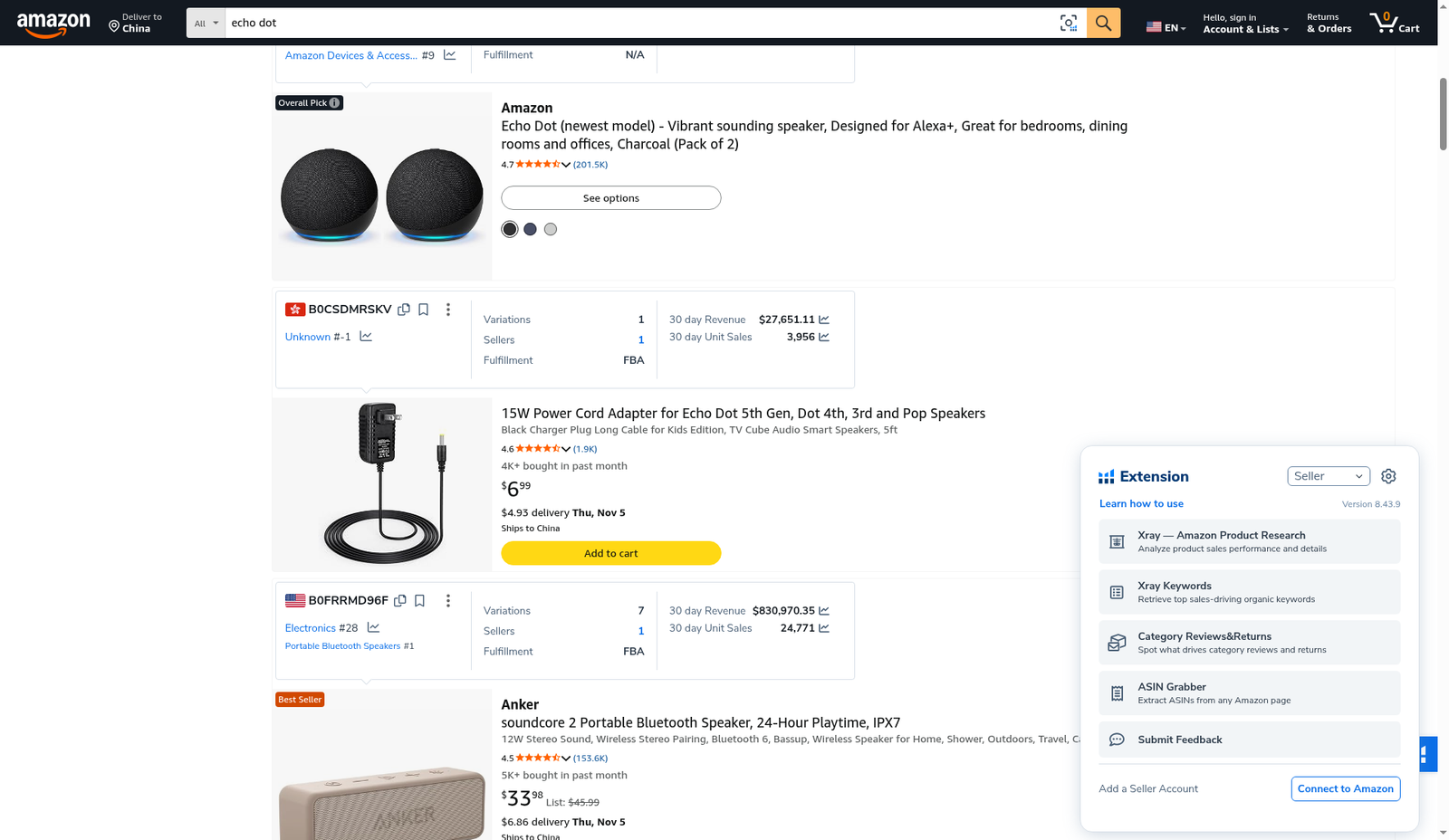
Tested: opened Xray on an echo-dot Amazon search; captured collapsed and expanded niche summary; read visible product-card 30-day revenue/units; opened row overflow menu + column visibility; opened the floating extension panel listing Xray / Xray Keywords / Category Reviews & Returns / ASIN Grabber.
Did not claim: inventing blurred niche revenue totals; that Deliver-to China changes Xray currency math in ways we did not measure in this package; annual coupon = 20%. Link only https://i.helium10.com/jR0Z10.
Step 1 — Install / open the extension on a search page
On amazon.com, search your keyword (we used echo dot). Open the Helium 10 extension panel. Version string in our shot: 8.43.9. Menu entries included Xray — Amazon Product Research, Xray Keywords, Category Reviews & Returns, and ASIN Grabber, plus a Connect to Amazon CTA.
Step 2 — Read the Page 1 Keyword Niche Summary
Xray injects a Page 1 Keyword Niche Summary for ‘echo dot’ bar. Visible KPIs: search volume 113,578, average BSR 1,161, average price $22.39, category Amazon Devices & Accessories, and top-10 quick filters (Revenue over $5,000 / Under 75 reviews — both 0/10 in our capture). Buttons: Analyze Products, Top Keywords, Download ASINs, Show Full Summary.
Step 3 — Expand the full summary (when you need the breakdown)
Click Show Full Summary for the organic page-1 revenue breakdown table and side charts (seller country, size tier, fulfillment). In our expanded shot, some revenue cells stayed blurred / gated—click through only what your plan unlocks, and do not invent hidden cells.
Step 4 — Read per-ASIN revenue cards on the SERP
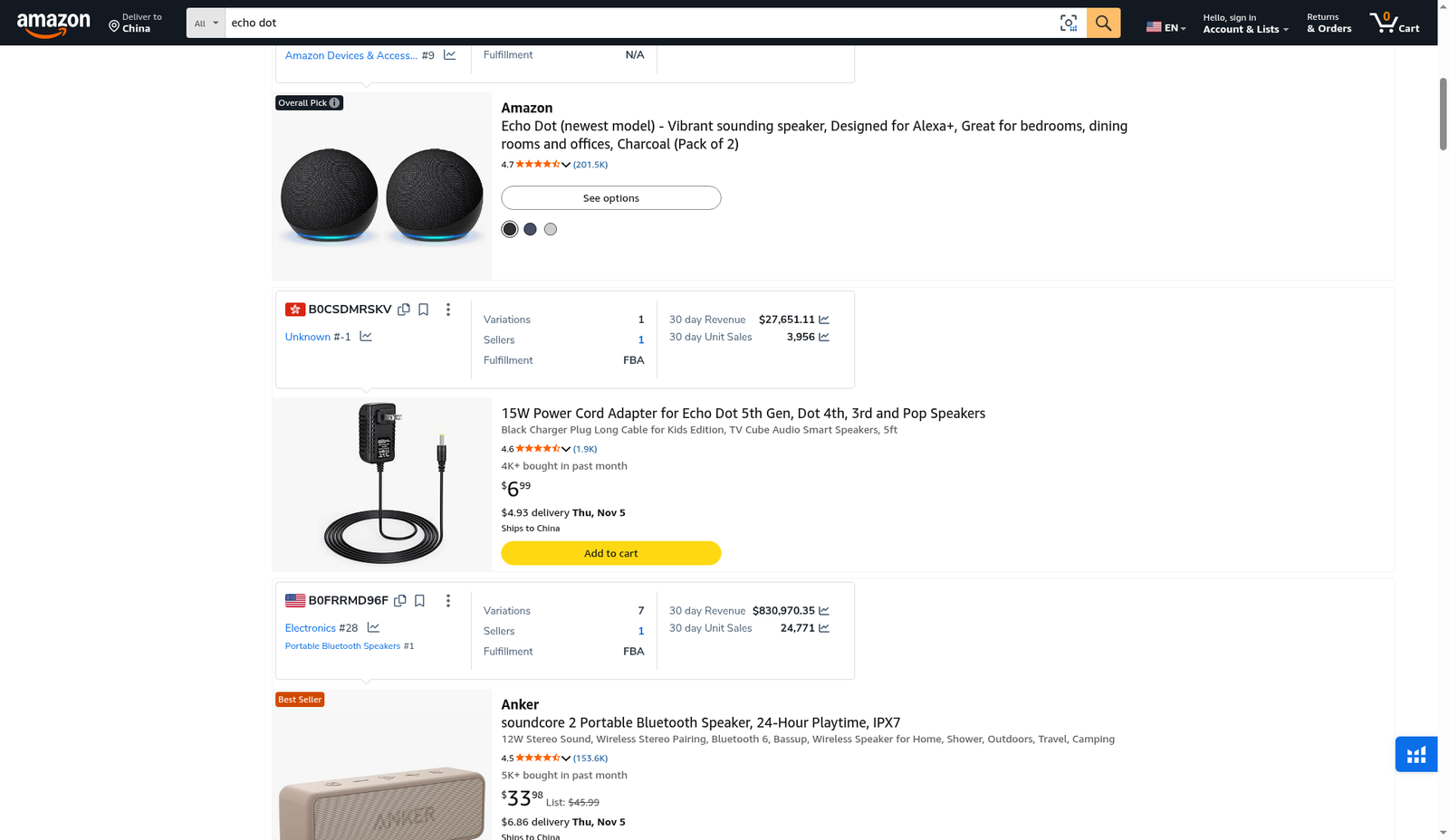
Under listings, Xray shows ASIN chips with variations, sellers, fulfillment, and 30-day estimates. Examples we could read clearly:
- B0CSDMRSKV — FBA · 30-day revenue $27,651.11 · 3,956 units
- B0FRRMD96F — FBA · Electronics #28 / Portable Bluetooth Speakers #1 · revenue $830,970.35 · 24,771 units
Note: SERP contamination is real—accessories and adjacent speakers appear in an echo-dot search. Always check the actual product before you model COGS.
Step 5 — Row menu and column settings
Open the overflow on a product row for shortcuts: Go to My List, Run on Cerebro, View Sales Chart, Estimate Profitability, Track Competitor, Save to Product Idea. Column toggles we saw: Variations Count, Sellers, Fulfillment, Seller Country/Region, Creation Date, 30 day Sales Data.
When to use Xray
Use it after a Black Box shortlist to validate page-1 BSR, fulfillment, and 30-day sales on the live SERP. Do not treat Xray estimates as accounting, and do not skip supplier / compliance work.
Common mistakes
- Modeling profitability on accessories that rank for your keyword but are not your product type.
- Quoting blurred niche totals you cannot see.
- Skipping Cerebro / Index Checker after Xray and launching on SERP vibes alone.
FAQ
Is Xray the same as Black Box?
No. Black Box is database search; Xray is a live Amazon page overlay; Index Checker checks keyword indexing.
Which extension version did you test?
8.43.9 (shown on the niche summary and extension panel).
CTA
Pin Helium 10, search your keyword, read the niche summary, and load 30-day cards on real contenders. Access: AIPILOTDAILY20 / AIPILOTDAILY10 via https://i.helium10.com/jR0Z10. Confirm on the coupon page. More: guides.

Leave a Reply