
Last verified: 2026-10-30 · Author: Alexander Vance · Human review
Affiliate disclosure: We may earn a commission if you buy Helium 10 through our links, at no extra cost to you. Helium 10 UI notes and screenshots come from our logged-in Helium 10 members account (English UI, Helium 10 Ads / Adtomic enable-landing captures 2026-10-29 / verified 2026-10-30). New-customer checkout figures for AIPILOTDAILY20 / AIPILOTDAILY10 come from our 2026-10-28 tests via https://i.helium10.com/jR0Z10 (no payment completed). Critical honesty: we did not click Enable Ads, authorize Amazon Advertising, or configure a live keyword-harvesting rule—so this guide documents product copy + operator workflow, not a live search-term harvest from our account.
Quick answer
Helium 10 Ads keyword harvesting: on the English enable landing (2026-10-29), Helium 10 Ads (powered by PACVUE / Adtomic branding) describes rules-based automatic keyword harvesting and negation under the Rules-based Advertising tab, and AI campaigns that “automatically incorporate relevant keywords” under AI Advertising. Keyword harvesting in seller talk means promoting converting search terms from auto / broad / search-term reports into exact / phrase targets (and negating junk). Honest gap: our capture package is the pre-enable marketing UI only—no live Ads console, no search-term report screenshot, no configured harvest rule. Use this as a first-look + workflow brief; for opening Ads itself see How to use Helium 10 Ads (WP 92191). PPC tool context: best Amazon PPC tools.
| Field | What we saw (English UI) |
|---|---|
| Tool | Helium 10 Ads · powered by PACVUE · enable landing |
| Harvesting mention | Rules tab: “automatic keyword harvesting and negation” |
| AI mention | AI tab: Sponsored Product campaigns that incorporate relevant keywords |
| Live harvest UI | Not captured — Enable Ads not clicked |
| Sibling | Ads first look · PPC hub |
| Upstream keywords | Cerebro listing optimization · keyword hub |
Honest takeaway: Helium’s landing promises harvesting automation; we cannot prove how the live rule builder behaves on our login until Ads is enabled. Do not treat marketing ACoS testimonials as your account results.
Related: How to use Helium 10 Ads · PPC tools hub · Helium 10 vs Jungle Scout for PPC · Cerebro beginners · FBA hub · coupon.
Pick your Helium 10 plan, then enter your AI Pilot Daily code.
Confirm eligibility, duration, renewal terms and the final amount on your checkout. Existing subscriptions usually cannot apply these codes.
What “keyword harvesting” means for Amazon PPC
Before Helium 10 Ads branding, sellers already harvested keywords manually:
- Source: Amazon search-term reports, auto campaigns, broad/phrase explorers, or a reverse-ASIN bank from Cerebro.
- Promote: move converting queries into dedicated exact (sometimes phrase) targets with controlled bids.
- Negate: add wasted queries as negative exact/phrase so they stop burning spend.
- Loop: re-check reports on a cadence; harvesting is maintenance, not a one-click launch.
Helium 10 Ads product copy positions rules (and AI) as automation for parts of that loop—especially “automatic keyword harvesting and negation” across campaigns. That is the claim. Our evidence package documents the claim on the enable landing; it does not show a finished harvest job.
Step 1 — Open Helium 10 Ads (enable landing)
Sign in → top nav Helium 10 Ads (NEW badge on our Elite capture). First open may show a loading shell, then the PACVUE enable page: “Helium 10 Ads is included in your subscription…” with blue Enable Ads and white Learn More.
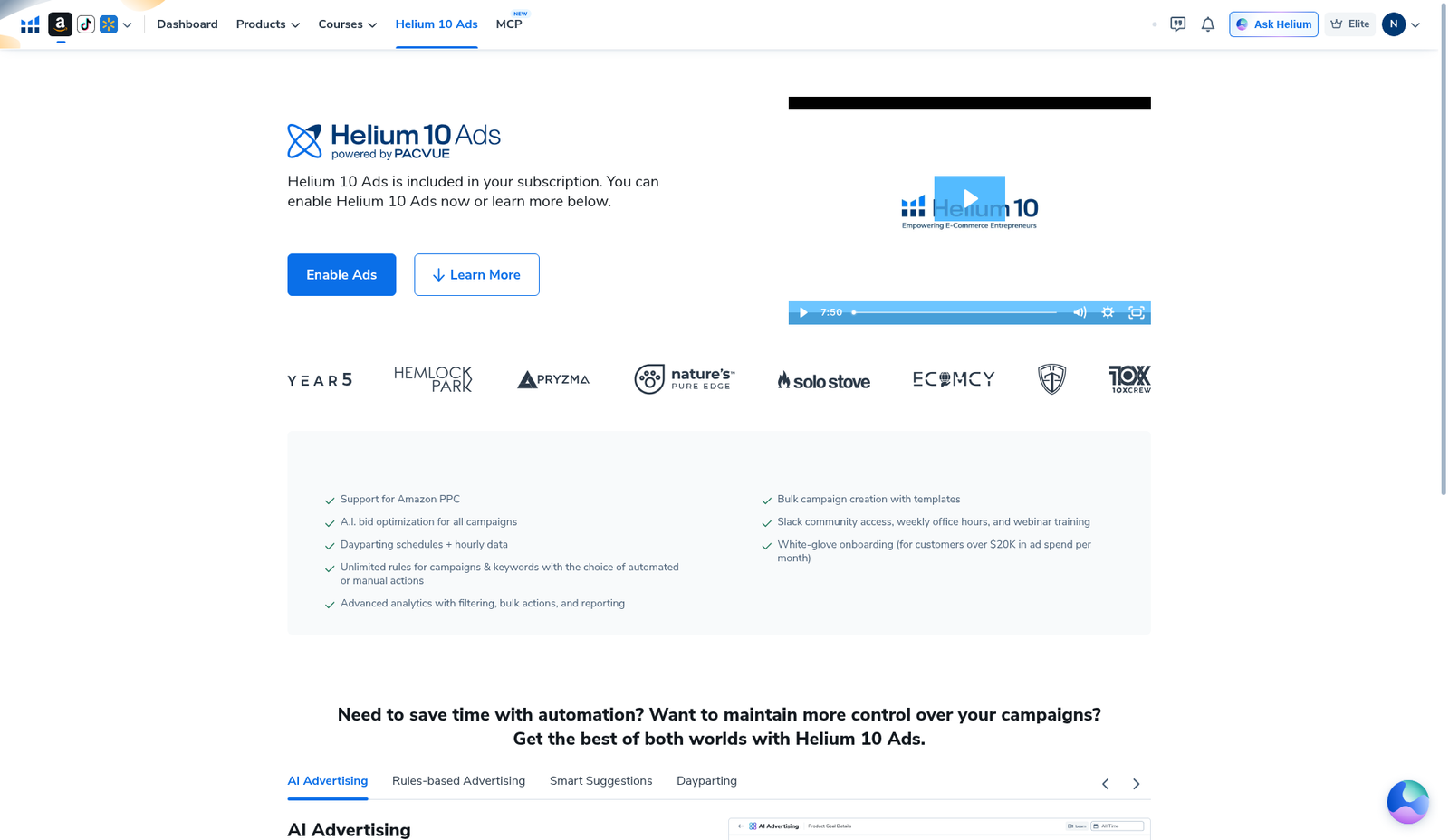
Full first-look walkthrough (loading shell, checklist, what we refused to click): How to use Helium 10 Ads. We still did not enable Ads for this keyword-harvesting article.
Step 2 — Read the Rules tab (where harvesting is named)
Scroll to the feature tabs. Open Rules-based Advertising. On our English capture the heading reads “Create, Manage, and Automate Campaigns in Bulk,” and a bullet explicitly says you can create and apply rules for automatic keyword harvesting and negation, bid adjustment, budgets, and more across multiple campaigns. A marketing inset shows a “Create Rule – Bid” style preview with ACoS / lookback criteria—not our live rule library.
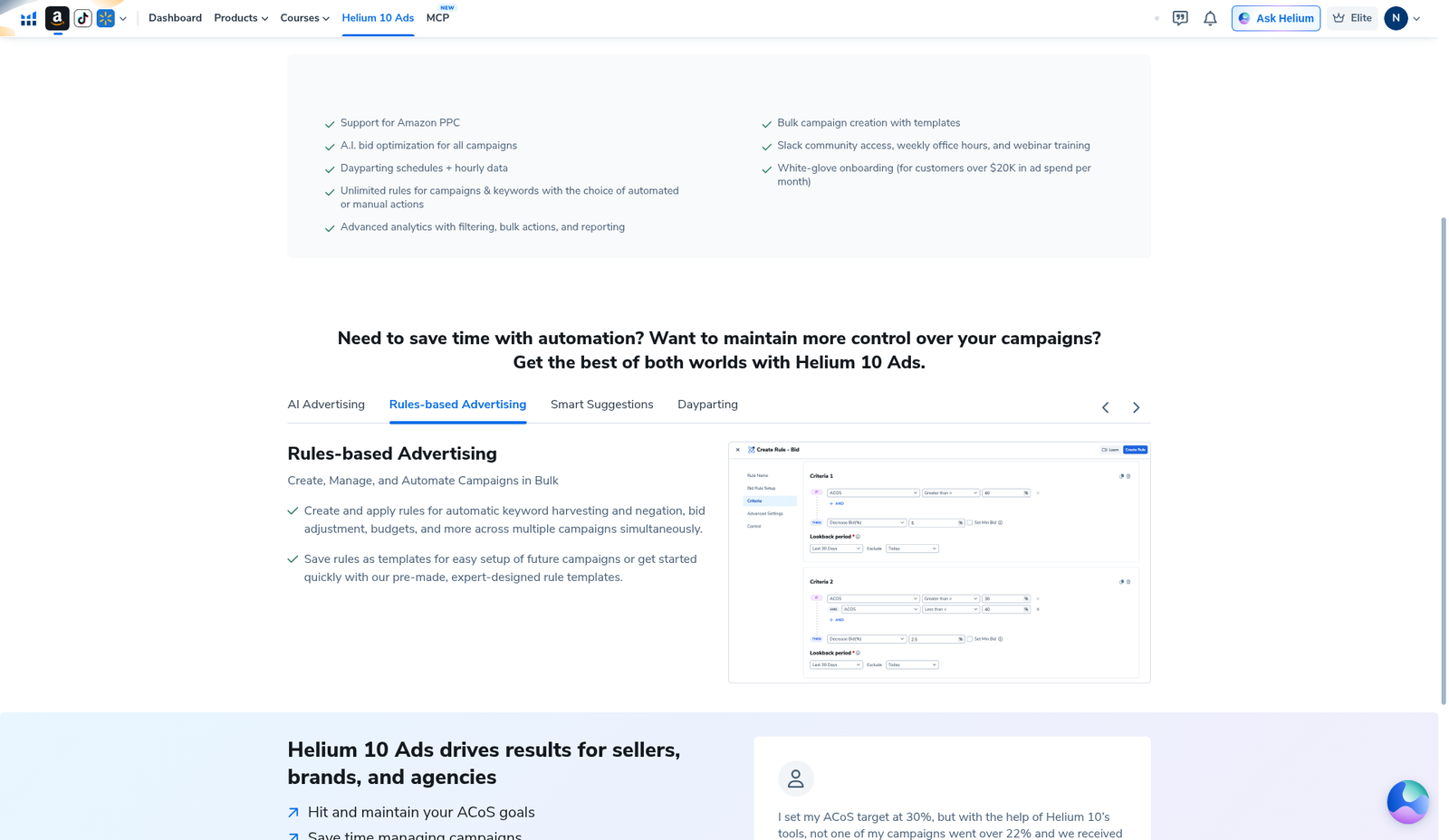
Operator reading of that promise (confirm labels after you enable):
- Define criteria (orders, clicks, ACoS, spend, lookback—exact fields depend on your live UI).
- Choose an action: harvest (add as target) vs negate vs bid change.
- Scope campaigns / ad groups carefully so a loose rule does not flood every ASIN.
- Save as a template if the product supports it; monitor the first week manually.
We will not invent the exact post-enable form fields, match-type defaults, or “recommended” ACoS thresholds. Those belong to your Ads workspace after enablement.
Step 3 — AI Advertising vs rules harvesting
The AI Advertising tab describes Target ACoS-style objectives and Sponsored Product campaigns that automatically incorporate relevant keywords and manage bids. That is a different path from explicit harvest/negate rules: AI may expand and bid without you approving every search term.
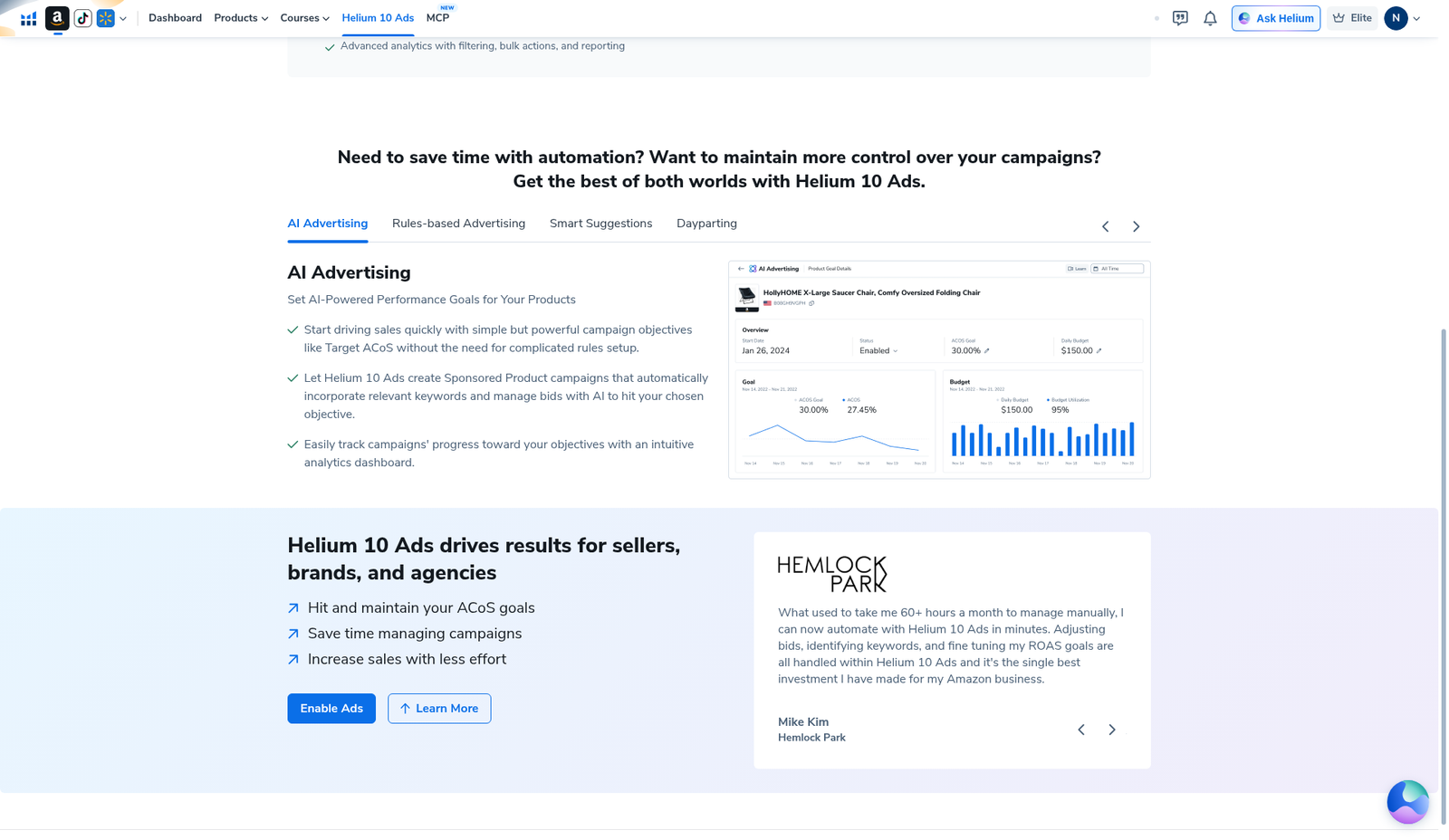
How we think about the split (seller practice, not a Helium guarantee):
| Approach | Best when | Risk |
|---|---|---|
| Rules harvesting + negation | You want explicit promote/negate logic from search terms | Bad criteria → mass wrong exacts or over-negation |
| AI keyword incorporation | You accept less manual term review for speed | Less transparency on every term added |
| Manual report harvest | Small catalog / learning phase | Time cost; easy to skip weekly |
Many operators still seed structure with Cerebro / Magnet banks, then let Ads automation refine. Upstream keyword triage: Cerebro for listing optimization · irrelevant keywords filter · hub: keyword research tools.
Step 4 — Practical harvest workflow (what we would do after enable)
Until we have live Ads screenshots, here is the operator sequence we recommend sellers verify in their own console—not a claim we executed it:
- Enable Ads only when you are ready to connect Amazon Advertising and set real budgets (Ads does not spend “included” money for free).
- Structure first: auto or broad discovery campaigns per ASIN / product group, plus exact campaign shells for winners.
- Harvest rule draft: promote terms with orders (or strong CTR + conversion) over a lookback you trust; start conservative.
- Negation twin: wasteful terms (wrong category, competitor brands you will not bid, gift-card bait) → negative exact.
- Bid guardrails: separate rules for bid up/down vs harvest so one misfire does not do everything.
- Weekly human audit: export or review newly harvested terms; kill brand pollution and irrelevant long-tails.
Suite comparison if you are shopping PPC stacks: Helium 10 vs Jungle Scout for PPC · roundup: best Amazon PPC tools.
Step 5 — Feed harvest with research (Black Box → Cerebro → Ads)
Harvesting works better when discovery campaigns are not pure garbage queries. Typical AI Pilot Daily stack:
- Shortlist ASINs in Black Box beginners (WP 92274) / Black Box for private label (WP 92297).
- Reverse keepers in Cerebro; filter noise; export once.
- Map listing buckets, then seed PPC exacts for head terms you already accept as paid-only.
- Let Ads rules harvest incremental converting queries—not replace research.
Seasonality / demand timing for the product itself is a Black Box Sales topic (seasonality filter, WP 92300)—separate from keyword search-volume filters in Cerebro or Black Box Keywords.
Keyword harvesting mistakes
- Enabling Ads without a budget / negative plan — automation amplifies spend mistakes.
- Harvesting on clicks alone — clicky irrelevant terms become expensive exacts.
- No negation twin — you promote winners but never stop losers.
- One global rule on every ASIN — different niches need different thresholds.
- Trusting landing testimonials as your ACoS — marketing quotes are not your account.
- Skipping Cerebro / listing cleanup — harvesting cannot fix a listing that cannot convert.
- Claiming we showed a live harvest UI — we did not; package is enable-landing only.
What we tested vs what we did not claim
Tested / visible (English UI, Ads enable landing): Helium 10 Ads nav entry; PACVUE enable hero; feature checklist; AI Advertising tab with mock campaign graphic; Rules-based Advertising tab naming automatic keyword harvesting and negation; empty/loading Ads canvas states.
Did not claim / missing evidence: clicking Enable Ads; connecting Amazon Advertising; creating a harvest or negate rule; live search-term report; account ACoS / spend; that harvesting guarantees profitable PPC. Affiliate only https://i.helium10.com/jR0Z10.
When Ads harvesting is worth turning on
Worth exploring when: Helium 10 suite already earns its keep (Black Box / Cerebro / Tracker), you have Amazon Advertising access, and you will audit rules weekly.
Wait when: you have not opened Ads enablement yet, your listing cannot convert, or you expected Ads alone to justify the subscription—see honesty on Is Helium 10 worth it and the Ads section of PPC tools hub.
Harvesting cadence we recommend (after enable)
Automation does not remove the calendar. A simple cadence many sellers can actually keep:
- Daily (light): glance at spend / ACoS vs goal on priority ASINs—pause runaway ad groups before rules compound the damage.
- 2–3× weekly: review newly harvested exacts; delete obvious junk; tighten bids on weak converters.
- Weekly: pair Ads harvest output with a Cerebro / listing check if conversion fell—harvesting cannot fix a broken offer.
- Monthly: prune stale exacts, refresh negatives, and re-seed discovery if search-term diversity collapsed.
Until we enable Ads on this login, treat the cadence as operator advice—not a screenshot-backed Ads UI tour. First-look enable path remains How to use Helium 10 Ads.
Frequently asked questions
Does Helium 10 Ads support keyword harvesting?
Product copy on the Rules-based Advertising tab explicitly mentions automatic keyword harvesting and negation. We have not configured a live rule on our login.
Is harvesting the same as Cerebro reverse ASIN?
No. Cerebro researches competitor keywords for listing / PPC seed lists. Harvesting (in Ads) promotes converting search terms from ad traffic into targets. Use both.
Do I need to enable Ads to harvest keywords?
For Helium 10 Ads automation, yes—you need the Ads workspace connected. You can still harvest manually from Amazon reports without Helium Ads.
Why are there no live harvest screenshots?
Honest gap: we refused Enable Ads on the 2026-10-29 capture, so only enable-landing / marketing UI is available. Recapture after a deliberate enable session if you need live proof shots.
Where should I start if Ads is new?
How to use Helium 10 Ads → this harvesting brief → PPC hub. Upstream: Cerebro beginners.
Which Helium 10 code should I use?
AIPILOTDAILY20 for monthly (Diamond test due $287.20); AIPILOTDAILY10 for annual or long stays (~10% ongoing). Start at https://i.helium10.com/jR0Z10.
Bottom line
- Harvesting = promote converting search terms + negate waste—Ads Rules copy names automation for that.
- Evidence package = English enable landing (Rules + AI tabs), not a live harvest console.
- Pair Ads automation with Cerebro / listing quality; audit weekly.
- Do not treat marketing ACoS stories as your results.
Next steps: How to use Helium 10 Ads → PPC hub → vs Jungle Scout PPC → Cerebro listing optimization → Black Box beginners → worth it → review → coupon → checkout https://i.helium10.com/jR0Z10.
Last verified: 2026-10-30 · Author: Alexander Vance
